Rms type or Cosine type Crossfade Curves
-
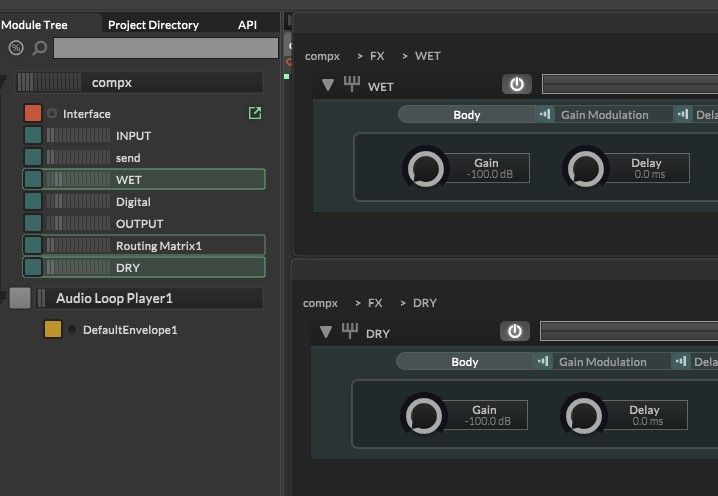
@David-Healey iam just trying to create a wet dry balance between the two gain modules. iam not using scriptfx node. the earlier script moved the knobs in opposite direction but it was checking the peak volume, so at 50% the overall gain would just goo silent..
-
@Jeetender Have you tried using the send container and send effect for this instead?
-
@David-Healey no i did not, but the thing is there, i still have to balance between the send or wet with Dry. there is no direct wet dry balance in the modules...
-
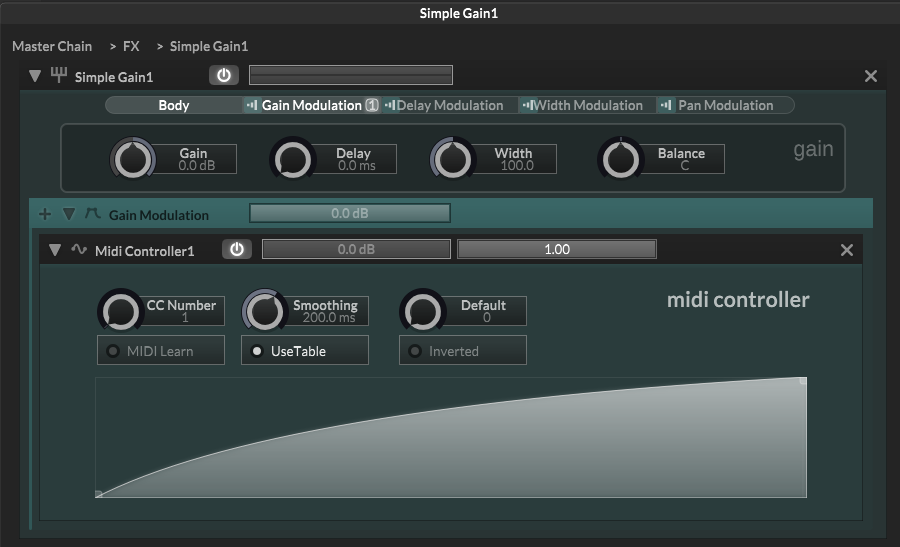
@Jeetender What about setting the Gain of the SimpleGain where you want it and using a CC modulator to control the actual value (you can connect the Default value knob to a UI knob, you don't actually need to use a CC). Then you could set any shape you want using the modulation tables.
-
Wet / Dry balance is done using a sin / cosine curve usually.
You don't need to do any RMS calculations for an equal power curve. -
This is pseudo code.
It's something like this// Equal-power wet/dry crossfade (pseudocode) // knob range value = 0 to 127 // normalize t = value / 127.0 // equal-power law // sin/cos keep total power constant wet_lin = sin(t * PI * 0.5) dry_lin = cos(t * PI * 0.5) // linear → dB // dB = 20 * log10(gain) // log10(x) = ln(x) / ln(10) wet_db = 20 * ln(wet_lin) / ln(10) dry_db = 20 * ln(dry_lin) / ln(10) // clamp near zero (avoid -inf) if (wet_lin < 0.00001) wet_db = -100 if (dry_lin < 0.00001) dry_db = -100 // apply WET.Gain = wet_db DRY.Gain = dry_db /* Behaviour: t=0 dry=1.0 (0 dB) wet=0.0 (-inf) t=0.5 dry≈0.707 (-3 dB) wet≈0.707 (-3 dB) Summed signal power stays constant across the crossfade, so the centre position does not sound quieter.This is the kind of question that AI can help you understand.
Ask chat gpt about it until you get why it works! -
@David-Healey this works good but still the same issue, at 50% the volume is not constant.
said in Rms type or Cosine type Crossfade Curves:
@Jeetender What about setting the Gain of the SimpleGain where you want it and using a CC modulator to control the actual value (you can connect the Default value knob to a UI knob, you don't actually need to use a CC). Then you could set any shape you want using the modulation tables.
-
@Jeetender said in Rms type or Cosine type Crossfade Curves:
this works good but still the same issue, at 50% the volume is not constant.
Have you used an equal power curve?
-
@griffinboy chatgpt or other bots aren't familiar with HISE coding yet i believe.. they just get confused with parameters.
said in Rms type or Cosine type Crossfade Curves:
This is pseudo code.
It's something like this// Equal-power wet/dry crossfade (pseudocode) // knob range value = 0 to 127 // normalize t = value / 127.0 // equal-power law // sin/cos keep total power constant wet_lin = sin(t * PI * 0.5) dry_lin = cos(t * PI * 0.5) // linear → dB // dB = 20 * log10(gain) // log10(x) = ln(x) / ln(10) wet_db = 20 * ln(wet_lin) / ln(10) dry_db = 20 * ln(dry_lin) / ln(10) // clamp near zero (avoid -inf) if (wet_lin < 0.00001) wet_db = -100 if (dry_lin < 0.00001) dry_db = -100 // apply WET.Gain = wet_db DRY.Gain = dry_db /* Behaviour: t=0 dry=1.0 (0 dB) wet=0.0 (-inf) t=0.5 dry≈0.707 (-3 dB) wet≈0.707 (-3 dB) Summed signal power stays constant across the crossfade, so the centre position does not sound quieter.This is the kind of question that AI can help you understand.
Ask chat gpt about it until you get why it works! -
Right but the math works the same way.
All you need to do is find the right hise functions in the API for the math calls. -
@Jeetender eaiest way is ro use a scriptnode network and a xfade module...
-
@Lindon said in Rms type or Cosine type Crossfade Curves:
@Jeetender eaiest way is ro use a scriptnode network and a xfade module...
Yes, but iam not using DspNetwork. just trygin sumthing with the modules only.
@griffinboy the script is ok, the knob is linear from min 0 to max 1, it only moves either knobs a few dbs +/- . I dont know, my tabs panels were working last night and now the panels wont change with buttons..
It did work with a macro control, but still the curves


