Forum
    • Categories
    • Register
    • Login

    Compile DSP networks as DLL keeps launching Export Setup Wizard

    Scheduled Pinned Locked Moved General Questions
    5 Posts 3 Posters 38 Views
    Loading More Posts
    • Oldest to Newest
    • Newest to Oldest
    • Most Votes
    Reply
    • Reply as topic
    Log in to reply
    This topic has been deleted. Only users with topic management privileges can see it.
    • V
      versusjona
      last edited by

      Hi everyone,

      I’ve been following David’s bootcamp and so far everything has been working fine, except when I try to export the FX plugin exercise.

      When I go to Export → “Compile DSP networks as dll”, I get a popup saying:
      “Your system has not been setup for export. Do you want to launch the export setup wizard?”

      I’ve run the export setup wizard multiple times, but the message keeps coming back and the DLL compile never starts.

      Some extra context:

      • Windows 11
      • Visual Studio 2026 installed (built HISE from the develop branch using VS2026)
      • I was able to build a VST3 successfully (the sampler exercise from the bootcamp), but I had to add the msbuild PATH manually.

      Any hints?

      Many thanks!
      Jon

      dannytaurusD 1 Reply Last reply Reply Quote 0
      • dannytaurusD
        dannytaurus @versusjona
        last edited by dannytaurus

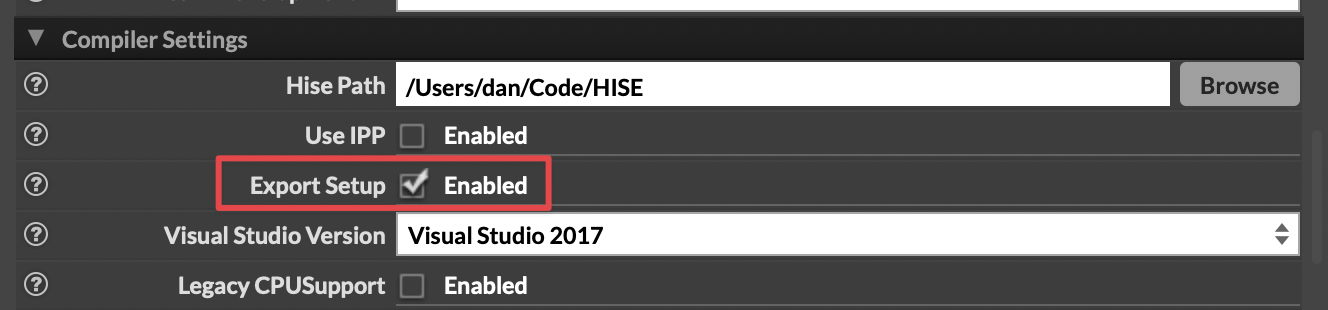
        @versusjona Is the Export Setup box checked in Settings > Compiler Settings? If not, try checking it manually.
        CleanShot 2026-02-26 at 19.39.19@2x.png

        Meat Beats: https://meatbeats.com
        Klippr Video: https://klippr.video

        V 1 Reply Last reply Reply Quote 0
        • V
          versusjona @dannytaurus
          last edited by versusjona

          @dannytaurus said in Compile DSP networks as DLL keeps launching Export Setup Wizard:

          @versusjona Is the Export Setup box checked in Settings > Compiler Settings? If not, try checking it manually.

          CleanShot 2026-02-26 at 19.39.19@2x.png

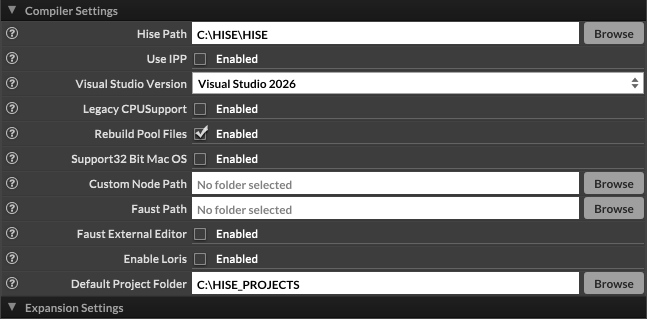
          Hi @dannytaurus, my build doesn't have that option:
          Captura de pantalla 2026-02-26 181100.png

          David HealeyD 1 Reply Last reply Reply Quote 0
          • David HealeyD
            David Healey @versusjona
            last edited by

            @versusjona Yeah it's super annoying. We're waiting for @Christoph-Hart to remove it.

            • Close HISE
            • Find the HISE app data folder on your system, in there find compilerSettings.xml and open it in a text editor.
            • Add <ExportSetup value="Yes"/> below the <EnableLoris> entry.
            • Save the file
            • Reopen HISE

            Free HISE Bootcamp Full Course for beginners.
            YouTube Channel - Public HISE tutorials
            My Patreon - HISE tutorials

            V 1 Reply Last reply Reply Quote 1
            • V
              versusjona @David Healey
              last edited by

              @David-Healey said in Compile DSP networks as DLL keeps launching Export Setup Wizard:

              @versusjona Yeah it's super annoying. We're waiting for @Christoph-Hart to remove it.

              • Close HISE
              • Find the HISE app data folder on your system, in there find compilerSettings.xml and open it in a text editor.
              • Add <ExportSetup value="Yes"/> below the <EnableLoris> entry.
              • Save the file
              • Reopen HISE

              Thanks a lot for the quick reply, that did it!

              Cheers,
              Jon

              1 Reply Last reply Reply Quote 0
              • First post
                Last post

              27

              Online

              2.2k

              Users

              13.4k

              Topics

              117.1k

              Posts
