Compile DSP networks as DLL keeps launching Export Setup Wizard
-
Hi everyone,
I’ve been following David’s bootcamp and so far everything has been working fine, except when I try to export the FX plugin exercise.
When I go to Export → “Compile DSP networks as dll”, I get a popup saying:
“Your system has not been setup for export. Do you want to launch the export setup wizard?”I’ve run the export setup wizard multiple times, but the message keeps coming back and the DLL compile never starts.
Some extra context:
- Windows 11
- Visual Studio 2026 installed (built HISE from the develop branch using VS2026)
- I was able to build a VST3 successfully (the sampler exercise from the bootcamp), but I had to add the msbuild PATH manually.
Any hints?
Many thanks!
Jon -
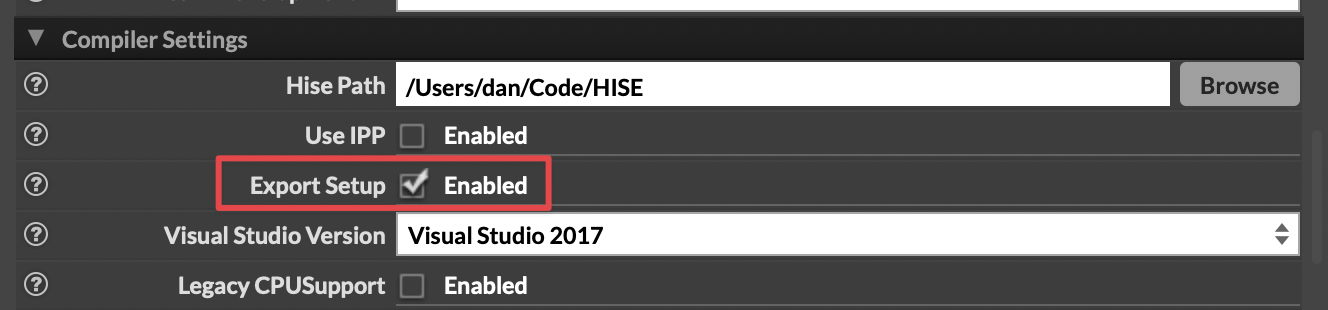
@versusjona Is the Export Setup box checked in Settings > Compiler Settings? If not, try checking it manually.
-
@dannytaurus said in Compile DSP networks as DLL keeps launching Export Setup Wizard:
@versusjona Is the Export Setup box checked in Settings > Compiler Settings? If not, try checking it manually.
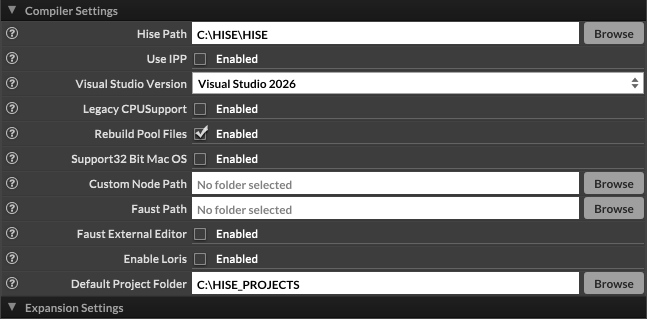
Hi @dannytaurus, my build doesn't have that option:
-
@versusjona Yeah it's super annoying. We're waiting for @Christoph-Hart to remove it.
- Close HISE
- Find the HISE app data folder on your system, in there find
compilerSettings.xmland open it in a text editor. - Add
<ExportSetup value="Yes"/>below the<EnableLoris>entry. - Save the file
- Reopen HISE
-
@David-Healey said in Compile DSP networks as DLL keeps launching Export Setup Wizard:
@versusjona Yeah it's super annoying. We're waiting for @Christoph-Hart to remove it.
- Close HISE
- Find the HISE app data folder on your system, in there find
compilerSettings.xmland open it in a text editor. - Add
<ExportSetup value="Yes"/>below the<EnableLoris>entry. - Save the file
- Reopen HISE
Thanks a lot for the quick reply, that did it!
Cheers,
Jon

