MacOS Parallels WIN build fail
-
yeah this is what shows when there is an error, it stops at this point and prompts the user to close the window, without the Completed message.
What's odd is that there is no error message above.There definitely is some kind of error here. Its refusing to compile.
Custom C++ DSP
-
@dannytaurus When I press any key, the terminal window closes immediately
-
@griffinboy said in MacOS Parallels WIN build fail:
What's odd is that there is no error message above.
Yeah, weird.
@pelle Cool. What versions of macOS, Parallels, Windows and Visual Studio are you on?
Did you build HISE from the latest commit from the develop branch, with JUCE as a submodule?
Does exporting a minimal plugin (like a volume knob) work ok?
-
@dannytaurus macOS Sonoma 14.4 (M3 pro), Parallels Version 26.2.2 (57373), Windows 11, Visual studio 2022. I've installed HISE 4.0.0 using the installer.I've tried with a simple knob but I have the same result
-
@pelle said in MacOS Parallels WIN build fail:
I've installed HISE 4.0.0 using the installer
Build HISE from source
Free HISE Bootcamp Full Course for beginners.
YouTube Channel - HISE tutorials
My Patreon - More HISE tutorials -
@David-Healey develop branch ?
-
@pelle Yes, with the submodule https://forum.hise.audio/topic/14184/juce-submodule-psa?_=1771595077490
-
@David-Healey Another vote for disabling the Export menu the pre-built HISE.
-
@pelle I've built it with the submodules but crashes
-
@pelle More info needed, what crashes? What triggers the crash?
-
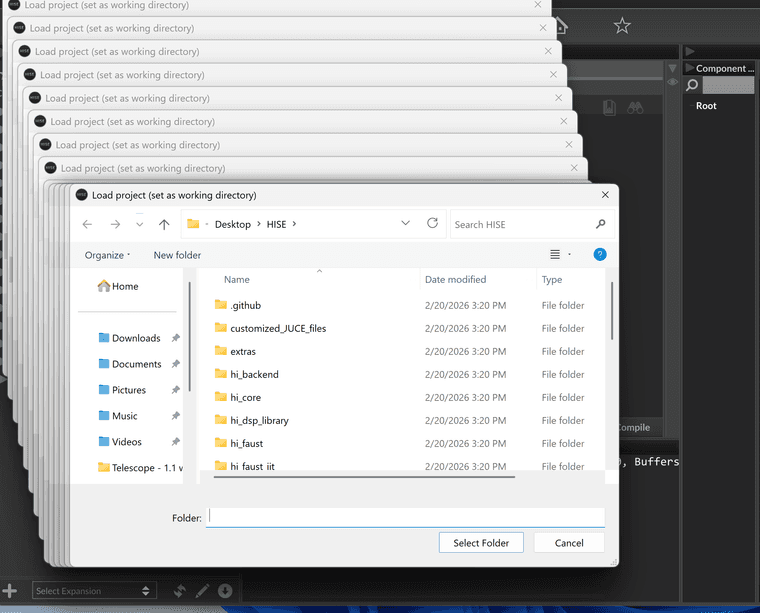
@David-Healey when I try to open a project form HISE generates 40 pop up windows to select the project folder and then crashes
-
@pelle said in MacOS Parallels WIN build fail:
HISE generates 40 pop up windows
Can you make a screen recording?
-
-
@David-Healey I managed to build HISE successfully, but now when I compile my project I get the following error. On macOS everything compiles fine.
Finished saving: Visual Studio 2022 Finished saving: Xcode (macOS) Finished saving: Xcode (iOS) Finished saving: Linux Makefile Compiling 64bit Instrument plugin STEPS ... MSBuild version 17.14.40+3e7442088 for .NET Framework win\Binaries\Source\PresetData.cpp(857098,75): error C1060: compiler is out of heap space [C:\Users\name\Desktop\HISE DEV WIN\Steps 0.1 win\Binaries\Builds\VisualStudio2022\STEPS_SharedCode.vcxproj] STEPS_VST3ManifestHelper.vcxproj -> C:\Users\name\Desktop\HISE DEV WIN\Steps 0.1 win\Binaries\Compiled\VST3 Manifest Helper\juce_vst3_helper.exe !Compilation error. Check the compiler output. -
@pelle Out of heap space means it ran out of memory. Does your project contain a lot of images or audio files?
-
@David-Healey yes
-
@pelle How many MB?
-
@David-Healey 60MB (audio + png)
-
@pelle You're over the limit

https://docs.hise.audio/working-with-hise/settings/project.html#embed-audio-files
-
@David-Healey Thanks, that was exactly the problem. How do I install the images separately? I just can't figure it out.