Forum
    • Categories
    • Register
    • Login

    MacOS Parallels WIN build fail

    Scheduled Pinned Locked Moved General Questions
    23 Posts 4 Posters 202 Views
    Loading More Posts
    • Oldest to Newest
    • Newest to Oldest
    • Most Votes
    Reply
    • Reply as topic
    Log in to reply
    This topic has been deleted. Only users with topic management privileges can see it.
    • pelleP
      pelle @David Healey
      last edited by

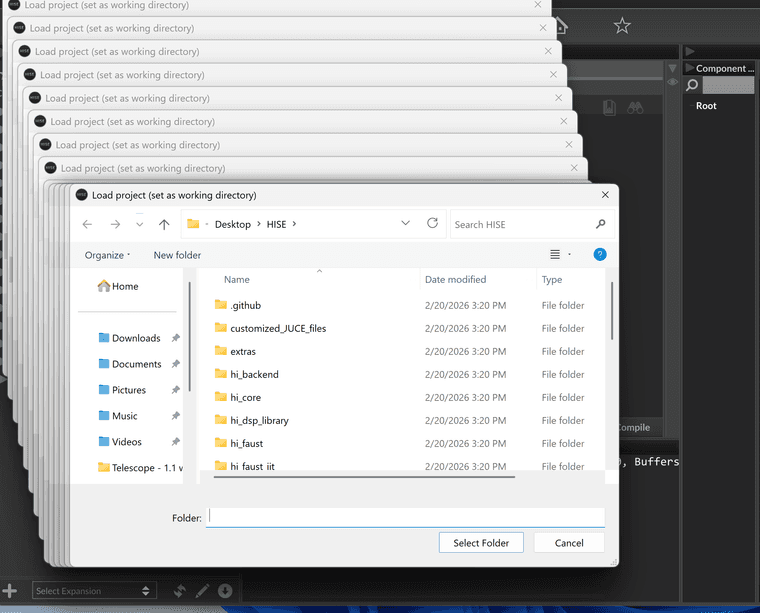
      @David-Healey when I try to open a project form HISE generates 40 pop up windows to select the project folder and then crashes

      David HealeyD pelleP 2 Replies Last reply Reply Quote 0
      • David HealeyD
        David Healey @pelle
        last edited by

        @pelle said in MacOS Parallels WIN build fail:

        HISE generates 40 pop up windows

        Can you make a screen recording?

        Free HISE Bootcamp Full Course for beginners.
        YouTube Channel - Public HISE tutorials
        My Patreon - HISE tutorials

        pelleP 1 Reply Last reply Reply Quote 0
        • pelleP
          pelle @David Healey
          last edited by

          @David-Healey CleanShot 2026-02-20 at 18.17.02@2x.png

          1 Reply Last reply Reply Quote 0
          • pelleP
            pelle @pelle
            last edited by

            @David-Healey I managed to build HISE successfully, but now when I compile my project I get the following error. On macOS everything compiles fine.

            Finished saving: Visual Studio 2022
            Finished saving: Xcode (macOS)
            Finished saving: Xcode (iOS)
            Finished saving: Linux Makefile
            Compiling 64bit Instrument plugin STEPS ...
            MSBuild version 17.14.40+3e7442088 for .NET Framework
            win\Binaries\Source\PresetData.cpp(857098,75): error C1060: compiler is out of heap space [C:\Users\name\Desktop\HISE DEV WIN\Steps 0.1 win\Binaries\Builds\VisualStudio2022\STEPS_SharedCode.vcxproj]
              STEPS_VST3ManifestHelper.vcxproj -> C:\Users\name\Desktop\HISE DEV WIN\Steps 0.1 win\Binaries\Compiled\VST3 Manifest Helper\juce_vst3_helper.exe
            !Compilation error. Check the compiler output.
            
            David HealeyD 1 Reply Last reply Reply Quote 0
            • David HealeyD
              David Healey @pelle
              last edited by

              @pelle Out of heap space means it ran out of memory. Does your project contain a lot of images or audio files?

              Free HISE Bootcamp Full Course for beginners.
              YouTube Channel - Public HISE tutorials
              My Patreon - HISE tutorials

              pelleP 1 Reply Last reply Reply Quote 0
              • pelleP
                pelle @David Healey
                last edited by

                @David-Healey yes

                David HealeyD 1 Reply Last reply Reply Quote 0
                • David HealeyD
                  David Healey @pelle
                  last edited by

                  @pelle How many MB?

                  Free HISE Bootcamp Full Course for beginners.
                  YouTube Channel - Public HISE tutorials
                  My Patreon - HISE tutorials

                  pelleP 1 Reply Last reply Reply Quote 0
                  • pelleP
                    pelle @David Healey
                    last edited by

                    @David-Healey 60MB (audio + png)

                    David HealeyD 1 Reply Last reply Reply Quote 0
                    • David HealeyD
                      David Healey @pelle
                      last edited by

                      @pelle You're over the limit 👮🏼

                      https://docs.hise.audio/working-with-hise/settings/project.html#embed-audio-files

                      Free HISE Bootcamp Full Course for beginners.
                      YouTube Channel - Public HISE tutorials
                      My Patreon - HISE tutorials

                      pelleP 1 Reply Last reply Reply Quote 1
                      • pelleP
                        pelle @David Healey
                        last edited by

                        @David-Healey Thanks, that was exactly the problem. How do I install the images separately? I just can't figure it out.

                        David HealeyD 1 Reply Last reply Reply Quote 0
                        • David HealeyD
                          David Healey @pelle
                          last edited by

                          @pelle In the pooled resources folder you'll find .dat files for the images. Place it in the plugin's app data folder

                          Free HISE Bootcamp Full Course for beginners.
                          YouTube Channel - Public HISE tutorials
                          My Patreon - HISE tutorials

                          1 Reply Last reply Reply Quote 0
                          • First post
                            Last post

                          33

                          Online

                          2.2k

                          Users

                          13.4k

                          Topics

                          117.0k

                          Posts