Matrix Modulation System - Last Call for bugs fixes & changes!!
-
@DanH yup, one shot indeed....
https://github.com/christophhart/HISE/pull/884
I couldn't reproduce your bug as this requires a lot of UI components to hit that scenario, but if you checkout the branch with the fix and confirm that it works, then I'll merge it into develop.
Aside from the concrete bug that we solved: with the new workflow setup correctly and an AI agent you'll be able to solve that completely on your own - it analysed the bug correctly, made a risk assessment that correctly came to the conclusion that this is a non-breaking change / fix and then applied the fix exactly as I would have done it. It also automatically would have created this PR with the summary so that I can do a quick review and merge that with a single click. Scary times.
-
@Christoph-Hart Thanks! I'm in a more manual mode tackling a couple of other issues right now which I'll post if and when successful, but a one shot option would certainly have made my morning go a lot smoother hahah!
-
@Christoph-Hart Nice!

Does a new issue automatically trigger the workflow?
HISE dev latest / herdr + Claude Code / Figma + Affinity
Meat Beats: https://meatbeats.com
Klippr Video: https://klippr.video -
@dannytaurus said in Matrix Modulation System - Last Call for bugs fixes & changes!!:
Does a new issue automatically trigger the workflow?
Not yet, but certainly something we can think about in the future. Currently the flow of events would be like this:
- user finds bug
- user either creates an issue or directly starts the HISE MCP server tool
/contribute- it accepts a issue link or a bug description as input - the AI agents makes a risk assessment and analyses the HISE codebase for a proposed fix. If green light + everything smooth (like in this case), it directly fixes it, creates a fork + branch with that fix, makes a PR and tags me. I'll just need to open that PR, quickly review it and merge it into develop if OK.
I'm not quite sure where the automatic workflow trigger fits in this workflow because there are two key steps in the phase that still require human intervention: 1. Building HISE & reproduce the bug and the fix. This can be done completely by the contributor, but cannot be automated away. 2. Code review the actual change before it is merged into HISE. I will defend this task to myself with my last dying breath.
-
Thanks! I'm in a more manual mode tackling a couple of other issues right now which I'll post if and when successful, but a one shot option would certainly have made my morning go a lot smoother hahah!
I'm meeting with Dominik tomorrow and we'll test the contributor route of that workflow tomorrow, then push it to the remote MCP server instance so you can use it too. When the AI stuff is integrated into HISE you'll likely want to run a local MCP server so you can connect with HISE to interact with it from your agent, but for now this function should be fully functional from a remote server.
-
@Christoph-Hart hasn't seemed to fix it for me actually.... I removed all my hacky script, but when opening the project no draggers are visible. I still have to click on a source button to show them.
I actually get the
Selectable sources are disablederror if I havematrixHandler.setCurrentlySelectedSource("LFO 1");in the script. Have launched the project with and without.This is throwing me because I've been messing about elsewhere in the source and getting the same error and behaviour, although I didn't pull these changes into that same fork. So hopefully the error makes sense to you.
EDIT - Having reopened my project in my current fork of Hise a huge effect chain is missing from the module tree.... Only seems to come back in the fork I created just now to test this fix... Not sure what's going on there, but it's slightly buggered me
EDIT 2 - I get the
Selectable sources are disablederror even without pulling the fix into the latest develop. Since my project no longer works with my previous version of Hise I'm trying to move to latest commit but I can no longer compile my networks so....EDIT 3 - Finally got project working. Can see you've made some changes to this system since my last commit and before the fix but behaviour same as I just posted: using
matrixHandler.setCurrentlySelectedSource("LFO 1");causesSelectable sources are disablederror to fire on launch. -
@Christoph-Hart said in Matrix Modulation System - Last Call for bugs fixes & changes!!:
Alright, the z-order should be fixed now, it also monitors the slider's visibility and hides itself when the parent slider is hidden.
Testing this again and the popups will get clipped by the parent panel's edges if the ui control is too close to the panel edge. I tried to have Claude draw the popups one level higher, which it could, until the higher level was the top level, at which point the popups either didn't draw or were drawn somewhere off screen - no way to tell.
So I would suggest drawing the popups one level higher that the parent (if possible). Perhaps there is no one-size-fits-all solution, but one level higher avoids immediate clipping and decent amount of flexibility to find a solution if required by the dev.
Also in the fix commit it states:
fix z-order of mod hover popup when using exclusive source matrix mode.What's the behaviour in non exclusive mode? As it was before i.e popups drawn at top level?
DHPlugins / DC Breaks | Artist / Producer / DJ / Developer
https://dhplugins.com/ | https://dcbreaks.com/
London, UK -
Testing this again and the popups will get clipped by the parent panel's edges if the ui control is too close to the panel edge.
Yes it's your job now to take care of that. If you're in Exclusive mode, they become part of your regular UI so you need to make space for them anyways, no?
What's the behaviour in non exclusive mode? As it was before i.e popups drawn at top level?
Yup, in non-exclusive mode you want them to show up in a modal UX workflow and it's OK if they temporarily hide other UI elements.
In both cases you should be able to control the positioning with LAF, there is a method that you can overwrite and define the positions of the knobs as well as the text label
-
@Christoph-Hart said in Matrix Modulation System - Last Call for bugs fixes & changes!!:
they become part of your regular UI so you need to make space for them anyways, no?
How do you mean? The draggers appear on source select sure, but the labels still appear only on hover. I draw a little placeholder for the dragger if that knob is connected to a source, but the label still needs to be drawn on hover.
@Christoph-Hart said in Matrix Modulation System - Last Call for bugs fixes & changes!!:
you should be able to control the positioning with LAF
Yep, but this essentially puts the labels in non-optimal / inconsistent positions fairly frequently on the ui.
In my specific case the draggers can remain at nested level. It's the labels that are causing the issue.
I can most likely get away with this in every area except for my swappable fx section, where the ui controls must be nested in the panels for obvious reasons.
I'm pretty close with Claude, it's just the top level bit it can't figure out. Happy to share my progress.
DHPlugins / DC Breaks | Artist / Producer / DJ / Developer
https://dhplugins.com/ | https://dcbreaks.com/
London, UK -
@DanH one level higher is a hack and just solves your immediate problem. If the parent component one level higher happens to cause clipping we're back at square one. Sounds like One More Lane Bro to me...
-
@Christoph-Hart that's fair enough, there isn't a solution for everyone I guess. Happy to force it myself in the source but Claude couldn't get over the line, here's where we got to:
Here's the full code we tried with the limitation noted:
if(auto pp = parent->getParentComponent())
{
    auto gpp = pp->getParentComponent();

    if(gpp != nullptr)
    {
        auto pIndex = gpp->getIndexOfChildComponent(pp);
        gpp->addAndMakeVisible(this, pIndex+1);

        auto b = dragAreas.getBounds();
        if(!labelArea.isEmpty())
            b = b.getUnion(labelArea);

        auto topLeft = gpp->getLocalPoint(pp, b.expanded(pd.margin).getTopLeft());
        setBounds(b.expanded(pd.margin).withPosition(topLeft));
    }
    else
    {
        auto pIndex = pp->getIndexOfChildComponent(parent);
        pp->addAndMakeVisible(this, pIndex+1);

        auto b = dragAreas.getBounds();
        if(!labelArea.isEmpty())
            b = b.getUnion(labelArea);
        setBounds(b.expanded(pd.margin));
    }
}

auto translationToOrigin = AffineTransform::translation(getBoundsInParent().getTopLeft().toFloat() * -1.0f);
dragAreas.transformAll(translationToOrigin);
if(!labelArea.isEmpty())
    labelArea = labelArea.transformed(translationToOrigin);
Limitation: This works for slider → panel → panel (grandparent is a panel), but fails for slider → panel → top level UI. In that case gpp is the top level HISE component which doesn't behave like a regular panel for addAndMakeVisible, so the popup either doesn't appear or appears offscreen. We couldn't resolve the coordinate space translation reliably for that case.
-
@Christoph-Hart said in Matrix Modulation System - Last Call for bugs fixes & changes!!:
confirm that it works
Tried it fresh again just now and get the
Selectable sources are disablederror when usingmatrixHandler.setCurrentlySelectedSource();so I'm not really sure if it works or not!Have set
"UnselectableExclusiveSource":to both true and false in the ModMatrix floating tile but neither changes anything -
Might take a look at this now but I think it would be nice to have an option to draw the label on
obj.clickedrather than auto appearing on hover. There is no.clickedoption ingetModulatorDragDatacurrently, and my effort to implement one with Claude code hit a wall.EDIT - Seemed to have got the clicked behaviour I wanted by drawing it
.clickedindrawModulationDragBackgroundinstead :). However, the issue of the label appearing when I don't want it to means that if I click in the label's area the label appears.EDIT 2 - I've got it so the label won't appear on click but if the mouse is in the label zone it still activates the hover laf for the dragger, so there's no real workaround here. I think the dragger and label need to be decoupled. Everything I'm doing is pretty hacky....
@DanH said in Matrix Modulation System - Last Call for bugs fixes & changes!!:
@Christoph-Hart so with the singleDragger method the dragger knob's label will appear on hover when hovering in it's location, rather than the label only appearing when hovering over the dragger itself. I've drawn the label well away from the dragger in the example below but you can see the label appear on mouse hover:
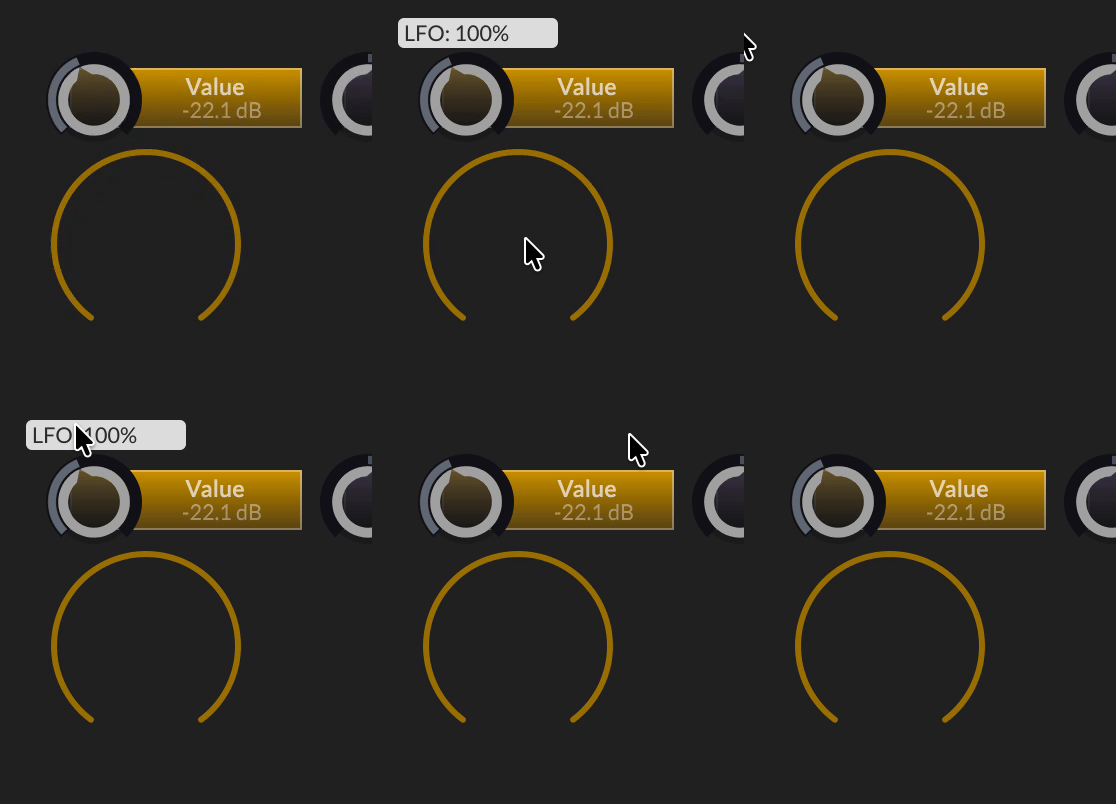
DHPlugins / DC Breaks | Artist / Producer / DJ / Developer
https://dhplugins.com/ | https://dcbreaks.com/
London, UK -
@Christoph-Hart Had Claude Code implement the decoupled label system, whilst retaining original behaviour. Seems solid but needs further testing. Can't comment on the code quality, but happy to pass on the summary if interested.
-
@Christoph-Hart So I'm back after being away for a while and it seems a lot of things happened around here!
Still the issue of selecting another target or "No Connection" from the dropdown is not fixed.
I did try the branchfix/686-matrix-target-changewith no improvement



