Anyone doing this to declare components?
-
Is this a common pattern for declaring components? Or is it too clever for its own good?

// Object to hold all declared components by prefix
const Comp = {};

// Find and declare all required components
for (b in Content.getAllComponents("btn")) Comp[b.getId()] = b;
for (p in Content.getAllComponents("pnl")) Comp[p.getId()] = p;
for (f in Content.getAllComponents("flt")) Comp[f.getId()] = f;

// Then access with
Comp.btn1
Comp.btnFive
Comp.pnlSettings
Comp.pnlKeyboard
Comp.fltPresetBrowser
Comp.fltKeyboard
EDIT: or, even shorter:
// Object to hold all declared components by prefix
const Comp = {};

// Find and declare all required components
for (name in ["btn", "flt", "pnl", "knb", "cmb", "sld"]) // etc.
	for (c in Content.getAllComponents(name)) Comp[c.getId()] = c;
HISE dev latest / herdr + Claude Code / Figma + Affinity
Meat Beats: https://meatbeats.com
Klippr Video: https://klippr.video -
I tend to declare my component references individually on separate lines, followed by setting properties, and then control callbacks, and preceded by a bookmark.
//! btnPlay
const btnPlay = Content.getComponent("btnPlay");
btnPlay.set("someProperty", "someValue");
btnPlay.setControlCallback(onbtnPlayControl);

inline function onbtnPlayControl(component, value)
{
}

//! Next component, etc.
This way I keep everything related to the component in one place and I can easily find it.
I also only declare a reference for each component once, and it will live in a namespace appropriate to that component's function.
The only time I use
getAllComponentsis if I need to handle multiple, related, components together as a group for some purpose. Like custom radio buttons for example.But with your approach why do you need 3 loops, why not just one?
const comp = {};

for (x in Content.getAllComponents(""))
    comp[x.getId()] = x;
Free HISE Bootcamp Full Course for beginners.
YouTube Channel - HISE tutorials
My Patreon - More HISE tutorials -
@David-Healey Yeah, I might stick with the more explicit route, although all I'm doing here is declaring the components at the top. All the stuff I do with them would be grouped, as you do.
Example:
// after the declaration loops

//! btnPlay stuff here
btnPlay.set("someProperty", "someValue");
btnPlay.setControlCallback(onbtnPlayControl);
inline function onbtnPlayControl(component, value) {}

//! btnPause stuff here
btnPause.set("someProperty", "someValue");
btnPause.setControlCallback(onbtnPauseControl);
inline function onbtnPauseControl(component, value) {}
Declaring all the components at the top (either line by line or in loops) also has the benefit that you know you'll never be calling a component before it's declared.
This way I keep everything related to the component in one place and I can easily find it.
How do you handle components that are referenced in different places, or components that interact?
Examples:
- Play/Pause/Stop buttons where the state of one affects the state of the others
- Panel open/close icons that have to close other panels when they're opened
But with your approach why do you need 3 loops, why not just one?
Just because there's a bunch of components in the UI that I don't need to use in script and I may as well not declare them. Things like backgrounds, graphics, dividers, etc. I would give them names that don't start with bin, pal, flt, etc.
But yeah, you're right - and if there's little overhead for redundant declarations then a single loop is even easier.
HISE dev latest / herdr + Claude Code / Figma + Affinity
Meat Beats: https://meatbeats.com
Klippr Video: https://klippr.video -
@dannytaurus said in Anyone doing this to declare components?:
How do you handle components that are referenced in different places, or components that interact?
Broadcasters
Free HISE Bootcamp Full Course for beginners.
YouTube Channel - HISE tutorials
My Patreon - More HISE tutorials -
@David-Healey Ugh. You and Broadcasters. Get a room!

-
@David-Healey Also, this works

But with your approach why do you need 3 loops, why not just one?
for (name in ["btn","flt","pnl"])
	for (c in Content.getAllComponents(name)) Comp[c.getId()] = c;
Which keeps it at 2 loops, regardless of how many component types I want to declare:
for (name in ["btn", "flt", "pnl", "knb", "cmb", "sld", "web", "lbl", "img", "wav"]) // etc for (c in Content.getAllComponents(name)) Comp[c.getId()] = c; -
@David-Healey By the way, the 'components that interact' thing is the main reason I wanted delectable radio buttons.
-
@David-Healey Just to be clear, I probably won't do any of this but it's fun to explore and see what works and what doesn't.
-
@dannytaurus actually I do it this way I find it easier and scales better with larger projects. That way I can easily recall what sliders/buttons/etc. apply to whatever effect/synth then apply all the controls and lafs in a loop.
-
@David-Healey said in Anyone doing this to declare components?:
and it will live in a namespace appropriate to that component's function.
Do you mean like this?
namespace Buttons
{
  //! btnPlay
  const btnPlay = Content.getComponent("btnPlay");
  btnPlay.set("someProperty", "someValue");
  btnPlay.setControlCallback(onbtnPlayControl);

  inline function onbtnPlayControl(component, value)
  {
  }

  //! Next component, etc.
}
HISE dev latest / herdr + Claude Code / Figma + Affinity
Meat Beats: https://meatbeats.com
Klippr Video: https://klippr.video -
@dannytaurus said in Anyone doing this to declare components?:
Do you mean like this?
Kind of.
I split my scripts into lots of separate files, preferably one file per part of the project - what constitutes a part could be functionality, or it could be UI, I often have one namespace per main UI panel.
For example, I'll have a file called Presets.js which contains the Presets namespace and this contains everything related to preset handling, including the UI.
I'll have another file for handling expansions.
I'll have another one that handles a drop down menu in my plugin's header. This will have items for opening the Settings page, the About page, etc. This is an interesting one because the menu itself shouldn't know anything about the Settings or About pages, it doesn't need to.
But the Settings and About pages are aware of the menu's existence. So using broadcasters those namespaces can watch the menu and if the Settings option is selected the Settings namespace will show the correct panel, if the About option is selected then the About namespace will handle it. Everything is very self contained and links between namespaces/parts of the project are minimised as much as possible.
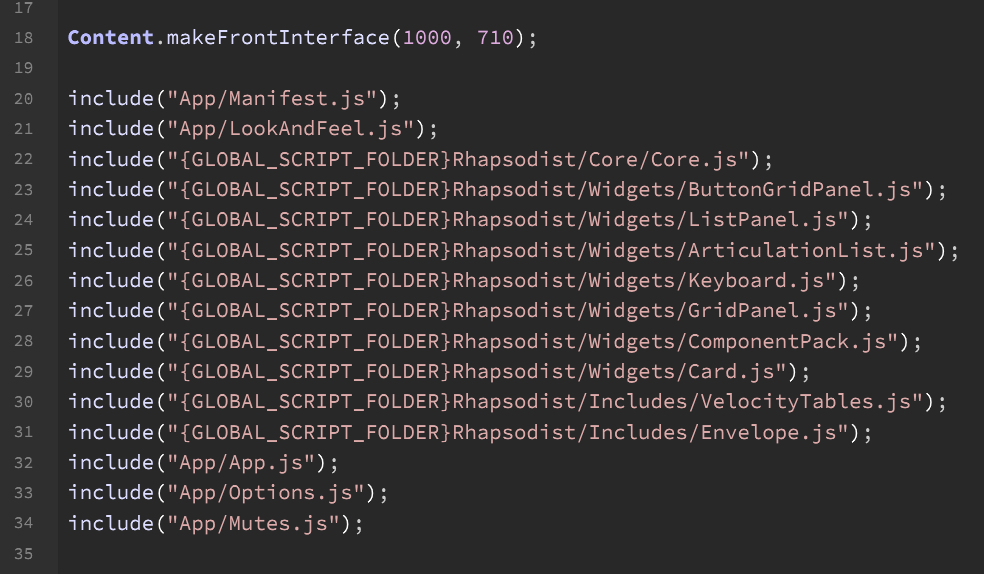
Here is what the
on initsection looks like for my current project. Nice and clean