Custom reactive audio animation
-
@bwoogie bruhhhh. You definitely did it wrong, but thats not totally your fault because nobody explained to you. I've done this before, thankfully not far into my build so it wasnt so devastating but It did suck.
@Christoph-Hart I think there should be a warning of some sort of 'where' or 'what' is happening to the snippet if the user tries to import. Options could be 'interface' or 'user-defined script editor' would be a cool choice option window.
-
@Chazrox said in Custom reactive audio animation:
I think there should be a warning of some sort of 'where' or 'what' is happening to the snippet if the user tries to import.
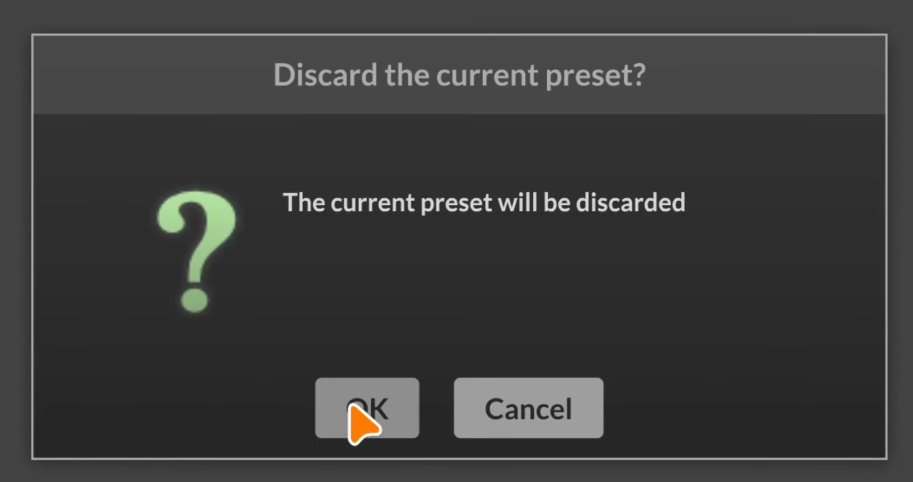
It shows this when you attempt to load a snippet and you already have a project open.
Free HISE Bootcamp Full Course for beginners.
YouTube Channel - HISE tutorials
My Patreon - More HISE tutorials -
@d-healey I know that now, but to a new user that didnt mean "clear the project" because it took time to learn what 'preset' meant in HISE ide.
-
@Chazrox It doesn't clear the project, it clears the preset. But yeah the wording is confusing since there are two different things called presets in HISE.
Free HISE Bootcamp Full Course for beginners.
YouTube Channel - HISE tutorials
My Patreon - More HISE tutorials -
@d-healey Yeah pretty much just a scary thing unless you know. haha.
-
i opened it in a new instance of hise, not in my project... but the auto saves even saved in my project. i don't know if it was still using my projects folder, apparently it was. i've turned auto save off now.
-
@bwoogie said in Custom reactive audio animation:
i opened it in a new instance of hise, not in my project.
A new instance of HISE automatically opens the last project - but doesn't open a preset. The autosave will write to that project, but it won't save over the xml file unless you manually save it.
Free HISE Bootcamp Full Course for beginners.
YouTube Channel - HISE tutorials
My Patreon - More HISE tutorials -
@d-healey i guess that explains it. my project crashed before i saved it. anyways, it wont be too hard to restart. just annoying.
-
@d-healey said in Custom reactive audio animation:
...The autosave will write to that project...
That's where things are going bad sometimes, remember that old directory issue not updating when switching the project. So the autosave writes to the previous directory unless you specifically close and restart Hise. There's been an attempt to fix that issue I am raising for so long (by someone who I don't know the name on the forum...) https://github.com/christophhart/HISE/issues/795
The same goes when using the preset browser. About two weeks ago again, got a crash, restarted Hise, reopened the last autosave, and baaamm it was one of a previous project. So now I know this well, I just go to the previously opened project and bring back the good autosaved file to the current project

There's a thing I systematically (well apparently it's not that systematic) do when switching between projects, it's close and restart!
Anyway that's preset overwriting, not project XML.
-
@ustk said in Custom reactive audio animation:
Anyway that's preset overwriting, not project XML.
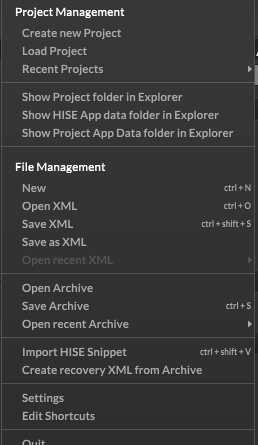
That's the issue.. How do you save the project? I don't understand how any of it works. There's Load Project, but no Save Project (I understand the "Project" is stored in directories.)
Under File Management there are Open and Save XML options, but I don't know what those are actually referring to.
And then Open and Save Archive which seems to be autosaves and presets...
I don't understand why it needs to be so non-intuitive. I'm not new to computers or programming by any means, and it's probably just because i'm new to hise, but........... -
@bwoogie I agree, it’s not intuitive and we all have habits that are adding to the confusion because by « save project » only people who know… are knowing… lol…
The project is the whole directory
By save project we mean save XML.
It’s not a good terminology though, because there is no file saved that are holding the project entirely. The XML is only the constitution of the module tree and the interface of your project. Files likes images, samples, etc… are not saved, they are just permanently lying in the project directory and there is no "global project file" holding them.And you’re right, archives are "project’s presets", being autosaved or manually saved.
I don’t know if people out there are using manual preset (archive) save. Except for quickly sketching something, I personally don’t get the point.
The things you should then focus on are saving the project XML, and set the autosave just in case something bad happens. You shouldn’t need to save an archive manually (cmd/ctrl+s) but instead just use cmd/ctrl+Shift+s and you’ll be good.
Everyone has been confused by all those strange naming at one time, and as @d-healey said, the concept of project preset (archive) vs user preset adds another layer of confusion…
Something worth adding, no matter how cautious you are handling your project, nothing will be safer than using git
-


