Thanks guys! I realized i should be using LOCAL Look and Feel before I even got out of bed this morning 
B
Best posts made by bwoogie
-
RE: Multiple Styles for Controls?posted in Scripting
-
RE: Drawing an Arc problem...posted in Scripting
Yay! I was able to get it working. I guess the bounds were off. Thanks for the direction.

Latest posts made by bwoogie
-
RE: Multiple Styles for Controls?posted in Scripting
@Chazrox said in Multiple Styles for Controls?:
@bwoogie and when you're done with that....

...I'll know right where to find you

-
RE: Multiple Styles for Controls?posted in Scripting
Thanks guys! I realized i should be using LOCAL Look and Feel before I even got out of bed this morning
-
RE: Multiple Styles for Controls?posted in Scripting
@Chazrox Yes, that makes sense. That may be the way I'll do it, if a better way doesn't show up. I'd prefer to be able to just change a style setting in the gui editor - like how you'd choose a knob or a slider. But at least I'll have a method.
-
Multiple Styles for Controls?posted in Scripting
Is it possible to create multiple styles for the same control? Like, if I wanted to have a couple different looking buttons or knobs for instance.
The only way I currently see is check the id of the control in my Look and Feel and draw based on that. But that's an awful way because it makes my code not reusable between plugins.
-
RE: Drawing an Arc problem...posted in Scripting
Yay! I was able to get it working. I guess the bounds were off. Thanks for the direction.
-
Drawing an Arc problem...posted in Scripting
I'm having a problem when trying to draw an arc. anything below about 160 degrees starts getting squashed and wonky. Need some help with figuring out what i'm doing wrong here....
function drawArc() {
var a = [0, 0, 64, 64];
var p = Content.createPath();
p.startNewSubPath(0, 0);

p.addArc(a, degToRad(0), degToRad(160));

var pathData = {};
pathData.Thickness = 2.0;
pathData.StrokeType = "Solid";

g.setColour(accentColor);
g.drawPath(p, a, pathData);
}

function degToRad(deg) {
	return deg * (Math.PI / 180);
}
45 Degrees:
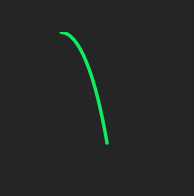
160 Degrees:

-
RE: Custom reactive audio animationposted in Scripting
@ustk said in Custom reactive audio animation:
Anyway that's preset overwriting, not project XML.
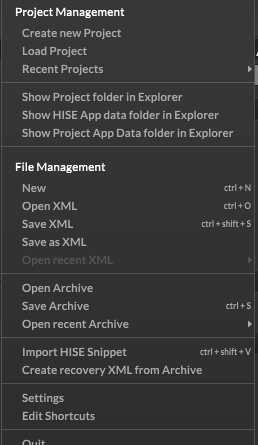
That's the issue.. How do you save the project? I don't understand how any of it works. There's Load Project, but no Save Project (I understand the "Project" is stored in directories.)
Under File Management there are Open and Save XML options, but I don't know what those are actually referring to.
And then Open and Save Archive which seems to be autosaves and presets...
I don't understand why it needs to be so non-intuitive. I'm not new to computers or programming by any means, and it's probably just because i'm new to hise, but........... -
RE: Custom reactive audio animationposted in Scripting
@d-healey i guess that explains it. my project crashed before i saved it. anyways, it wont be too hard to restart. just annoying.
-
RE: Custom reactive audio animationposted in Scripting
i opened it in a new instance of hise, not in my project... but the auto saves even saved in my project. i don't know if it was still using my projects folder, apparently it was. i've turned auto save off now.
-
RE: Custom reactive audio animationposted in Scripting
Well I got it working but my project got overwritten by the snippet..

i absolutely hate hise's project management.