Forum
    • Categories
    • Register
    • Login

    How to Open CSS Debugger?

    Scheduled Pinned Locked Moved Solved General Questions
    css
    5 Posts 3 Posters 242 Views
    Loading More Posts
    • Oldest to Newest
    • Newest to Oldest
    • Most Votes
    Reply
    • Reply as topic
    Log in to reply
    This topic has been deleted. Only users with topic management privileges can see it.
    • HISEnbergH
      HISEnberg
      last edited by

      The docs say this:

      In order to check the value of each property for individual components, you can right click on any UI component in the Interface designer that has assigned a CSS LookAndFeel and then choose Show CSS debugger in the context menu.

      https://docs.hise.dev/scripting/scripting-api/scriptlookandfeel/index.html#setstylesheet

      But I am not seeing this as an option. Is there some flag you need set in HISE to use it?

      Example from the Mod Matrix Tutorial:
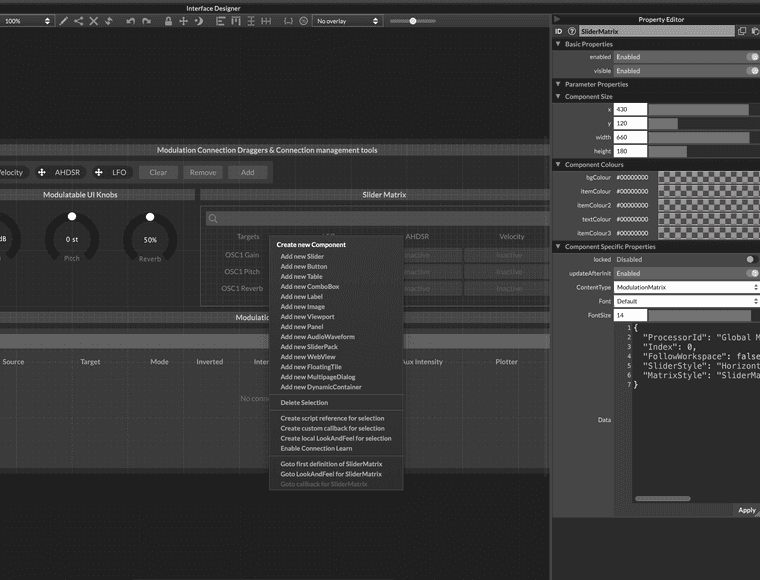
      Screenshot 2025-11-13 at 11.21.16 AM.png

      Sonic Architect && Software Mercenary

      David HealeyD 1 Reply Last reply Reply Quote 0
      • David HealeyD
        David Healey @HISEnberg
        last edited by

        @HISEnberg https://forum.hise.audio/topic/13193/scripteditor-better-css-styling/11?_=1763051721888

        Free HISE Bootcamp Full Course for beginners.
        YouTube Channel - Public HISE tutorials
        My Patreon - HISE tutorials

        HISEnbergH 1 Reply Last reply Reply Quote 0
        • HISEnbergH
          HISEnberg @David Healey
          last edited by

          @d-healey Ya I saw that too, what does he mean "reset workspace"? Rebuild HISE, close and open the project? Still not showing up for me...

          Nevermind I see it: Top bar go to View > Reset Workspace. Always so many hidden features inside of HISE!

          Thanks David!

          Sonic Architect && Software Mercenary

          ustkU 2 Replies Last reply Reply Quote 1
          • HISEnbergH HISEnberg has marked this topic as solved on
          • ustkU
            ustk @HISEnberg
            last edited by

            @HISEnberg It means just close Hise, delete editorData.json in the Hisa appdata folder, restart Hise.
            This will reset the entire workspace

            Hise made me an F5 dude, any other app just suffers...

            1 Reply Last reply Reply Quote 0
            • ustkU
              ustk @HISEnberg
              last edited by

              @HISEnberg said in How to Open CSS Debugger?:

              Nevermind I see it: Top bar go to View > Reset Workspace. Always so many hidden features inside of HISE!

              Oh nice, was easier than I thought in the end 😆

              Hise made me an F5 dude, any other app just suffers...

              1 Reply Last reply Reply Quote 1
              • First post
                Last post

              14

              Online

              2.1k

              Users

              13.2k

              Topics

              114.4k

              Posts

