Forum
    • Categories
    • Register
    • Login

    Regex Help!

    Scheduled Pinned Locked Moved General Questions
    15 Posts 3 Posters 726 Views
    Loading More Posts
    • Oldest to Newest
    • Newest to Oldest
    • Most Votes
    Reply
    • Reply as topic
    Log in to reply
    This topic has been deleted. Only users with topic management privileges can see it.
    • CasmatC
      Casmat
      last edited by Casmat

      Hey!

      Let's say I have this:

      Once upon a time, a brave HISE hero who was <Tags> amazing and helpful </Tags> helped me with my post :)
      

      I'd like to create a regex string that returns this:

       amazing and helpful 
      

      I got this regex: <Tags>(.*?)<\/Tags> but it doesnt work in hise... also the <Tags> and </Tags> are included with the regex code above, couldnt figure out how to remove it.. maybe use non capture groups or use the replace() function?

      Thanks!

      i make music

      David HealeyD 1 Reply Last reply Reply Quote 0
      • David HealeyD
        David Healey @Casmat
        last edited by David Healey

        @Casmat Do you want it to return "amazing and helpful", or do you want it to always return what is between <tags></tags>?

        Also you have a typo. Tag/Tags

        Free HISE Bootcamp Full Course for beginners.
        YouTube Channel - Public HISE tutorials
        My Patreon - HISE tutorials

        CasmatC 1 Reply Last reply Reply Quote 0
        • CasmatC
          Casmat @David Healey
          last edited by

          @d-healey always between the <Tags> and </Tags>, so in this case, " amazing and helpful " (including spaces!)

          i make music

          1 Reply Last reply Reply Quote 0
          • David HealeyD
            David Healey
            last edited by David Healey

            const s = "was <Tags> amazing and helpful </Tags> helped";
            
            const results = Engine.getRegexMatches(s, "<Tags>(.*?)<\/Tags>");
            
            Console.print(results[1]);
            

            Free HISE Bootcamp Full Course for beginners.
            YouTube Channel - Public HISE tutorials
            My Patreon - HISE tutorials

            CasmatC 1 Reply Last reply Reply Quote 0
            • CasmatC
              Casmat @David Healey
              last edited by

              @d-healey hmm, doesnt work for my use case.. Im trying to modify the preset file like you said and im trying to use a regex string to find <Tags> and </Tags>. Any ideas?

              i make music

              David HealeyD 1 Reply Last reply Reply Quote 0
              • David HealeyD
                David Healey @Casmat
                last edited by

                @Casmat

                The code I put above returns the string in between as in your original example (is that not working on your system?). Give me more details about what you want to do.

                Free HISE Bootcamp Full Course for beginners.
                YouTube Channel - Public HISE tutorials
                My Patreon - HISE tutorials

                Christoph HartC 1 Reply Last reply Reply Quote 0
                • Christoph HartC
                  Christoph Hart @David Healey
                  last edited by

                  what do you want to modify? There's a user preset handler preload callback which lets you process the preset data as JSON before it's loaded, so maybe you don't have to resort to Regexing an XML like it's 1982...

                  David HealeyD CasmatC 2 Replies Last reply Reply Quote 0
                  • David HealeyD
                    David Healey @Christoph Hart
                    last edited by

                    @Christoph-Hart He wants to make a custom interface for managing preset tags. See other thread - https://forum.hise.audio/topic/8142/tagging-presets/

                    Free HISE Bootcamp Full Course for beginners.
                    YouTube Channel - Public HISE tutorials
                    My Patreon - HISE tutorials

                    1 Reply Last reply Reply Quote 0
                    • CasmatC
                      Casmat @Christoph Hart
                      last edited by Casmat

                      @Christoph-Hart @d-healey Yeah, im using a custom browser (preset browser tags wont work AFAIK) and I'm looking for a way to add tags to the preset file, some suggested putting it on the file name/making an internal database of preset tags, but for my use case, (preset sharing plays a big role), I'm looking for a way to add presets to the xml file itself. @d-healey suggested using the load as string and write as string functions to modify the xml itself so I'm thinking of adding a structure like this to the xml:

                      <?xml version="1.0" encoding="UTF-8"?>
                      
                      <Preset Version="1.0.0">
                        <Content Processor="Interface">
                          <Control type="ScriptControl" id="amazingId" value="0.0"/>
                        </Content>
                        <Tags>
                          <Tag>Synth</Tag>
                          <Tag>Pad</Tag>
                          <Tag>Pluck</Tag>
                        </Tags>
                        <MidiAutomation/>
                        <MPEData Enabled="0"/>
                      </Preset>
                      

                      and be able to read the tags as strings and put them in arrays in hise. Hence my question of using regex to just get this part out of the mess above:

                          <Tag>Synth</Tag>
                          <Tag>Pad</Tag>
                          <Tag>Pluck</Tag>
                      

                      The regex @d-healey posted does weird things on my system and creates an undefined file, i also tried to use the split() function like this: split("") it splits the whole xml string by <'s (even when using < as a unicode character thinking < itself may be causing issues)

                      i make music

                      David HealeyD 1 Reply Last reply Reply Quote 0
                      • David HealeyD
                        David Healey @Casmat
                        last edited by

                        @Casmat I wouldn't put each tag within . I'd just use a comma separated list, then you can easily put it into an array.

                        Free HISE Bootcamp Full Course for beginners.
                        YouTube Channel - Public HISE tutorials
                        My Patreon - HISE tutorials

                        CasmatC 1 Reply Last reply Reply Quote 0
                        • CasmatC
                          Casmat @David Healey
                          last edited by

                          @d-healey ahh. that makes life easier! any idea still on how to get the identifiable in hisecript? heres what I have in my code:

                          inline function taggingView()
                          {
                          	reg preset = filePreset.loadAsString();
                          	Console.print(preset);
                          	if(preset.contains("\u003C" + "Tags" + "\u003E"))
                          	{
                          		reg result = Engine.getRegexMatches(preset, "<Tags>(.*?)<\/Tags>")[1];
                                          Console.print(result);
                          	}
                          };
                          

                          but result comes out as undefined.. preset is the preset file.

                          i make music

                          David HealeyD 1 Reply Last reply Reply Quote 0
                          • David HealeyD
                            David Healey @Casmat
                            last edited by David Healey

                            @Casmat Use local within inline functions, not reg.

                            My guess is it doesn't like the new line characters.

                            Try local matches = Engine.getRegexMatches(s.replace("\n"), "<Tags>(.*?)<\/Tags>");

                            Free HISE Bootcamp Full Course for beginners.
                            YouTube Channel - Public HISE tutorials
                            My Patreon - HISE tutorials

                            CasmatC 1 Reply Last reply Reply Quote 0
                            • CasmatC
                              Casmat @David Healey
                              last edited by Casmat

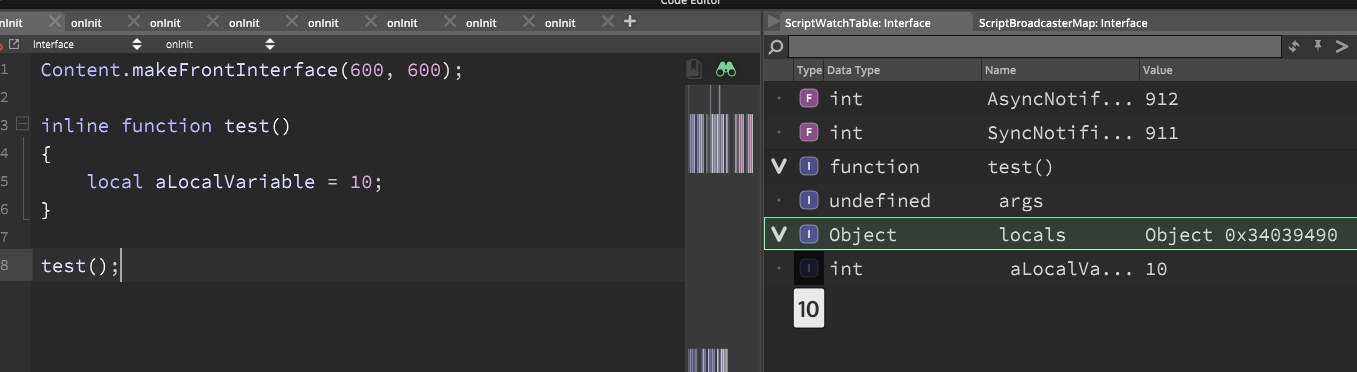
                              @d-healey used reg to look at the script watch table, is there a way to see local variables in that table? And that was a very good guess! Thanks :)

                              i make music

                              David HealeyD 1 Reply Last reply Reply Quote 0
                              • David HealeyD
                                David Healey @Casmat
                                last edited by

                                @Casmat

                                f844c5ac-031a-401e-9134-ec4ca45a9e9e-image.png

                                Free HISE Bootcamp Full Course for beginners.
                                YouTube Channel - Public HISE tutorials
                                My Patreon - HISE tutorials

                                CasmatC 1 Reply Last reply Reply Quote 0
                                • CasmatC
                                  Casmat @David Healey
                                  last edited by

                                  @d-healey ooh, never looked there! Thanks!

                                  i make music

                                  1 Reply Last reply Reply Quote 0
                                  • First post
                                    Last post

                                  30

                                  Online

                                  2.1k

                                  Users

                                  13.0k

                                  Topics

                                  112.5k

                                  Posts