Multi Channel / Multi Output Help!
-
I compiled an AUi with 12 outputs from the standalone version of HISE. The routing appears to be correct in HISE.

Reaper and Logic both recognize the plugin has 12 outputs, but the plugin only outputs a stereo mix of all the samples.
The result looks a lot like what Dan Korneff shows at the end of his video here, but I figured the newer versions of HISE would have addressed the issues mentioned in the related thread:
https://forum.hise.audio/topic/566/hise-multiple-outputs/8?_=1681839406706
https://youtu.be/lOH-dRXPp9k?t=100Any ideas?
-
@ericchesek In Standalone version will always route all the channels to 1/2, you can use multichannel plugin version of HISE or use a script that routes the channels, I use comboboxes to the user can manually route the output of every channel. You'll need to get a typed matrix reference of the container and use de addConnection function.
-
@Soundavid this is true for exporting and compiling multichannel plugins? I have to use the multichannel plugin of HISE to build a multichannel plugin?
-
@ericchesek No you don't, but if you want to use Standalone you need to Route the channels from a script because Standalone only supports Stereo Output. its quite simple.

-
@ericchesek Looks like this

-
That was indeed the issue! Thanks for nudging me in the right direction.
For anyone else who comes across this issue and wants to follow along, I just decided to hard-code the output routing in the script for testing. I am still learning HISE, so I do not claim this is the best way forward!
- Right click on your master container > Create Typed routing matrix script reference
- Paste the reference into your Interface script onInit.
- I added a simple for loop for 12 outputs.
// Typed routing matrix script reference: const var Container = Synth.getRoutingMatrix("masterContainer"); // change 13 below to your number of channels + 1 for(i=1; i < 13; i++){ Container.addConnection(i,i); // 1 to 1 channel routing Console.print(i); //check for correct channel numbers } -
@ericchesek can you post a snippet on that? I've tried any multi output here in this forum with standalone and plug in version and still got 1/2 outs, I can see in the onLit the 16 out or whatever out I choose, but I dont find where I can see the 16 out in the master container or anywhere, thanx
-
@WepaAudio Sure, give me a little time. I'm not sure I fully understand your problem. Just so you know, multi-output only works properly after compiling your instrument to VST3/AUi/whatever. It will not work in the standalone or plugin version of HISE.
-
@WepaAudio Here is the snippet
HiseSnippet 1272.3oc6Y0saZbDEdWfMxPZqZpRT6kihpTsUnFuKzzJE0ZrMXWTCAjwwN2EMd2AXpWlY0ryRLpp22Gu9HzGA+FzdlcAyr1DfPRZTZAYYw428aNybNyGPaA2kDFxEFl4OYT.wv7Sr5LhI6ePeLkYznlg4mY0DGJIBThp8GEfCCIdFllYORovLeNi3WWs69XeLykLUkgwobpK4ozAT4Tssq9KTe+CwdjSnCz7tR0Ftb1AbedDfmrV6XDfcu.2i7LrxsLVFl2otGUxEcjXIIzvL29buQc5yeEKw+Sogzy8IJAaiNPhRT2ZHQLjRd0gbeOExUVMNnO02q8j0enAj71SqFYSpF22pI0ids9oUkOO1.ZZD50EyLogY1Tvz90AyY.ISMHkKAR2ypiqfFHmZQgm6Z0fAaRcwP4WGJI9Zj4OxZc.G7fI2d.9BxgBP35H17w6rSQD7usdRgBvVPnDMDKPI66wqYzOhhOVrcOh7Xdjjx50DKEzK27g5mNdnJAkJgNCOjzkKFfNhvHBLTJrQzPj.hj3gjbjdPH6G4flcTNyIpxOpRgBZPbarmGrDYDWIky1ztn8VOAAYUAWRp0BnHHRhrUoLvOpmlp4jPmhNKHgN2NgNyIgkKVdAIr7sSX44jvJEqrfDV41IrR7F1Qbkk5WFvERz29SSdGND0.NMHhF.GbT90bDhDaB1PNsyIk164TTWpOIDQXPqEJJ.AoV4Ib77WAbEVpFYXo8oLrfRBKseDbBOrTSraqNunz4JoRwdCHQ1mGRTgOB5+Q016ruIbBV6pZbEgEAeHLjOG6k3zXyvefAUHpUAzxI2taDKtnf3rmwkjVrM2pvuUHegeu.5ll51cl1TsKBtuOQLSypQWh4E3lrnAmSDEgVI+Hx0NB8woGNbmka3faR2qlibVCFU1JfLVd9S2LF29Cu64MpgkX0zkw5.+BHBIUAGSX+BFYmLqIuUMR3ERd.Lz9VChfQfbuHeUep9bQ0kBiM.0iTCiTCbXgT4H8KMt4vxbu95wNZ0iErZWR3dOq1Toa+Yi2Ly.uPU68MdGe0ymZUuaWnCZJXyYc3Kl68LuygxCRfxcsTiliu.HFHOvZFC3mCyf+bYYFDrzLCZ4JAHbh.yBCfwF15Y9F1bzsUiHiXocOQUJuTKuCgkms9A0IJ07bipswrTICjSkolzK0EqyvvFRGBrZ7ZE5BKVUsS+ozNxOjbF0S1WKu+klZGc0+LV3A6KtoNflM8oBqka.S59VM++Pyd5e0ABu8yuxtbvcAj8xOAicnCB7I0YCI9vP5XL9EvT4t3He4Dso68ZxY7f9bFM0ohiI.csd8HoNrMyEzdRIP6dpl6W8XhOAGp0O90UeJkQvBnNQVwZwaNw2Yte8UVIvEoFXf9uw8NY+e+8NyuCElo9wyN8WZAy4cPwa2nO762o9vavcCOKZPG3RUWBfX3CR3qtuvLihtXh7NJYEb5.D7iE9a30Xi1JYywFsmXbEIP37w.Ahq1ckIPrQ0YPfv3Mi.wU6tl.wZBDu6IP3rl.wZBDqIPrl.w6IBDYlGAhr2h.wMdF4m4yH2aEIkwFclHqL5bCik0Mdsfw.rqf+R2jukO0nlMh0.ULV7uSQdqlJYjsQ727m9Vx.3RqW55lNU2JPmUMvxqZfUV0.+tUMvGupA98qZf+vhCTwoXuHIePRGFP9pc83upTSyDdWwMaF+iGdZVZ -
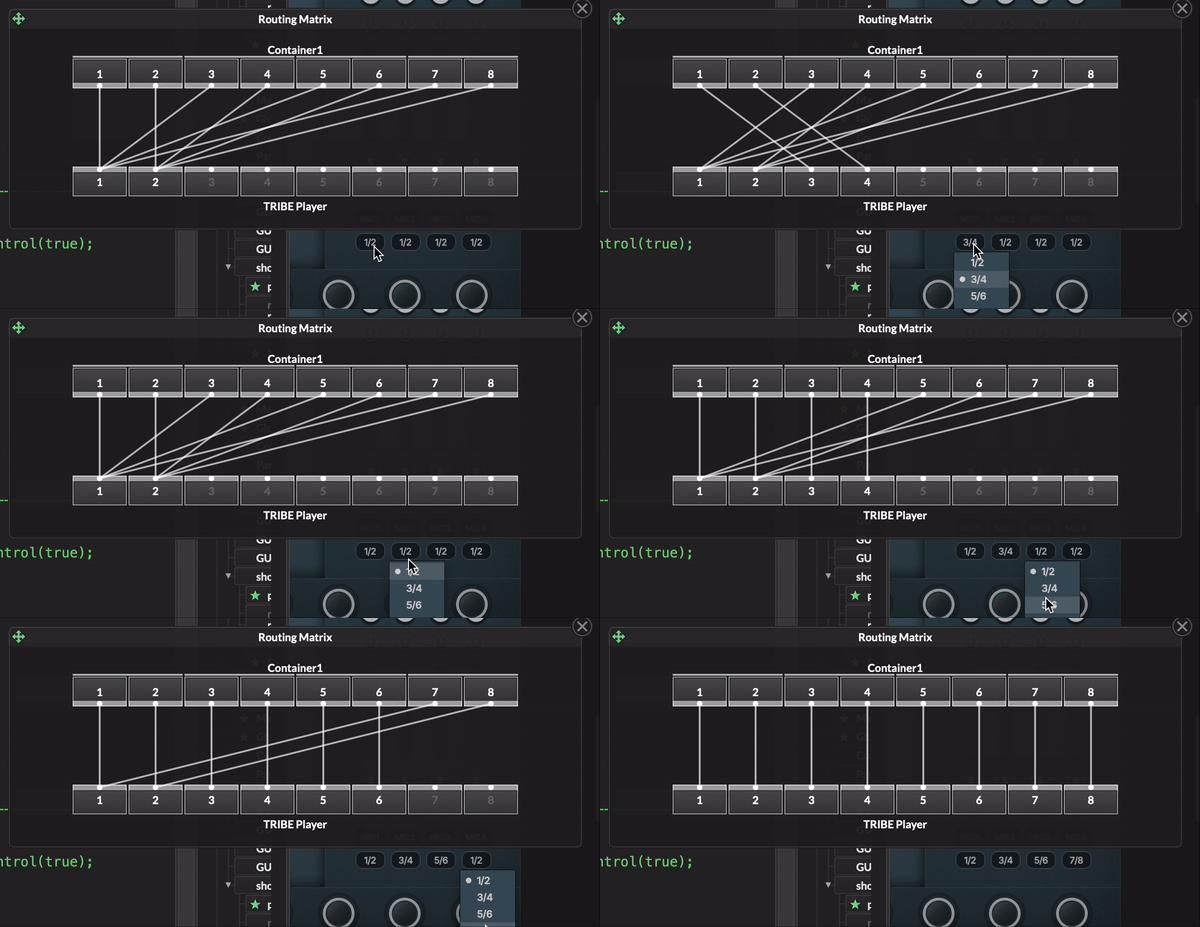
@Soundavid Hi, how to make a drop down menu to select output like this. I hope you will share the way to me. Thanks
-
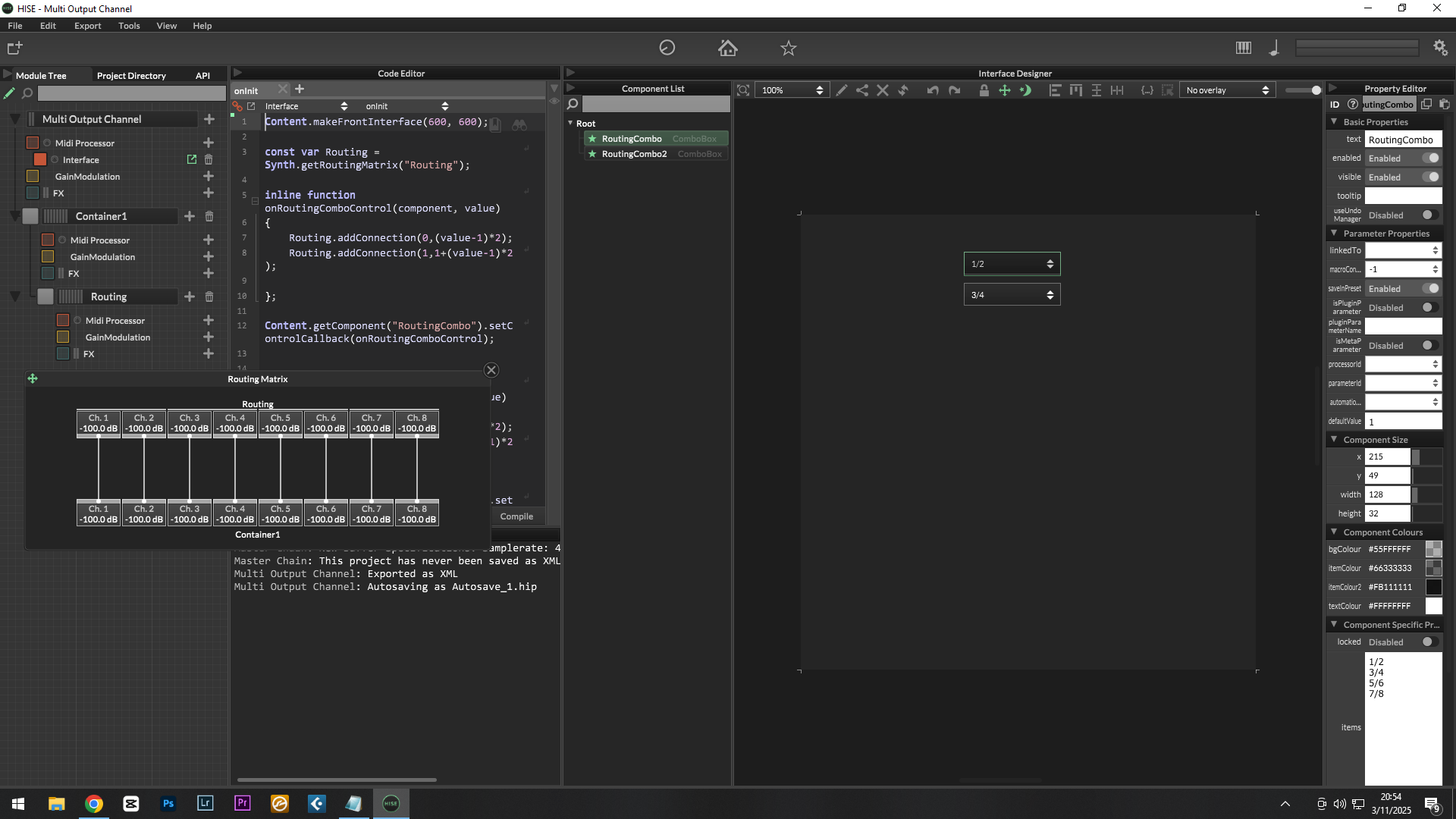
@Dadang You just need to use the Routing Matrix "addConnection" Callback on a ComboBox, you can use more combo boxes to route more sources and simplify the code using a Loop but is basically this:
HiseSnippet 1059.3oc6XEtahaDDdW.mFbu1dWUe.rxuHWSSvFvjnpplFRRKpkbnx0SU8OmVrWBqh8tH6kqAUcOZ84nuF8MncV6k.X3H9nbQJRkeDwreyry27wNiWmtQBOZbrHBgMe4jQTD9IF8lvkCaMjv3n1mivepQGRrjFYktzYSFQhio9HLt32qV.WtDJ4ye+smQBHbO5rkPnWIXdzehExjyVs6o+HKH3RhO8krv47t9os8D7Vh.wXfOEMphFQ7tgbM8JhxsBFnefDODgetQ0FtTZyZC78I0p4655dxwmT+Daxfp0I8scOotS8lNG2b.BuyE9LoHpmjHowvldlveRughemmlfWwhY8CnJCaTOHyoKiZMjE32cp3DiPXityjphoR0WXzg4yta8YR1SS.rlEw7hFtv5nj86AkvyQoRoT5YF87hXijyPT74iMZygeAGPfealmJo9hJ7mELZI.O3xCCI2PuLBLtKhJtUqdfE7m8+ZSS32mXo0aHQV+rXrjwu15arRNub30TodoNDYD61J6oM2SEGiGv3TqAi4dRlfaI3ZzVhv9BUxiDAU7DgiDbfFG.oHXLcey+vrr1wCI99febZxFTo5AURb4qr2+4NPFdGtYef8WlwQy2B7YZ4Brt0zjdGiS3zd6eXrBLgYsHAA8gyhUVIuUE38TgNaPI5juRr1RkX9JPm7TgNyJw4prqDR5K3UR3t4aMsxBMXvJwz6U.MZkvpgAQqKvJ7wg8oQyqbJGgC+K1QsS95n7Rkn4bTvayYxWLhpsuTD3q5TTee49OjVigNwBZFBtJS5CeptOLQDOSbKh4qljNuzhRph4Gehx0t7YKrKNY2Fzoneo84DIQMfPyPf0inQRlRbvmSeCLRNcbQYiyow2HEiRJA8wDP.yeQbKLYD+WPZmn9BHSnPRxZJ5vjzPHketg8QNl0NptYiibMadzwlJsKWYKawtX59sbmtkmTBynE9iCHxEGbqdjlF.N6svzR0DQdLSNY9eydOllWcsSyyKEelQWlza3p4XgUvQ0wyO.bT+LvOw3hACfIQyHXIiK+0M8Ad4O869NtsxSRdRFXQir2F2UYTtuqBt3i4qZrcNb9+8OO16eJOcf6i0lmRenZdJkOY+dtyvCVizCJc2BMUac9t4MXaGprvaCARzUiC6Am28n.SfKuGDqt1xtpqQlZWUYqTldTtehw+.ezf1JarFzNCnixtfFzICXMkcQMXsLf0md0IEX8LfMT1FZvFY.cU16nAcy.1TY+QZvlSAenUDz5TD75TDz5TD75TDz5TD78oHFqTQJ7eRQfKH6EIdsW5qVnlPtaxJv4Vdx+VkxFcT1V1K8lDnPX53q87VbqVJPmMMvZaZf02z.aroA5toA1bSC736OP0Cu9twRQX5HWDpS2KRdyOL9BNAlXkLcC8u.lyw3. -
@Soundavid Wow... thank you sir, I just understood how it works after opening your Snippet.
Thank you very much.
-
This post is deleted! -
@Soundavid Hi, I’ve replicated your hiseSnippet but it doesn’t work. Could you help me? Thanks.
HiseSnippet 1467.3oc6X0saaaCElJNJMQsqnsqWrArAHTrKb5xhs7uIXXntwIoKX0sFwoE6tBFIJahJQJHQm0rg9NsGg8H02fsCojrkjccR7xZ2e9BCcNe7vygmeoT+PtMIJhGhzLN47.BR6V5CNmIF0cDlxPGsOR6158vQBRnYLq8NO.GEQbPZZkdhjg1FqhT+d2i1C6gY1jorPnWxo1jmR8ohob624GnddGhcHmP8yr5FcNxly5x83iA6ojdUT.1903gjmgkKaEcz2iiFgzdn9tMaZgcba6ZU2Z2ScbsI0aWsUi10vM2w0scUqF0cZ61.Lx0NvgJ3gCDXAIB1z83NmOXD+mXwJ3kzH5odDIgEZ.n4X1ntindN8ScNQHjld+otpRwtp6q2i5PmvepK6NJ.yoRj0oosxhLIqqfIokwjVM1jtq9.6PZfXJhzdto9QLHB5hgXSVSIdsnUt2J5c4vJXhs8wulbXHPLQhxspVcKS3uM+VCiJULC4iET1PS+wdBp8HLiQ7LLf.Wjv7Lbn4ww38wrdX.x76LUITaOjHRf5gEgz2T9ARcBtLRX5ZefTEFTlGvzzcLyVP4LSNKQttb+S4RgB4dks49AbFXxaAZ0aLYSiewXiB5dariCrdFQsQkqtUY0R+FqMeXMPUWvxs1x5qKHfwaACL0UAGntoFAbXF8fM2NRxRYecwddmBYukmq0C6ko5WlC4y3BxyYkUmCi2ZLCjq6bwR1QOR3bgkUXgKRvxrw9mRBy5EkKDxnxmlt1kKM0N14jYgb1QLp34AjD5C4dNxzO4yylTiR7txz6DKDVpPkbemjjakmbO9aPTXaVUu6Hjx1y1IB8hi1GKvo6BrgfRBHgBp7rnsO4LnsTbIyF56ShdsfGnVaR7DNuWjNeCzSPyGz14xGdI7fOVwaM3Qpf3CJ5KzspTyndkFFMqzxnckcL1shUUCKqJV0f9fyT9BMN3Ni8vh7cSj8YS.fXWtRXYYJKhJNO6o+Jzho5BawbYMw6p2mJrGMeabk4XiPf4uBaLow7mnefqKTEO0.WU+vebY6Be4U+5umQnep9Ls5tNliFbomipU5u8iAW8xE.tftGevJo9fZtWCkWW616xWpcsaJeYrobO8AhPB1Gl0N.6G.SDSh0PMmCIjHveDp75GR73XmAzeNyx9sN6MF7Zg449qcTp5w97wrb5J4zbLIffEPRPFYVuywG+D3FYAEk5cORkxbRHbGDvgjE34LB38EYOicC4QQtvwQsWQYg5ONbnzWMkywjyHgQ448rw9ciuJXjbDnFv5EQDYDmZGecurqVokpmfUQc3Z8JZqBz0JPWu.ciBzMKP2p.c6ozwNzd3.Y9APW7tN23xcWGXC5Kynxrx8nCmr4wbx2nIyRm3yU1Ullwyoq6Z+eW2+bSoy8tRajZiCnxP0AryfZTfizFuGbaPWL7pMobsxYk83LdvHNiZmuh.xvGNjDl01m6A5wBATPNky86bLwifixTR+UcdJbQAbX9B8qju3p+diyMd8Y5wlqorIm4+NlVV5+7SKWjq615wcuLAsGJ9adb9V5p95lxwverL0beQCj1mCyAG.y9sIYmFdK4D1X5pRZoAMfvbTD+N7KAzJczoDzp.XMI8JIf0J.VWRWJArdAvFR5US.aT.rojVOArYAvVouNqDrUAv1R5aj.1t.3NR50S.2o.3tR5MR.2snSP4ULR8By3iT9kalBOwKgrSc3PFPxypu.fVIBSNfUcUYO3pKdYK7if6gICbvk.9PGKQKJVpsnXoj98FKSAmarLEbtwxTv4FKSAmarLEb9wxTz2SrbB7zX4+XhDnEUUosnpJzhppzVTUEZQUUZKrpBs3pJsYqp7w1g7WYG+g3j0Vqq3.UUL02jeC8dRZSqheBNDxGtE5qrsyuUyHXskUv5KqfMVVAatrB1ZYEr8xJ3NWrfxWR3wiEb+3qHgP85ePbCSsClzvrD5O.Q8fDV![imagen_2025-08-19_130906818.png]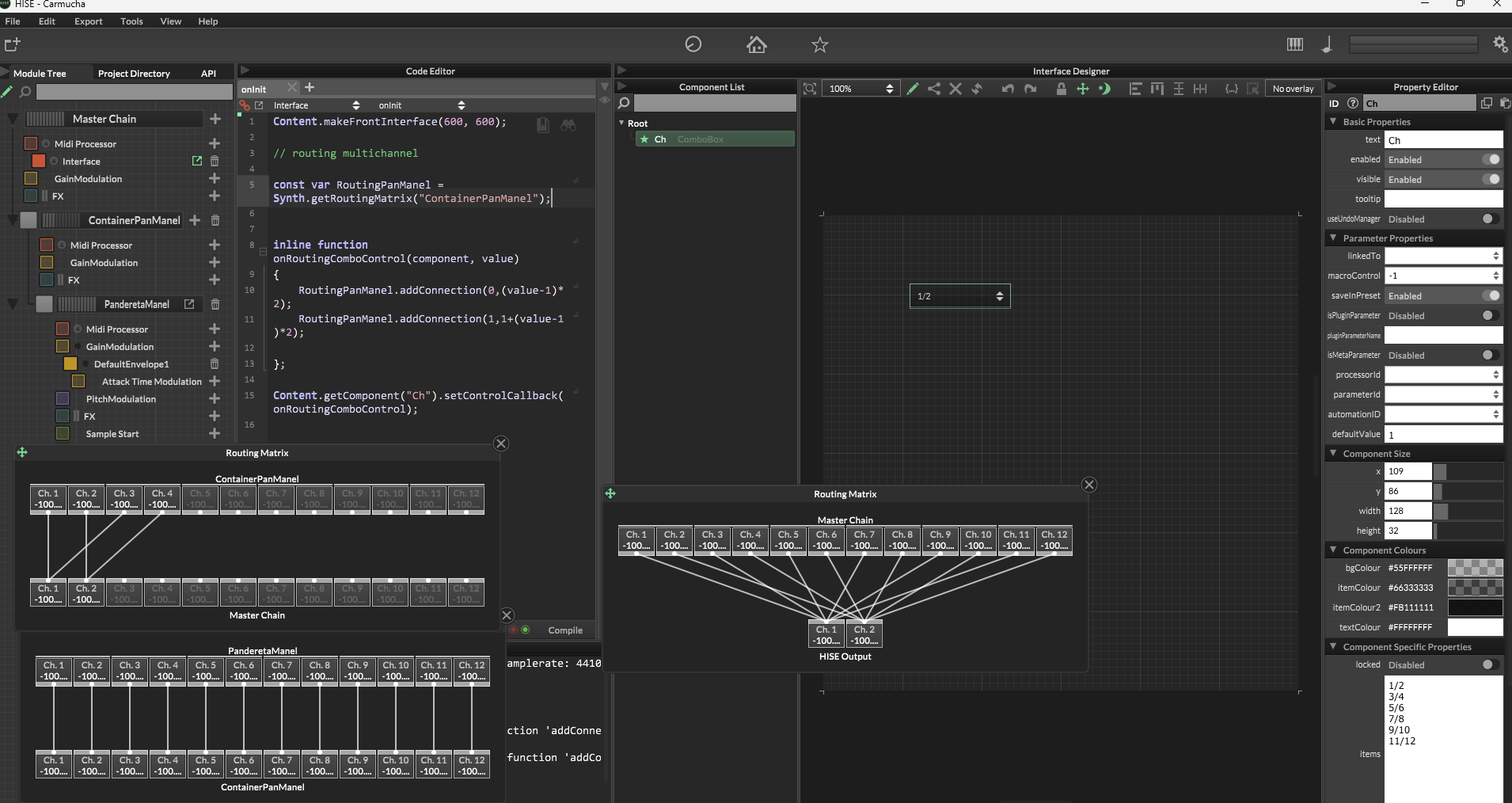
-
@lijas90 It's working for me, you don't going to hear any difference because you're using the Standalone HISE, you'll need the Plugin version to test it but if you don't want to compile the Plugin version of HISE just force the Multichannel routing at the beginning of your script and ensure you are compiling your Plugin as a multichannel Instrument.
Something like this:
for (i = 0; i < 12; i++) Matrix.addConnection(i, i); -
@Soundavid Thank you so much! I had been trying for a long time. This works:
for (i = 0; i < 12; i++) Matrix.addConnection(i, i);Thanks again!
-
 L lijas90 referenced this topic on
-
Highjacking, sorry for that, but i am really frustrated:
I want to route Sampler 1 to Output 1/2 and Sampler 2 to Output 3/4. My problem is, even in the plugin version of my drum sampler, i see only 2 outputs on my main Output container. In my sampler routing matrix i see all the outputs and can route them, but when i load the hise vst in cubase, it only gives me stereo out. I can do screeenshots later, but do you guys have any idea? I hust want to have a routing choice for snare, kick and so on ?
Do i need to compile HISE itself with some other flags or so?
Cheers
Ben -
@Ben-Catman You need to compile HISE with 2 preprocessor definitions added to the Projucer, under Extra Preprocessor Definitions:
NUM_MAX_CHANNELS=16
HISE_NUM_PLUGIN_CHANNELS=16
Then in your HISE plugin project settings, under Extra Definitions Windows & OSX:
HISE_NUM_PLUGIN_CHANNELS=16This will give you 16 internal routing channels in your plugin, and expose 16 outputs to your host/DAW. Change it to whatever number you need.
-
@Ben-Catman Can you share the code snippet?
-
let me check that ! Thx !!!!
