Expansions and executable HiseScript in AdditionalSourceCode folder
-
So I have a project that wants to act like a player, allowing the end user to load different "instruments". These will have their own capabilities, e.g. tremolo, vibrato, envelope etc. as well as sound sets(samples and maps)
So theres a bunch of issues with this, not least that there needs to be a suitable set of UI controls available that these instruments can pick-and-choose from to display and use, in different ways.
So first question... How does the AdditionalSourceCode folder in an expansion work, or more importantly, how do I get it to load some scripts that will use the available ui widgets in the way required by each "instrument" ?
HISE Development for hire.
www.channelrobot.com -
@Lindon you cannot add executable hise script in standard expansions - these are limited to static resources only.
you have two options:
- implement all logic that is required by all expansions in the base project, then just hook into it. the additional data can store JSON - this would be the config setting for which expansion needs which logic.
- If that isn't enough flexibility you can always use the Full Instrument Expansion route - this is basically what Rhapsody is doing. You get a completely dynamic module tree / script interface, basically Kontakt Player tailored for Lindon and every expansion is a complete HISE project.
-
@Christoph-Hart ok well I look like Im going down path 2 then...
can you point me at any documentation about how to get this done?
..oh and the customer wants to have a left and right panel that remains across all "instruments/expansions" is that possible with full Instrument Expansion?
HISE Development for hire.
www.channelrobot.com -
@Lindon said in Expansions and executable HiseScript in AdditionalSourceCode folder:
..oh and the customer wants to have a left and right panel that remains across all "instruments/expansions" is that possible with full Instrument Expansion?
Yes - I opened some PRs recently with a bunch of expansion additions for the preset browser that might be useful to you, including a built in installer/uninstaller. None of them have been merged yet so things might change.
@Lindon said in Expansions and executable HiseScript in AdditionalSourceCode folder:
can you point me at any documentation about how to get this done?
Make your base project (this is your player). Add some method to it for installing expansions and loading expansions. I have a video about building an installer, and loading them could be as simple as adding a preset browser. In project preferences set expansion type to Full, add an encryption key - this key will be used by all expansions you create. Export this project as a plugin/standalone app, this gets sent to the end user.
To create an expansion make a new HISE project. Leave the expansion type set to disabled, add the same encryption key as your base project. Once you're happy with the project export it as a Full Instrument expansion, this will create an info.hxi file. Then export your samples as a hr1 archive and in the exporter window you can select the info.hxi file.
You ship the hr1 (hr2, hr3, etc.) file to the end user and they install it in the base project.
https://docs.hise.audio/working-with-hise/project-management/expansions/index.html#features
Free HISE Bootcamp Full Course for beginners.
YouTube Channel - HISE tutorials
My Patreon - More HISE tutorials -
@David-Healey Thanks for this, Im sure I will have follow-up questions, but meanwhile Im going to have to think how(or even if) I might use this to meet the requirements, which by the way require me to mix and match articulations from different instruments - which I think in this functionality would require the player to load multiple Full expansions at the same time. So as it stands I think this may not be usable and Im off down Chris's path 1.
HISE Development for hire.
www.channelrobot.com -
@Lindon Yes you won't be able to do that with full instrument expansions.
Free HISE Bootcamp Full Course for beginners.
YouTube Channel - HISE tutorials
My Patreon - More HISE tutorials -
@David-Healey well there's a design discussion on going so I may very well be back to talking to you about this soon... but thanks so far.
HISE Development for hire.
www.channelrobot.com -
@David-Healey - Ok so heres a curve ball question.......
I use expansions, and I allow any voice in any expansion to be loaded into my "instrument" (which is NOT a Full expansion its just a plain old (huh) thing)....
I do this using the {EXP} token in the sampler load ....
now.....
What if I build an instrument that does this, but then I save, set up and load it as a Full Expansion.... will it load any and all sound that I know about (via some other meta data process) ????
HISE Development for hire.
www.channelrobot.com -
@Lindon I suspect it won't work, but try it and let us know.
Free HISE Bootcamp Full Course for beginners.
YouTube Channel - HISE tutorials
My Patreon - More HISE tutorials -
@David-Healey yeah it'd be a lot of dev work, maybe if theres time at the end...
HISE Development for hire.
www.channelrobot.com -
@Lindon nope won't work.
Use regular expansions, make a map of all features / articulations you want, then embed a metadata system where you load the files as JSON from each expansion, then adapt the UI to show what you need.
The Full expansion mode is used if you actually want to make a company wide sample playback engine that can be fed with any product, but you loose the ability of loading content from multiple expansion (=each full instrument expansion is a closed off container, you just gain the advantage of not supplying one binary per expansion).
-
@Christoph-Hart said in Expansions and executable HiseScript in AdditionalSourceCode folder:
@Lindon nope won't work.
Use regular expansions, make a map of all features / articulations you want, then embed a metadata system where you load the files as JSON from each expansion, then adapt the UI to show what you need.
The Full expansion mode is used if you actually want to make a company wide sample playback engine that can be fed with any product, but you loose the ability of loading content from multiple expansion (=each full instrument expansion is a closed off container, you just gain the advantage of not supplying one binary per expansion).
thanks _ I wont bring it up then. The customer wants a Library browser - down one side of the UI and to be able to load any Instrument(from a set in a Library). Each instrument will have different back-end configuration of samplers and UI widgets and functionality - so, as you suggested, there are only 2 ways to do this:
- build the most complex back end module structure, put ever possible widget and function into the product and load samples as required then use some JSON to say what happens in this particular instrument...its deeply ugly, expensive in effort and requires everyone to know on day 1, what every possible instrumetn they ever ship will be doing
- Use Full Instrument Expansions and build whats needed when and where its needed.
Frankly what's disappointing me now is that Full Instrument expansions "steal" the entire UI, so if I want some Instrument management area, then I will have to duplicate it in every Full Expansion....so users can move from one expansion to another without going back thru the base player interface. This assumes I can call ExpansionHandler.getExpansion(var name) from within a Full Expansion....yes?
HISE Development for hire.
www.channelrobot.com -
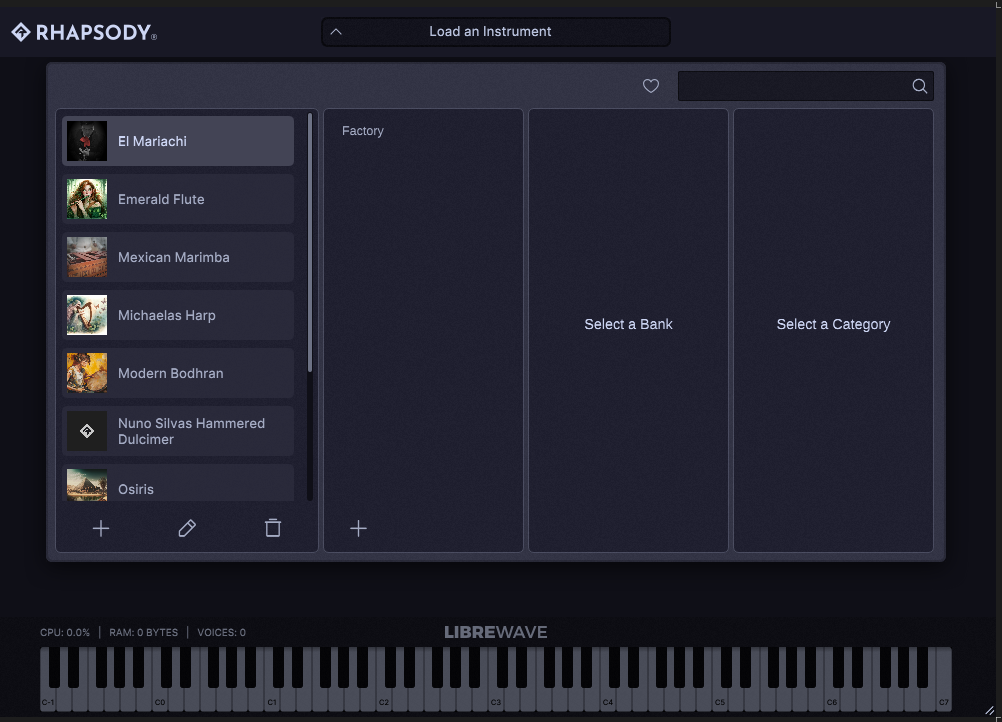
@Lindon Can't you use the built-in preset browser?
I added expansion management controls to the expansion column recently.
Free HISE Bootcamp Full Course for beginners.
YouTube Channel - HISE tutorials
My Patreon - More HISE tutorials -
@David-Healey not what they want, they want it to look at least familiar for Kontakt Player users...so it has to be available at all times.
HISE Development for hire.
www.channelrobot.com -
@Lindon This could be. You could just have a single column off to the side
Free HISE Bootcamp Full Course for beginners.
YouTube Channel - HISE tutorials
My Patreon - More HISE tutorials -
@Lindon I‘m pretty sure you can load another full instrument expansion without going back to the vanilla state, and a common shared left tab is not the hardest thing to implement - just make sure that code is self contained then ship the script files to each instrument using the asset manager.
-
@Christoph-Hart Yes you can call
setCurrentExpansionto change it. -
@David-Healey said in Expansions and executable HiseScript in AdditionalSourceCode folder:
@Lindon This could be. You could just have a single column off to the side
nope I mean this:
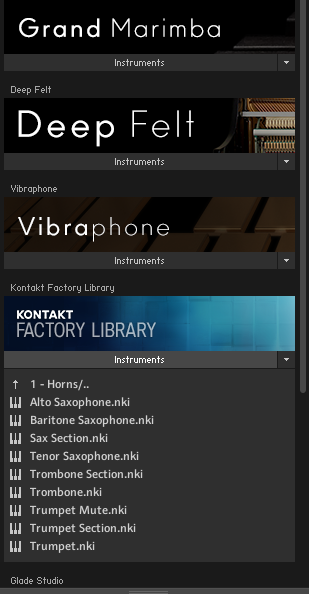
cant see how I can get the std preset browser to do this open/close - list instruments in a library approach, as well as all the single and dbl click functionality they want as well as search....
If you can see how to do it please let me know.
-
@Christoph-Hart said in Expansions and executable HiseScript in AdditionalSourceCode folder:
@Lindon I‘m pretty sure you can load another full instrument expansion without going back to the vanilla state, and a common shared left tab is not the hardest thing to implement - just make sure that code is self contained then ship the script files to each instrument using the asset manager.
Yes this is my current plan...just sad I have to do it at all...
HISE Development for hire.
www.channelrobot.com -
@Lindon said in Expansions and executable HiseScript in AdditionalSourceCode folder:
just sad I have to do it at all.
It's very little extra work to include it in each project - if you use the new asset manager or the global script folder it's just a single line of code added to each project.
And charge accordingly :D
Free HISE Bootcamp Full Course for beginners.
YouTube Channel - HISE tutorials
My Patreon - More HISE tutorials


