Using custom preset system - as in the actual presets themselves, not a browser
-
@ustk Yep, indeed you can! the XML data you get from the module state call isn't pretty, but it does work. I think you'd do that if you had some module that did not have any UI controls, but you still wanted the preset to dictate its internal state when loading or saving.
-
@ustk clever - but possibly running through all the presets every time you load a new preset is going to take a while.... I'd need to cache them somehow.
How does saving panel data work? Do you have to save the preset (bad for my use case)? Does it auto update / write to the .preset file? Where is the data in the .preset file?!
EDIT - Oh it's not persistant... doh

DHPlugins / DC Breaks | Artist / Producer / DJ / Developer
https://dhplugins.com/ | https://dcbreaks.com/
London, UK -
@DanH said in Using custom preset system - as in the actual presets themselves, not a browser:
@ustk clever - but possibly running through all the presets every time you load a new preset is going to take a while.... I'd need to cache them somehow.
No, only at init when for checking if new presets are present
How does saving panel data work? Do you have to save the preset (bad for my use case)? Does it auto update / write to the .preset file?
Yes true... but it should be possible to just write it in the preset dynamically without the need to save. but that would require some clever string handling, don't know if it's secure enough and/or doable, but that might worth a try...
That might be where the already existing custom preset system is better...Where is the data in the .preset file?!
Under the panel's value, like all other components
EDIT - Oh it's not persistant... doh
Yes it is if in the preset..., it's recalled like any other value, that's what I do a lot in the things I've worked on
-
@ustk said in Using custom preset system - as in the actual presets themselves, not a browser:
that's what I do a lot in the things I've worked on
of course
Ok I'm obviously passing the data in wrong. Will take another look...DHPlugins / DC Breaks | Artist / Producer / DJ / Developer
https://dhplugins.com/ | https://dcbreaks.com/
London, UK -
@ustk ok got it working. Is it possible to update the .preset file without using
Engine.saveUserPreset?DHPlugins / DC Breaks | Artist / Producer / DJ / Developer
https://dhplugins.com/ | https://dcbreaks.com/
London, UK -
@DanH Yeah that's where the biggest job resides.
might doable with some XML parsing, and save as XML but the object might live as strings that are difficult to read/write. I won't be able to make tests within the next days so... -
@ustk I think it's too risky. One mistake in a preset file and it doesn't load.
DHPlugins / DC Breaks | Artist / Producer / DJ / Developer
https://dhplugins.com/ | https://dcbreaks.com/
London, UK -
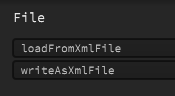
@DanH what about with HISE's xml parser?
Free HISE Bootcamp Full Course for beginners.
YouTube Channel - HISE tutorials
My Patreon - More HISE tutorials -
@David-Healey don't know anything about it
DHPlugins / DC Breaks | Artist / Producer / DJ / Developer
https://dhplugins.com/ | https://dcbreaks.com/
London, UK -
@DanH These two
Free HISE Bootcamp Full Course for beginners.
YouTube Channel - HISE tutorials
My Patreon - More HISE tutorials -
@David-Healey I tried in during my testing and even if I could make it work, the parsing of an array that contains strings is bad bad bad. You need to rework the result to remove the escape char and other things.
This might just be normal, but then what about rewriting it back? Might work, might be risky, this I'm not sure until further testing it -
@DanH said in Using custom preset system - as in the actual presets themselves, not a browser:
@ustk ok got it working. Is it possible to update the .preset file without using
Engine.saveUserPreset?Why do you want to do this?
I'm doing this when I save my custom fx chain format:
inline function saveFXChainPreset() {
        FileSystem.browse(FileSystem.getFolder(FileSystem.UserPresets), true, "*.fxchain", function (f) {
            if (!isDefined(f) || f == 0) return;

            PluginSharedData.presetMode = "FXChain";

            // Get the data object directly from our custom save logic
            var data = PluginUserPresetHandling.onPresetSave();
            f.writeObject(data);
        });
    }
the key being setup a file reference, and then call f.writeObject(blahblah) on it.
-
@Orvillain said in Using custom preset system - as in the actual presets themselves, not a browser:
Why do you want to do this?
Because it kills voices and I want to silently update some metadata like tags and author for presets.
But.... your method seems to be working!!! I feel like I'm going to have to remove certain characters in case it messes up the preset code....
-
It's like this ..... I have an external arppegiator triggering my synth... I click my left/right arrows to change preset.... and because I use a custom data model, I have to tap into the pre/post callbacks.... so here's what I get:
synth notes triggering.... click the arrow....
Interface: preLoadCallback triggered - no synth notes triggering when this is running
Interface: onPresetLoad triggered - no synth notes triggering when this is running
Once the onPresetLoad method is finished, a midi note does sneak through into the synth....Then this callback fires:
Interface: postLoadCallback triggered
This kills the previous notes, and triggers the new ones.....Here is my full loadGlobalPreset method:
inline function loadGlobalPreset(obj) {
        local samplemaps = obj.samplemaps;
        local wavetables = obj.wavetables;
        local params = obj.parameters;
        local fxSelections = obj.fxSelections;
        local fxChainOrder = obj.fxChainOrder;

        lastLoadParams = params;

        // Restore samplemaps
        UISoundSelector.syncSamplerMenu(1, samplemaps[0]);
        UISoundSelector.syncSamplerMenu(2, samplemaps[1]);
        UISoundSelector.syncSamplerMenu(3, samplemaps[2]);

        // Restore wavetables
        UISoundSelector.syncSynthMenu(1, wavetables[0]);
        UISoundSelector.syncSynthMenu(2, wavetables[1]);
        UISoundSelector.syncSynthMenu(3, wavetables[2]);

        // Update all UI parameters - except the ones that are not tagged as saveInPreset
        UserPresetHandler.updateSaveInPresetComponents(params);

        // TODO: Restore custom samples

        // Fix-up FX menus by stable id, but only when they differ
        if (isDefined(fxSelections)) {
            for (i = 0; i < fxSelections.length; i++) {
                local sel = fxSelections[i];
                if (!isDefined(sel) || !isDefined(sel.id)) continue;

                local targetId = (isDefined(sel.idName) && sel.idName != "") ? sel.idName : "empty";

                local menu = Content.getComponent(sel.id);
                if (!isDefined(menu)) continue;

                // what saveInPreset restored (by index)
                local currentId = UIEffectDropDownMenu.getIdForIndex(menu.getValue());
                if (currentId == undefined) currentId = "empty";

                // only fire callback if mismatch
                if (currentId != targetId)
                    UIEffectDropDownMenu.setMenuToId(sel.id, targetId, true);
            }
        }

        // Restore FX chain ordering (pageKey -> [4 slots])
        if (isDefined(fxChainOrder)) {
            for (k in fxOrderKeys) {
                local key = fxOrderKeys[k];
                local saved = fxChainOrder[key];

                // expect an array of length 4 with unique 0..3
                if (!isDefined(saved) || saved.length != 4) continue;

                UIEffectReordering.pageOrder[key] = saved;          // update UI state
                UIEffectReordering.applyVisualOrder(key);           // move panels
                PluginEffectReorder.apply(key, saved);              // set DSP chain
            }
        }

        // Update all UI parameters - except the ones that are not tagged as saveInPreset
        //UserPresetHandler.updateSaveInPresetComponents(params);
    }
It is doing quite a lot... and ultimately what happens is when I switch a preset, I get one voice that sounds one way... and then another voice that sounds completely different... like a voice is being allowed to be triggered before the preset is fully loaded.
It seems to be something related to my effect menus and/or effect re-ordering.
It is hard to explain. Might have to make a video. But any immediate thoughts??



