Forum
    • Categories
    • Register
    • Login

    Preset Browser doesn't show the bottom buttons in exported plugin

    Scheduled Pinned Locked Moved Solved Bug Reports
    8 Posts 5 Posters 428 Views
    Loading More Posts
    • Oldest to Newest
    • Newest to Oldest
    • Most Votes
    Reply
    • Reply as topic
    Log in to reply
    This topic has been deleted. Only users with topic management privileges can see it.
    • ustkU
      ustk
      last edited by ustk

      So everything is in place inside Hise, but not buttons are present in the exported plugin, unless I click on a preset (but it strangely doesn't work with some presets for whatever reason).

      So in the case of selecting the User category, since it's empty, there're no preset to click to make the buttons appearing

      EXPORTED PLUGIN:

      WITHIN HISE:
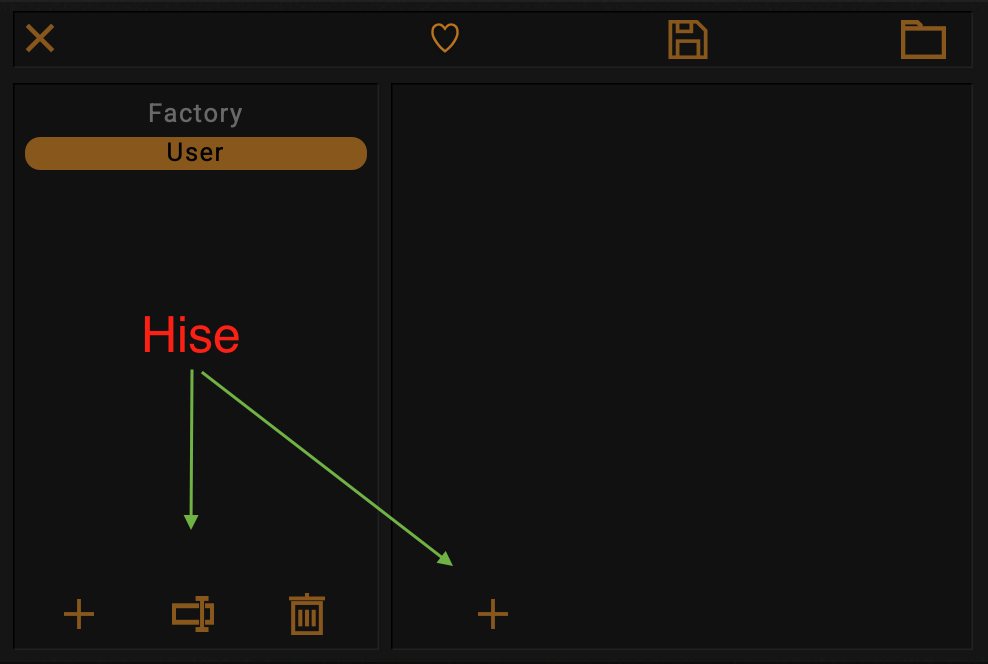
      Screenshot 2025-02-25 at 14.33.30.png

      Hise made me an F5 dude, any other app just suffers...

      ustkU 1 Reply Last reply Reply Quote 0
      • ustkU ustk marked this topic as a question on
      • ustkU ustk has marked this topic as solved on
      • ustkU
        ustk @ustk
        last edited by ustk

        So this is finally working after deleting the UserPreset folder in both the project and the appData folder. Probably a corrupted file somewhere...

        Hise made me an F5 dude, any other app just suffers...

        ChazroxC 1 Reply Last reply Reply Quote 2
        • ChazroxC
          Chazrox @ustk
          last edited by

          This post is deleted!
          1 Reply Last reply Reply Quote 0
          • Adam_GA
            Adam_G
            last edited by

            hey yo @ustk ! i have the exact same issue and nothing i try seems to resolve it including your solution. any other recommendations??

            ustkU Oli UllmannO 2 Replies Last reply Reply Quote 0
            • ustkU
              ustk @Adam_G
              last edited by

              @Adam_G Mmmm... Not that I know unfortunately...

              Hise made me an F5 dude, any other app just suffers...

              1 Reply Last reply Reply Quote 0
              • Oli UllmannO
                Oli Ullmann @Adam_G
                last edited by

                @Adam_G
                You could check whether Read Only Factory Presets is selected in your project settings. If so, that could be the cause of the problem.

                Adam_GA 1 Reply Last reply Reply Quote 0
                • Adam_GA
                  Adam_G @Oli Ullmann
                  last edited by

                  @Oli-Ullmann thank you! it was already unchecked unfortunately.

                  this is a most frustrating issue. i solved it on windows by updating the company/product info but on mac nothing seems to be making any difference. stuck again :(

                  David HealeyD 1 Reply Last reply Reply Quote 0
                  • David HealeyD
                    David Healey @Adam_G
                    last edited by

                    @Adam_G Got a screenshot?

                    Free HISE Bootcamp Full Course for beginners.
                    YouTube Channel - Public HISE tutorials
                    My Patreon - HISE tutorials

                    1 Reply Last reply Reply Quote 0
                    • First post
                      Last post

                    28

                    Online

                    2.1k

                    Users

                    13.2k

                    Topics

                    114.7k

                    Posts