Custom Display panel questions...
-
Happy holidays all!
Haven't been able to spend as much time as I would like working on projects and ideas but I was pleased I managed to create a custom preset bar that would display the loaded preset (if you click that text it opens the preset browser, as well as having next and previous buttons) its not the most sophisticated but it works:

I know this can be done with a combo box (I've got that set up atm) but in order to keep the UI consistent I'm looking to create essentially the same but that using the buttons will cycle through the various IR files in the folder for the Convolution Reverb.
Firstly is this possible? Can it be built onto what I've already done with the combo box and then making the combox not visible but behind the scenes? I know I can essentially recycle the look and feel bits and pieces I've done in terms of design its the under the hood bits and pieces that I can't envision in my head.
As always thanks for your help/responses in advance!
-
@JamesC You can adapt the example in the docs:
https://docs.hise.dev/hise-modules/effects/list/convolution.html#parameters
Instead of a combo box, use control callbacks on the 2 buttons to call
setFile(). You'd put the list of impulse names in an array, then the buttons would load the previous or next impulse. -
J JamesC has marked this topic as solved on
-
@JamesC Nice its always the simplest thing here's what I ended up doing in case anyone else needs it and for any general feedback:
const var ConvolutionReverb1 = Synth.getAudioSampleProcessor("Convolution Reverb1");
const var irs = Engine.loadAudioFilesIntoPool();

const var rvbnextbtn = Content.getComponent("rvbnextbtn");
const var rvbprevbtn = Content.getComponent("rvbprevbtn");

// Track current IR
var currentIRIndex = 0;

ConvolutionReverb1.setFile(irs[currentIRIndex]);

inline function onrvbnextbtnControl(component, value)
{
    if (value)
    {
        currentIRIndex++;

        if (currentIRIndex >= irs.length)
            currentIRIndex = 0;

        ConvolutionReverb1.setFile(irs[currentIRIndex]);
    }
}

inline function onrvbprevbtnControl(component, value)
{
    if (value)
    {
        currentIRIndex--;

        if (currentIRIndex < 0)
            currentIRIndex = irs.length - 1;

        ConvolutionReverb1.setFile(irs[currentIRIndex]);
    }
}

rvbnextbtn.setControlCallback(onrvbnextbtnControl);
rvbprevbtn.setControlCallback(onrvbprevbtnControl);
Now all becomes about show the curently loaded file name in the panel!
-
J JamesC has marked this topic as unsolved on
-
Thanks for that buttons now working as I wanted now working on the text appearing, I can't quite work out what I've missed, currently it displays undefined:

This is the current code in respect of the text:
const var rvbfilename = Content.getComponent("rvbfilename"); inline function onrvbfilenameControl(component, value) { local currentReverb = ConvolutionReverb1.getCurrentlyLoadedFile(); if (currentReverb == "") { rvbfilename.set("text", currentReverb); } else { rvbfilename.set("text", currentReverb); } rvbfilename.repaint(); }; Content.getComponent("rvbfilename").setControlCallback(onrvbfilenameControl); rvbfilename.setPaintRoutine(function(g) { var a = this.getLocalBounds(0); var cornerRadius = 4; // Text color if (isContainerOpen || isHovered) { g.setColour(0xFFFFFFFF); } else { g.setColour(0xFFFFFFFF); } // IR text var textArea = [a[0], a[1], a[2], a[3]]; g.setFont("font", 20); if (currentReverb == "") { g.drawAlignedText("Default", textArea, "centred"); } else { g.drawAlignedText(currentReverb, textArea, "centred"); } }); -
@JamesC said in Custom Display panel questions...:
getCurrentlyLoadedFile
What does this return?
Also, both clauses of your if statement do the same thing.
-
This post is deleted! -
@David-Healey I'm not sure I've tried to get it to print some info to console for me but stuck at this point. Here is the full code if that helps shed any further light:
///Convo Reverb const var ConvolutionReverb1 = Synth.getAudioSampleProcessor("Convolution Reverb1"); const var irs = Engine.loadAudioFilesIntoPool(); const var rvbnextbtn = Content.getComponent("rvbnextbtn"); const var rvbprevbtn = Content.getComponent("rvbprevbtn"); // Track current IR var currentIRIndex = 0; ConvolutionReverb1.setFile(irs[currentIRIndex]); inline function onrvbnextbtnControl(component, value) { if (value) { currentIRIndex++; if (currentIRIndex >= irs.length) currentIRIndex = 0; ConvolutionReverb1.setFile(irs[currentIRIndex]); } } inline function onrvbprevbtnControl(component, value) { if (value) { currentIRIndex--; if (currentIRIndex < 0) currentIRIndex = irs.length - 1; ConvolutionReverb1.setFile(irs[currentIRIndex]); } } rvbnextbtn.setControlCallback(onrvbnextbtnControl); rvbprevbtn.setControlCallback(onrvbprevbtnControl); const lafrvbnextbtn = Content.createLocalLookAndFeel(); rvbnextbtn.setLocalLookAndFeel(lafrvbnextbtn); lafrvbnextbtn.registerFunction("drawToggleButton", function(g, obj) { var c = obj.area; g.setFont("phosphor", 30); g.setColour(obj.textColour); g.drawAlignedText("\ue02e", c, "centred"); }); const lafrvbprevbtn = Content.createLocalLookAndFeel(); rvbprevbtn.setLocalLookAndFeel(lafrvbprevbtn); lafrvbprevbtn.registerFunction("drawToggleButton", function(g, obj) { var c = obj.area; g.setFont("phosphor", 30); g.setColour(obj.textColour); g.drawAlignedText("\ue05a", c, "centred"); }); const var rvbfilename = Content.getComponent("rvbfilename"); inline function onrvbfilenameControl(component, value) { local currentReverb = ConvolutionReverb1.getCurrentlyLoadedFile(); if (currentReverb == "") { rvbfilename.set("text", currentReverb); } else { rvbfilename.set("text", currentReverb); } rvbfilename.repaint(); }; Content.getComponent("rvbfilename").setControlCallback(onrvbfilenameControl); rvbfilename.setPaintRoutine(function(g) { var a = this.getLocalBounds(0); var cornerRadius = 4; // Text color if (isContainerOpen || isHovered) { g.setColour(0xFFFFFFFF); } else { g.setColour(0xFFFFFFFF); } // IR text var textArea = [a[0], a[1], a[2], a[3]]; g.setFont("font", 20); if (currentReverb == "") { g.drawAlignedText("Default", textArea, "centred"); } else { g.drawAlignedText(currentReverb, textArea, "centred"); } }); -
Combine the prev/next button actions into a single function, no need to repeat the same thing twice.
Here's an example of doing it with presets
https://youtu.be/rCJ0ljwzXjcif (currentReverb == "") { rvbfilename.set("text", currentReverb); // This is the same } else { rvbfilename.set("text", currentReverb); // as this }ConvolutionReverbis an audio sample processor.getCurrentlyLoadedFilethis function only exists for audio files, not audio sample processors.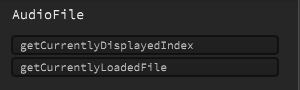
-
@JamesC said in Custom Display panel questions...:
inline function onrvbfilenameControl(component, value)
{
local currentReverb = ConvolutionReverb1.getCurrentlyLoadedFile();
if (currentReverb == "")
{
rvbfilename.set("text", currentReverb);
}
else
{
rvbfilename.set("text", currentReverb);
}
rvbfilename.repaint();
};Ok well lets look at this:
local currentReverb = ConvolutionReverb1.getCurrentlyLoadedFile();is trying to get a file name..... from ConvolutionReverb1....
ConvolutionReverb1 is an AudioSampleProcessor, because of this:
const var ConvolutionReverb1 = Synth.getAudioSampleProcessor("Convolution Reverb1");but when we look in the documentation at AudioSampeProcessor it has no method called
.getCurrentlyLoadedFile();https://docs.hise.dev/scripting/scripting-api/audiosampleprocessor/index.html
..it does however have:
https://docs.hise.dev/scripting/scripting-api/audiosampleprocessor/index.html#getfilename


