Forum
    • Categories
    • Register
    • Login

    Snippet not working

    Scheduled Pinned Locked Moved Scripting
    19 Posts 2 Posters 1.5k Views
    Loading More Posts
    • Oldest to Newest
    • Newest to Oldest
    • Most Votes
    Reply
    • Reply as topic
    Log in to reply
    This topic has been deleted. Only users with topic management privileges can see it.
    • pcs800P
      pcs800 @David Healey
      last edited by

      @d-healey Ahh, ok. So if I just replicate that scriptFX in my project, it will work?
      I mean the code in prepareToPlay, processBlock, onControl

      pcs800P 1 Reply Last reply Reply Quote 0
      • pcs800P
        pcs800 @pcs800
        last edited by

        @pcs800 Oh I see it now, A network full of stuff I am not familiar with. I will try to dissect it.

        David HealeyD 1 Reply Last reply Reply Quote 0
        • David HealeyD
          David Healey @pcs800
          last edited by

          @pcs800 Check out my HISE Bootcamp, video 21 shows how to build a similar effect in scriptnode, but you should watch from the first video in order to get the best experience.

          Free HISE Bootcamp Full Course for beginners.
          YouTube Channel - Public HISE tutorials
          My Patreon - HISE tutorials

          pcs800P 1 Reply Last reply Reply Quote 2
          • pcs800P
            pcs800 @David Healey
            last edited by

            @d-healey Ok, I watched and built it as the video progressed. Is the reverb necessary? I wouldn't want to add reverb to the signal, just widen it.

            David HealeyD 1 Reply Last reply Reply Quote 0
            • David HealeyD
              David Healey @pcs800
              last edited by

              @pcs800 said in Snippet not working:

              Is the reverb necessary?

              Nope, just make it how you want :)

              Free HISE Bootcamp Full Course for beginners.
              YouTube Channel - Public HISE tutorials
              My Patreon - HISE tutorials

              pcs800P 1 Reply Last reply Reply Quote 0
              • pcs800P
                pcs800 @David Healey
                last edited by

                @d-healey Here's what happens when I remove the reverb
                Video here

                David HealeyD 1 Reply Last reply Reply Quote 0
                • David HealeyD
                  David Healey @pcs800
                  last edited by

                  @pcs800 said in Snippet not working:

                  Here's what happens when I remove the reverb

                  Turning down the reverb signal doesn't remove the node from the signal path. You need to delete the node from the network.

                  Free HISE Bootcamp Full Course for beginners.
                  YouTube Channel - Public HISE tutorials
                  My Patreon - HISE tutorials

                  pcs800P 1 Reply Last reply Reply Quote 0
                  • pcs800P
                    pcs800 @David Healey
                    last edited by

                    @d-healey Ok, this doesn;t have any effect either
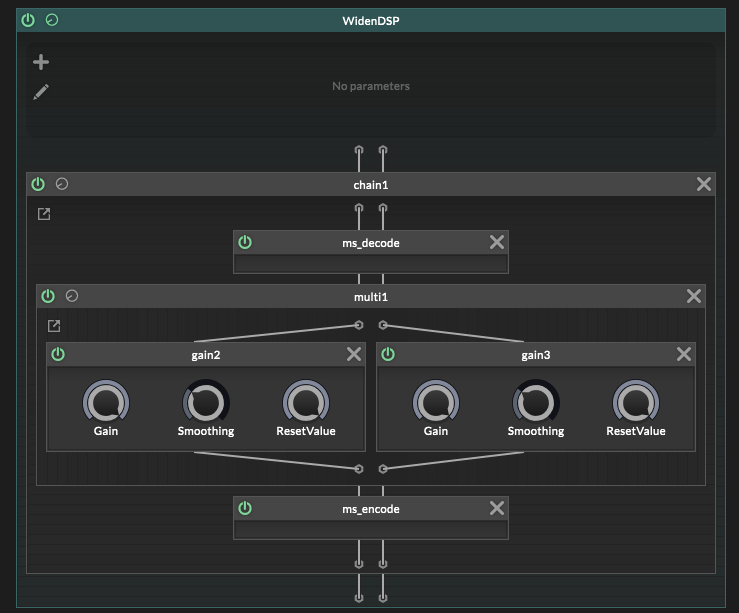
                    09d66bab-d21a-4780-8eb5-07332c3bf27e-image.png

                    David HealeyD 1 Reply Last reply Reply Quote 0
                    • David HealeyD
                      David Healey @pcs800
                      last edited by

                      @pcs800 Are you using stereo samples?

                      Free HISE Bootcamp Full Course for beginners.
                      YouTube Channel - Public HISE tutorials
                      My Patreon - HISE tutorials

                      pcs800P 1 Reply Last reply Reply Quote 0
                      • pcs800P
                        pcs800 @David Healey
                        last edited by

                        @d-healey No, it's a mono guitar clip. The reason is that when a user plays live guitar with an amp sim, it is mono. Many amp sim plugins have a widening function. I am sure you already know this, but it just clones the audio and pans them hard L/R, then adds a delay to one of them.
                        That is what I am trying to accomplish here.

                        David HealeyD 1 Reply Last reply Reply Quote 0
                        • David HealeyD
                          David Healey @pcs800
                          last edited by David Healey

                          @pcs800 Ah I see the issue, a stereo widener will change the width of a stereo signal, but it won't create a stereo signal from a mono one.

                          For that you need a mono-to-stereo effect (some "stereo wideners" include one), there are different ways to do this, you can use a delay to offset the left and right channels. There's also a Haas node that is a little more sophisticated than a simple delay.

                          Free HISE Bootcamp Full Course for beginners.
                          YouTube Channel - Public HISE tutorials
                          My Patreon - HISE tutorials

                          pcs800P 1 Reply Last reply Reply Quote 0
                          • pcs800P
                            pcs800 @David Healey
                            last edited by

                            @d-healey I have been using a delay to accomplish it, but it's a bit glitchy sounding as the user turns the width up and down. I thought maybe this would be a better way.

                            David HealeyD 1 Reply Last reply Reply Quote 0
                            • David HealeyD
                              David Healey @pcs800
                              last edited by

                              @pcs800 Use the delay to create the stereo signal, feed this into the stereo widener to control the width.

                              Free HISE Bootcamp Full Course for beginners.
                              YouTube Channel - Public HISE tutorials
                              My Patreon - HISE tutorials

                              pcs800P 1 Reply Last reply Reply Quote 0
                              • David HealeyD
                                David Healey
                                last edited by

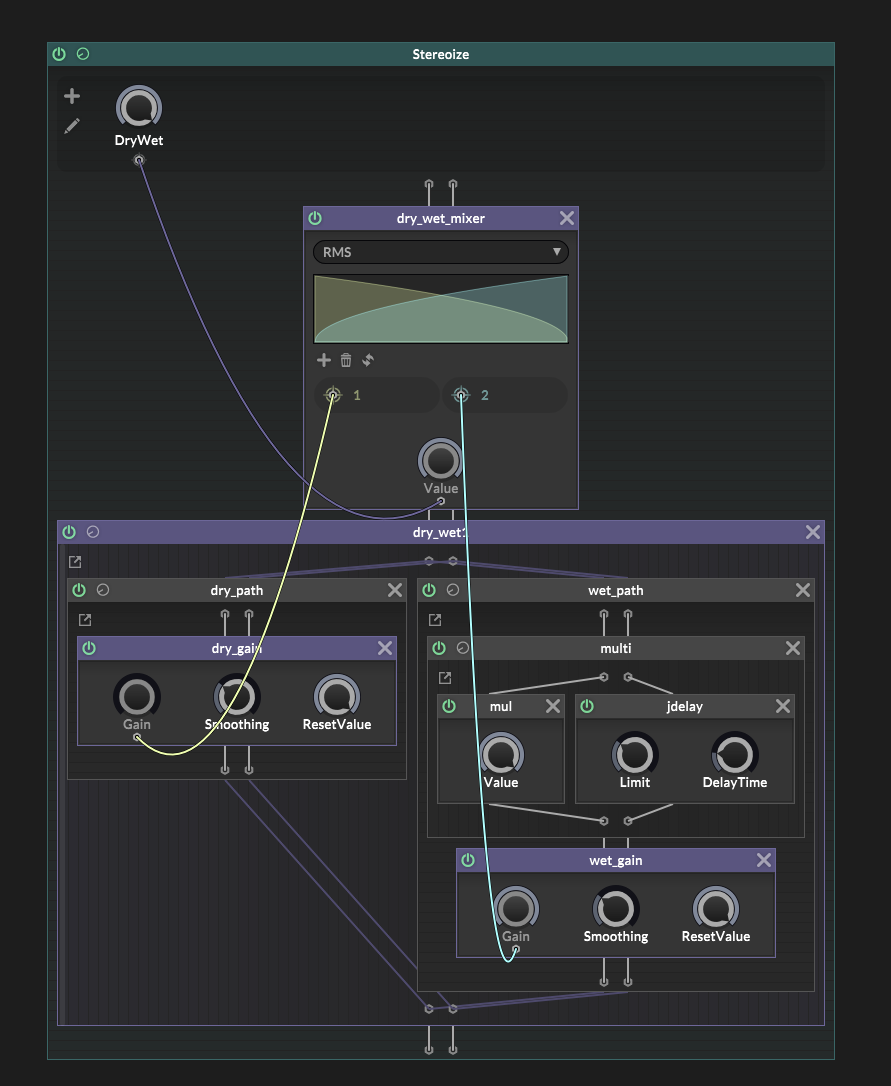
                                Here's a mono-stereo in scriptnode

                                5d028b0c-9799-4b3e-a412-73e714a56e77-image.png

                                Free HISE Bootcamp Full Course for beginners.
                                YouTube Channel - Public HISE tutorials
                                My Patreon - HISE tutorials

                                pcs800P 1 Reply Last reply Reply Quote 0
                                • pcs800P
                                  pcs800 @David Healey
                                  last edited by

                                  @d-healey How do I send the delay into the ScriptFX?
                                  I've looked and cannot seem to add a delay inside ScriptFX.

                                  David HealeyD 1 Reply Last reply Reply Quote 0
                                  • pcs800P
                                    pcs800 @David Healey
                                    last edited by

                                    @d-healey Oh, I will check that out

                                    1 Reply Last reply Reply Quote 0
                                    • David HealeyD
                                      David Healey @pcs800
                                      last edited by

                                      @pcs800 Just chain them up in the module tree, add the delay, then add the script effect below it.


                                      Free HISE Bootcamp Full Course for beginners.
                                      YouTube Channel - Public HISE tutorials
                                      My Patreon - HISE tutorials

                                      1 Reply Last reply Reply Quote 1
                                      • First post
                                        Last post

                                      10

                                      Online

                                      2.1k

                                      Users

                                      13.1k

                                      Topics

                                      113.9k

                                      Posts