Forum
    • Categories
    • Register
    • Login

    Level meters or VU

    Scheduled Pinned Locked Moved General Questions
    12 Posts 3 Posters 333 Views
    Loading More Posts
    • Oldest to Newest
    • Newest to Oldest
    • Most Votes
    Reply
    • Reply as topic
    Log in to reply
    This topic has been deleted. Only users with topic management privileges can see it.
    • David HealeyD
      David Healey @pcs800
      last edited by

      @pcs800 said in Level meters or VU:

      Where can I find level meters or a VU meter for my plugin gui?

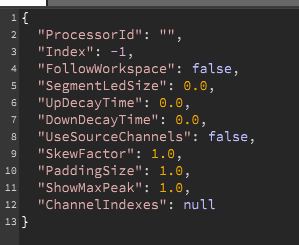
      Add a matrix peak meter floating tile.

      Set the processorId to the name of your master container (or another module with a routing matrix). Set the channel indexes to [0,1]
      e8eccb08-ea77-4b98-9261-395dff395cab-image.png

      Free HISE Bootcamp Full Course for beginners.
      YouTube Channel - Public HISE tutorials
      My Patreon - HISE tutorials

      pcs800P 1 Reply Last reply Reply Quote 1
      • pcs800P
        pcs800 @David Healey
        last edited by

        @d-healey Ok, I did that but it doesn't work.
        Here's what I have.

        {
        "ProcessorId": "Master Chain",
        "Index": -1,
        "FollowWorkspace": false,
        "SegmentLedSize": 0.0,
        "UpDecayTime": 0.0,
        "DownDecayTime": 0.0,
        "UseSourceChannels": false,
        "SkewFactor": 1.0,
        "PaddingSize": 1.0,
        "ShowMaxPeak": 1.0,
        "ChannelIndexes": 0.1
        }

        David HealeyD 1 Reply Last reply Reply Quote 0
        • David HealeyD
          David Healey @pcs800
          last edited by

          @pcs800 As I said, set channel indexes to [0,1]

          Free HISE Bootcamp Full Course for beginners.
          YouTube Channel - Public HISE tutorials
          My Patreon - HISE tutorials

          pcs800P ChazroxC 2 Replies Last reply Reply Quote 0
          • pcs800P
            pcs800 @David Healey
            last edited by

            @d-healey said in Level meters or VU:

            [0,1]

            Ok, didn't realize I needed the brackets.
            Gonna have to find or make a skin, it's fugly ;-)

            David HealeyD 1 Reply Last reply Reply Quote 0
            • David HealeyD
              David Healey @pcs800
              last edited by

              @pcs800 You can customise it with look and feel.

              Free HISE Bootcamp Full Course for beginners.
              YouTube Channel - Public HISE tutorials
              My Patreon - HISE tutorials

              1 Reply Last reply Reply Quote 0
              • ChazroxC
                Chazrox @David Healey
                last edited by

                @d-healey question! I have this pesky VU meter that shows up fine in Hise but is dead on export. Any clues to what this might be? I've tried declaring various channel amounts but it doesnt export properly. I've fiddled with the property settings a bunch but still the same results. I remember seeing some pre-processor definitions mentioning enabling all VU meters. Could something like that be the culprit or am I just doing it all wrong? I do have the plugin switching from 2 and 24 track modes, which both dont work. I think the documentation reads that it will process all channels. I have other scripted meters but I was hoping to use the stock one for the 'Master VU' meter but this one is giving me a hard time. Any clues would help. Or just tell me to ditch that whole thing, I'd just have to figure out how to route multiple outputs to one meter which is out of my realm at the moment.

                David HealeyD 1 Reply Last reply Reply Quote 0
                • David HealeyD
                  David Healey @Chazrox
                  last edited by

                  @Chazrox said in Level meters or VU:

                  I remember seeing some pre-processor definitions mentioning enabling all VU meters.

                  This

                  ENABLE_ALL_PEAK_METERS=1

                  Free HISE Bootcamp Full Course for beginners.
                  YouTube Channel - Public HISE tutorials
                  My Patreon - HISE tutorials

                  ChazroxC 1 Reply Last reply Reply Quote 1
                  • ChazroxC
                    Chazrox @David Healey
                    last edited by

                    @d-healey sorry, do I have to include that in the build or can I just put that in the projects definitions section?

                    David HealeyD 1 Reply Last reply Reply Quote 0
                    • David HealeyD
                      David Healey @Chazrox
                      last edited by

                      @Chazrox project's is all that's required I think

                      Free HISE Bootcamp Full Course for beginners.
                      YouTube Channel - Public HISE tutorials
                      My Patreon - HISE tutorials

                      ChazroxC 2 Replies Last reply Reply Quote 1
                      • ChazroxC
                        Chazrox @David Healey
                        last edited by

                        @d-healey Sweet. Either way i'll try both and hopefully thats the solution. Seems simple enough. Thank you sir!

                        1 Reply Last reply Reply Quote 0
                        • ChazroxC
                          Chazrox @David Healey
                          last edited by

                          @d-healey That was it btw. 👍

                          1 Reply Last reply Reply Quote 0
                          • First post
                            Last post

                          21

                          Online

                          2.1k

                          Users

                          13.1k

                          Topics

                          113.3k

                          Posts