Set order of parameters as listed for automation
-
@dannytaurus There are methods to force your own order:
UserPresetHandler.setPluginParameterGroupNames(Array pluginParameterGroupNames) UserPresetHandler.setPluginParameterSortFunction(Function customSortFunction) -
@ustk I use them, but they don't seem to enforce order for AU in Ableton Live and Reaper.
Logic does its own thing because that's the only DAW I'm testing that recognises group names.
HISE dev latest / super.engineering + Claude Fable / Figma + Affinity
Meat Beats: https://meatbeats.com
Klippr Video: https://klippr.video -
@dannytaurus Mmmm very true,I just tested it (I'm in a middle of a release and this slipped my mind...)
-
@dannytaurus Pro tools respects the order as well
-
@dannytaurus Found it:
JUCE_FORCE_USE_LEGACY_PARAM_IDS=1Tested in Ableton, Reaper, and Logic

PT was already doing it right thanks to AAX default behaviourWithout this flag, VST and AU use a parameter ID hashing done during the build. This flag forces to use the order you set with the preset handler (yeah the name of the flag doesn't let you think it does this...)
Here's what Claude said:
AU hosts (Ableton, and Reaper-as-AU) build their automation menu sorted by that numeric ID. Since the IDs are hashes of the name strings, the order looks scrambled but is 100% deterministic and identical in every AU host — exactly what you see. Pro Tools (AAX) and HISE don't hash, so they keep the authored/group order.
The escape hatch is right there at line 2133: when forceUseLegacyParamIDs is on, the AU ID becomes the parameter index instead of the hash → hosts then sort by index = your authored order. Let me confirm how that flag is driven and whether HISE exposes it.
forceUseLegacyParamIDs is a compile-time switch driven solely by the JUCE_FORCE_USE_LEGACY_PARAM_IDS preprocessor define — there's no runtime/script lever. Let me confirm VST3 hashes the same way (in case Reaper is loading the VST3), so the same fix covers both:
Both AU and VST3 use the same JUCE_FORCE_USE_LEGACY_PARAM_IDS define, so one switch fixes both. Let me find where this HISE project sets extra preprocessor definitions so I can point you at the exact spot.
That's the whole picture, and I found the exact fix location.
Why Ableton/Reaper scramble it (and PT/HISE don't)
It's the AU/VST3 parameter-ID hashing. Confirmed in both wrappers HISE bundles:AU (juce_AU_Wrapper.mm:2126): paramHash = juceParamID.hashCode()
VST3 (juce_VST3_Wrapper.cpp:431): same — uses the hashed vstParamIDs
Each parameter's string id (your pluginParameterName) gets hashed into the numeric ID the host uses. Ableton and Reaper build their automation list sorted by that numeric ID, so it comes out in hash order — looks random, but it's stable and identical across both (which is exactly your symptom). Pro Tools (AAX) and HISE's own simulator render the authored parameter tree, so they stay in order. Your sort function is working perfectly — these two hosts just never look at the order; they look at the IDs.The fix: one compile-time define
Both wrappers gate on the same switch — JUCE_FORCE_USE_LEGACY_PARAM_IDS. When on, the host ID becomes the parameter index instead of the hash (AU:2133, VST3:429), so AU/VST3 hosts sort by index = your authored order. One define covers both formats.It is not set in your project. In project_info.xml:
project_info.xml:16 ExtraDefinitionsOSX and :15 ExtraDefinitionsWindows — neither lists it.
AppConfig.h:541 shows it commented out (default 0 = hashing). (Don't edit AppConfig.h — it's regenerated on export; the source of truth is project_info.xml, which is also what HISE's Settings → Project Settings → Extra Definitions edits.)
So the change is: append JUCE_FORCE_USE_LEGACY_PARAM_IDS=1 to both ExtraDefinitionsOSX and ExtraDefinitionsWindows, then re-export/rebuild the plugin. ️ The tradeoff you're committing to
This flips what automation is keyed to:Automation identity Safe to… Breaks on… Now (hashed name) hash of pluginParameterName reorder params rename a param After (legacy) parameter index rename params reorder/insert a paramOnce you ship with legacy IDs, parameter order becomes a permanent contract — inserting a knob in the middle later shifts every user's saved automation. So lock your order (the ORDER/GROUPS you just set) before release. The good news: you're pre-release and just did a big rename pass — which already invalidated all hash-keyed automation — so this is the ideal moment to switch, and from here on renames are free.
-
@ustk Thanks. I looked into that setting, but as your Claude says, it's a tradeoff between renaming and reordering.
I decided to go for a more nerdy and convoluted route!

I had Claude write a script to add extra characters to my parameter IDs that forced a certain order when the values are hashed.
So now, with forced hashes, the order in the component tree matches the hashed order.
It also means that, because I left a lot of room between hashes, I can add new params between existing ones and the order is maintained, as well as hash compatibility with existing automation. I think!

I'm testing it now in a few hosts to check it works...
I honestly don't think it's worth all this work!
HISE dev latest / super.engineering + Claude Fable / Figma + Affinity
Meat Beats: https://meatbeats.com
Klippr Video: https://klippr.video -
@dannytaurus Whaaattt????


Hise made me an F5 dude, any other app just suffers...
-
These param IDs:
knbSourceShape
knbSourceFM
knbSourcePunch
knbSourceDrop
produce hashes that aren't in that order. So the AU params show in a scrambled order.
But if you suffix certain characters (calculated by Claude's Python script), like this:
knbSourceShapey0flsry
knbSourceFMceb9co1
knbSourcePunch3v588bg
knbSourceDrop5pn7u77
then those produce hashes that are in a determined order.
If you do that for all params, then they are:
- In the right order in the Component Tree, so VST3 should show them correctly, and
- In the right hashed order so that AU shows them correctly, and
- Spaced wide enough apart (hashes) that you can insert new params between existing ones if you need to.
That third point is the one not possible with the JUCE_FORCE_USE_LEGACY_PARAM_IDS setting because that just sets a sequential integer order.
HISE dev latest / super.engineering + Claude Fable / Figma + Affinity
Meat Beats: https://meatbeats.com
Klippr Video: https://klippr.video -
@ustk Claude said, according to the HSIE source,
JUCE_FORCE_USE_LEGACY_PARAM_IDSdoesn't actually work at all for AU.It calls
getIntValue()on the param name, and because all my param names are strings, and all strings return0forgetIntValue(), all the param IDs would be set to0. -
@dannytaurus Yeah that's how I understand it, clever!

-
@ustk But I'll stay out of this added brain-shuffling beast and stick to legacy, I think.
I might never add any new automation parameter, and if I do, it'll probably be for a v2.0 so I don't mind the break in my case...Hise made me an F5 dude, any other app just suffers...
-
@ustk Make sure to check the AU version if you use the LEGACY setting. According to Claude, it will set all params IDs to
0and therefore only one param (or none of them) will survive to show in the DAW as automatable.Interested to hear what you find out.
-
HISE dev latest / super.engineering + Claude Fable / Figma + Affinity
Meat Beats: https://meatbeats.com
Klippr Video: https://klippr.video -
@dannytaurus Yeah I tested successfully AU and AAX (not VST3 yet but it should be good)
I'll keep your idea in mind though because it seems very interesting.
In fact, it might be doable to add this as a layer in Hise so it's transparent to us @Christoph-Hart ? -
@ustk I've been looking at the automation params of some other synths, that are exposed in the DAW and really, they're all over the place. Nothing consistent at all.
That's why I don't think it's worth all this effort.
Although it might be nice to be one of the few plugins that has sensible and predictable automation params.
HISE dev latest / super.engineering + Claude Fable / Figma + Affinity
Meat Beats: https://meatbeats.com
Klippr Video: https://klippr.video -
@dannytaurus said in Set order of parameters as listed for automation:
That's why I don't think it's worth all this effort.
That might be precisely where we can add value
-
@ustk Agreed. I look at these jumbled lists of hundreds of automation params and wonder how anyone bothers with automation. It must be so confusing wading through it all, just to find that ONE param you want to automate.
HISE dev latest / super.engineering + Claude Fable / Figma + Affinity
Meat Beats: https://meatbeats.com
Klippr Video: https://klippr.video -
@dannytaurus If others are like me, you record automation while turning the knobs, and show the recorded lanes... This way you don't spend your time scrolling like crasy

-
@ustk True, true.
-
These are my test results to far.
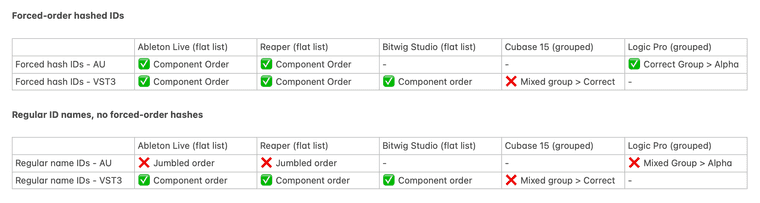
Forcing the order by manipulating the IDs to produce specific hashes gets:
- Correct ordering for AU in Ableton Live and Reaper (but those users likely use VST3 anyway), and
- Correct group ordering in Logic Pro, although params in the group are still alphabetical
VST3 always shows in the component tree order either way, except in Cubase, which shows the param groups in the wrong order, but the params inside the groups in the correct order. WTF.
Conclusion - probably not worth the effort, but since the work is already done, I'll use it.
HISE dev latest / super.engineering + Claude Fable / Figma + Affinity
Meat Beats: https://meatbeats.com
Klippr Video: https://klippr.video


