Possible to add more colouring options in script editor?
-
I've found that I really appreciate good use of colour in a script editor or IDE!
It makes it 10 times easier to read for my brain.Sadly the HISE script editor doesn't color functions or namespaces, even though the code preview option in this forum does color functions.
Would it be possible to add this feature? Or is this something I can do myself?
I've read that this is actually not that easy to do, and there might be real technical limitations, but I don't know for sure how it works.There's also no HISE extension for Visual Studio Code right?
namespace MyNameSpace { var variable; } // --- Target ComboBox --- // Only testing Filter for now inline function onTargetBox(component, value) { if (value <= 1) // Disconnect MM_Filter if "None" option is selected {MM.connect("LFO Modulator", "MM_Filter", false);} else if (value == 2) // Connect MM_Filter if "Filter" option is selected {MM.connect("LFO Modulator", "MM_Filter", true);} } cmbTarget.setControlCallback(onTargetBox); MyNameSpace.variable = 1; -
I know I've flagged this as a feature request, but I don't actually know if it's possible or not already. Claude told me this has to do with a languages interpreter and changing that can be very difficult to do.
Can anyone explain?
-
@observantsound You might want to try using an external editor. I use Sublime but it won't give you much more colours. However Atom seems much better at colouring javascript (Hise script is recognised as javascript) and the only reason I didn't switch fully to Atom is that I am used to Sublime...
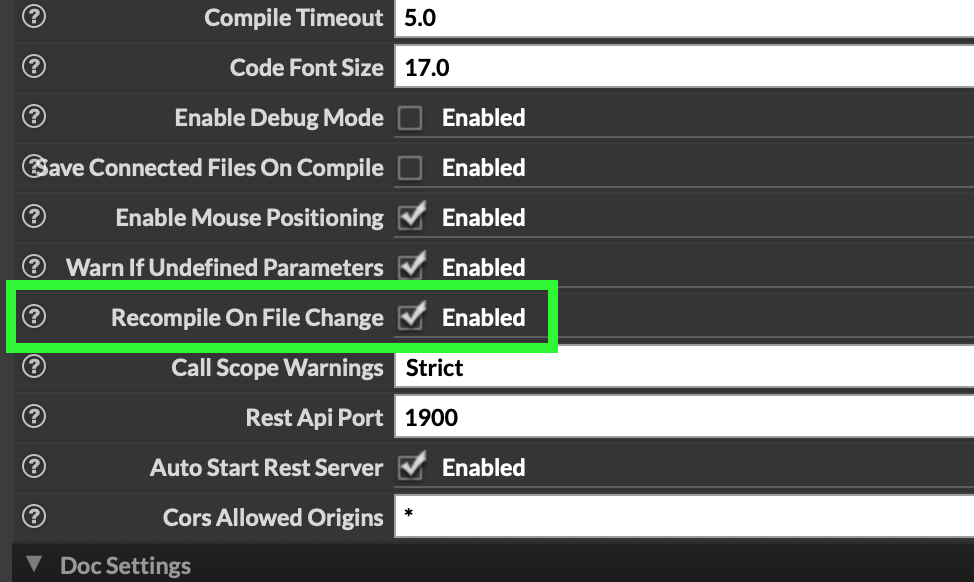
In Hise there is a option in the settings allowing the project to be recompiled as soon as a file as changed (so when you saved it in the external editor)
Hise made me an F5 dude, any other app just suffers...
-
@ustk Atom's dead, Pulsar is the replacement. But there are probably better options line Zed or LiteXL
Free HISE Bootcamp Full Course for beginners.
YouTube Channel - HISE tutorials
My Patreon - More HISE tutorials -
@David-Healey Great
 I live in the past...
-
@ustk That's what I used to do when working with Kontakt.
I was hoping to find a visual studio code solution since I've been getting more familiar with that IDE.Doesn't it throw compile errors though since it's not true Javascript? Like namespaces are apparently not a thing in Javascript.
-
@David-Healey What are those?
I've never heard of either of them.
Are they all IDEs?I actually do like the Hisescript editor and the auto complete of API and your own variables is also a really nice feature that I'd prefer to not give up.
It's mainly the lack of color that bothers me a bit.
Especially if you have lots of line that are just pure white.What would you recommend David?
-
@observantsound said in Possible to add more colouring options in script editor?:
Are they all IDEs?
They're code editors like Sublime. With extensions you can get some IDE like features too. I use Pulsar for editing xmls, html, etc. For writing HISE scripts though I work inside HISE's script editor, the lack of colours doesn't bother me, but maybe it's just because I'm used to it.
I think Zed is probably a better editor than Pulsar but I'm too stuck in my ways to look into it properly. Pulsar is built with Electron so it's kind of slow, especially for very large files like sample maps.
Free HISE Bootcamp Full Course for beginners.
YouTube Channel - HISE tutorials
My Patreon - More HISE tutorials -
@ustk said in Possible to add more colouring options in script editor?:
Sublime but it won't give you much more colours
Have you seen the options in menu VIEW / SYNTAX ?
-
@David-Healey Im curious, if you don't mind: Why use something like Pulsar specifically for editing certain file types if programs like Sublime or VSCode come with extensions for making those things easier? Just preference and force of habit?
I really don't come from a coding background and am kind of learning as I go.
But from my IT friend I got the impression that he uses VSCode (or terminal) for everything. -
@Chazrox I know it has a lot of color options, but I don't think I'm willing to give up on auto-complete for more colours : /
-
@observantsound said in Possible to add more colouring options in script editor?:
Just preference
Pretty much