Velocity layers overlapping issue
-
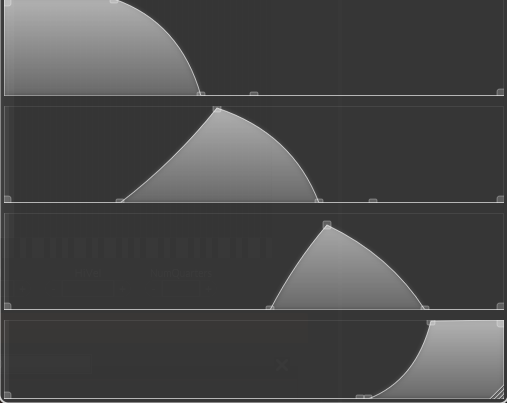
Hi! I'm running some tests using multiple velocity layers with round robins linked to my modulation wheel, following D. Healy’s video. I'm trying to draw the curves so they don’t overlap, but there are still ranges where two samples play at the same time. Does anyone know a tip to fix or at least hide this issue? Thanks!
-
@lijas90 All your ranges there have overlap. If you're going for dynamic crossfades you usually want an equal power curve between each layer - overlap. But unless your samples in each layer are perfectly in tune or phase aligned, you will hear two samples playing (a kind of chorusing or phasing sound) during the crossfade.
This is a problem that all sample library developers run into and come up with various solutions for.
Free HISE Bootcamp Full Course for beginners.
YouTube Channel - HISE tutorials
My Patreon - More HISE tutorials -
@lijas90 Thanks!
-
@David-Healey Hi again David,
I’m still getting a rather abrupt transition between layers. No matter how well the curves are tuned and adjusted, I still get quite a noticeable jump between the different samples.
Could you recommend any website or forum where I can find information about how to properly align samples in phase? I assume this is something that is usually done as part of the audio post-production process.
Thanks!
-
@lijas90 said in Velocity layers overlapping issue:
I still get quite a noticeable jump between the different samples.
I don't think this is a phase alignment issue - although that may be a separate issue that you'll need to deal with - this sounds more like a volume issue.
Are your samples normalised?
Are you applying a gain curve at the same time as the group xfade?
Are the samples perfectly in tune?
Are the sample starts trimmed tightly? -
@lijas90 said in Velocity layers overlapping issue:
I still get quite a noticeable jump between the different samples.
What kind of jump? Volume, tone, pitch, stereo field, something else?