Forum
    • Categories
    • Register
    • Login

    Velocity layers overlapping issue

    Scheduled Pinned Locked Moved General Questions
    6 Posts 3 Posters 263 Views
    Loading More Posts
    • Oldest to Newest
    • Newest to Oldest
    • Most Votes
    Reply
    • Reply as topic
    Log in to reply
    This topic has been deleted. Only users with topic management privileges can see it.
    • lijas90L
      lijas90
      last edited by

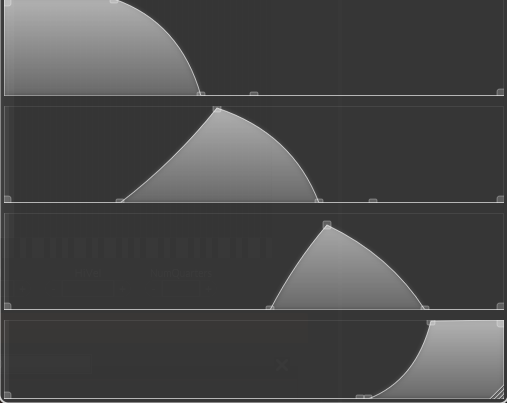
      Hi! I'm running some tests using multiple velocity layers with round robins linked to my modulation wheel, following D. Healy’s video. I'm trying to draw the curves so they don’t overlap, but there are still ranges where two samples play at the same time. Does anyone know a tip to fix or at least hide this issue? Thanks!
      Captura de pantalla 2026-06-18 020319.png

      David HealeyD lijas90L 2 Replies Last reply Reply Quote 0
      • David HealeyD
        David Healey @lijas90
        last edited by David Healey

        @lijas90 All your ranges there have overlap. If you're going for dynamic crossfades you usually want an equal power curve between each layer - overlap. But unless your samples in each layer are perfectly in tune or phase aligned, you will hear two samples playing (a kind of chorusing or phasing sound) during the crossfade.

        This is a problem that all sample library developers run into and come up with various solutions for.

        Free HISE Bootcamp Full Course for beginners.
        YouTube Channel - HISE tutorials
        My Patreon - More HISE tutorials

        lijas90L 1 Reply Last reply Reply Quote 0
        • lijas90L
          lijas90 @lijas90
          last edited by

          @lijas90 Thanks!

          1 Reply Last reply Reply Quote 0
          • lijas90L
            lijas90 @David Healey
            last edited by

            @David-Healey Hi again David,

            I’m still getting a rather abrupt transition between layers. No matter how well the curves are tuned and adjusted, I still get quite a noticeable jump between the different samples.

            Could you recommend any website or forum where I can find information about how to properly align samples in phase? I assume this is something that is usually done as part of the audio post-production process.

            Thanks!

            David HealeyD dannytaurusD 2 Replies Last reply Reply Quote 0
            • David HealeyD
              David Healey @lijas90
              last edited by David Healey

              @lijas90 said in Velocity layers overlapping issue:

              I still get quite a noticeable jump between the different samples.

              I don't think this is a phase alignment issue - although that may be a separate issue that you'll need to deal with - this sounds more like a volume issue.

              Are your samples normalised?
              Are you applying a gain curve at the same time as the group xfade?
              Are the samples perfectly in tune?
              Are the sample starts trimmed tightly?

              Free HISE Bootcamp Full Course for beginners.
              YouTube Channel - HISE tutorials
              My Patreon - More HISE tutorials

              1 Reply Last reply Reply Quote 0
              • dannytaurusD
                dannytaurus @lijas90
                last edited by

                @lijas90 said in Velocity layers overlapping issue:

                I still get quite a noticeable jump between the different samples.

                What kind of jump? Volume, tone, pitch, stereo field, something else?

                HISE dev latest / super.engineering + Claude Fable / Figma + Affinity
                Meat Beats: https://meatbeats.com
                Klippr Video: https://klippr.video

                1 Reply Last reply Reply Quote 0
                • First post
                  Last post

                14

                Online

                2.8k

                Users

                14.0k

                Topics

                121.6k

                Posts

