ALT+S requires TWO confirmations. Can this be switched off?
-
Ahoi,
I'm pretty sure you all know hitting ALT+S requires two confirmations, which conditioned me to hit Enter twice in pretty much every other software I ever use, when I save something. This is causing real problems and damage....
Is there a way to turn this off and have ALT+S work like in any other program?
cheers!
https://instagram.com/morphoice - 80s inspired Synthwave Music, Arcade & Gameboy homebrew!
-
@Morphoice Not sure about ALT+S but you can set custom keyboard shortcuts for Save HIP and Save XML in the Edit Shortcuts menu from File > Edit Shortcuts
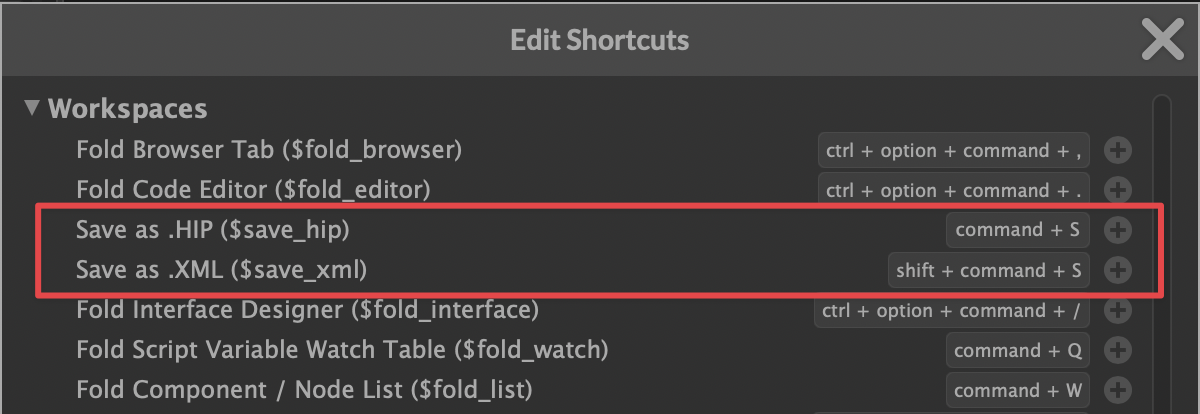
-
@Morphoice said in ALT+S requires TWO confirmations. Can this be switched off?:
I'm pretty sure you all know hitting ALT+S...
Not really and I've found nothing general about this, more app specific stuff... Please enlighten me

-
@ustk im just looking for a way to ged rid of those two confirmation dialogs. ALT+S needs to save, not ask twice if I wanna really save and then again if I really wanna overwrite the file.
https://instagram.com/morphoice - 80s inspired Synthwave Music, Arcade & Gameboy homebrew!
-
@Morphoice Asking if you want to overwrite an existing file is very common in many apps.
At least in HISE it's just another Enter press. On some Mac apps, it pops up a new dialog where you have to click the Replace button to confirm overwriting a file.
But I guess there could be added a "Don't ask again" checkbox in HISE for overwriting files.
My muscle memory for saving a HISE project (on Mac) is:
CMD+S > Enter > Enter > SHIFT+CMD+S > Enter > Enter

Also, I remapped CMD+Q (Quit) to CTRL+OPTION+CMD+Q because HISE doesn't prompt you to save unsaved work when quitting, which meant I lost work a few times. So I wanted the Quit action to be much more intentional.
HISE dev latest / herdr + Claude Code / Figma + Affinity
Meat Beats: https://meatbeats.com
Klippr Video: https://klippr.video -
@dannytaurus said in ALT+S requires TWO confirmations. Can this be switched off?:
CMD+S > Enter > Enter
&
...which meant I lost work a few times
both resolved with autosave. Mine is 1min interval so I never lose much
-
@ustk Yeah, autosave is a reasonable safety net in the event of a crash.
But these days I'm saving the XML so Claude can see any changes I made. Autosave doesn't solve that because it only autosaves the HIP files, not XML.
I'm happy with my long multi-key press for saving - it feels direct and intentional.
Another 'fun' thing about autosave is, if you launch HISE and don't load an XML - just to to do some experimental work, or paste a snippet from the forum maybe - then HISE will still happily autosave that current throwaway work OVER your existing Autosave_X.hip files for your current project.
With a 1-minute autosave timer, you've lost ALL your autosaved backups within 5 minutes of that throwaway work.
HISE dev latest / herdr + Claude Code / Figma + Affinity
Meat Beats: https://meatbeats.com
Klippr Video: https://klippr.video -
@dannytaurus said in ALT+S requires TWO confirmations. Can this be switched off?:
CMD+S > Enter > Enter > SHIFT+CMD+S > Enter > Enter
yes my muscle memory exactly. and i caught myself doing this in other programs where the two Enters cause a lot of trouble depending on the program, it might have saved and then jump execute something else two times, worst case the second enter is a confirmation for the first that already did something it shouldnt lol
-
@dannytaurus Yeah of course I constantly save as XML too, would be living a dangerous life without it

Another 'fun' thing about autosave is, if you launch HISE and don't load an XML - just to to do some experimental work, or paste a snippet from the forum maybe - then HISE will still happily autosave that current throwaway work OVER your existing Autosave_X.hip files for your current project.
That bug I reported years back... many times...
That's why I systematically save the XML first when i create a new project, even for a draft...
I had the same issue with the Sinppet Browser which was even worse by simply overwritting everything in your project... no git and you're dead...). In the end that led me to simply not use it so much I was afraid...
Something else very dangerous but not for many people. I have a french AZERTY keyboard, so Q is on the left of S...
So a too fast CMD+SHIFT+(almost S but your loosy finger touched Q) -> Baaaammmm!!!! You've just told the mac to close everything and shut down!!!


Why didn't I replaced the mac shortcut yet is a complete mystery...
-
Just realised I wrote "Sinppet"

Will just keep that one so much it fits the issue