Directory.hasWriteAccess()
-
hmm, I must be doing it wrong I think...
so I say this:
readCheck = FileSystem.fromAbsolutePath(FilePathValue.get("text"));

Console.print("is a directory:" + readCheck.isDirectory());
Console.print("read only is returning:" + readCheck.hasWriteAccess());
Which returns a directory, but it says its writable...when I've set the directory up to be read-only
what am I doing wrong?
HISE Development for hire.
www.channelrobot.com -
@Lindon said in Directory.hasWriteAccess():
Which returns a directory,
Is it returning the correct directory?
@Lindon said in Directory.hasWriteAccess():
I've set the directory up to be read-only
Which OS? How did you set the permission?
Free HISE Bootcamp Full Course for beginners.
YouTube Channel - HISE tutorials
My Patreon - More HISE tutorials -
@David-Healey said in Directory.hasWriteAccess():
@Lindon said in Directory.hasWriteAccess():
Which returns a directory,
Is it returning the correct directory?
yes - I have set up a folder called ReadOnly on my D drive so it tells me this:
here's the Console, output:
Interface: location:D:\AudioContent\ReadOnly
Interface: clicked:D:\AudioContent\ReadOnly
Interface: is a directory:1
Interface: is a file:0
Interface: is the full path:D:\AudioContent\ReadOnly
Interface: read only is returning:1@Lindon said in Directory.hasWriteAccess():
I've set the directory up to be read-only
Which OS? How did you set the permission?
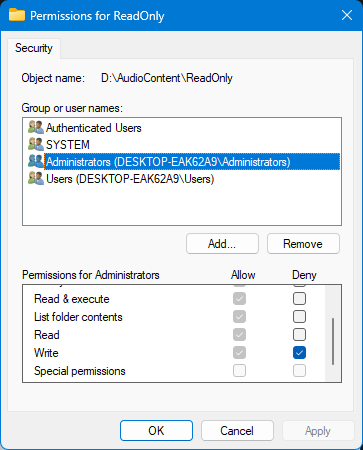
Windows, setting permissions with the Properties/Security dialog
HISE Development for hire.
www.channelrobot.com -
@Lindon I shall test and report back
Did you also deny write permission for Users?
Free HISE Bootcamp Full Course for beginners.
YouTube Channel - HISE tutorials
My Patreon - More HISE tutorials -
@David-Healey I denied access for every group, and when I try to use the File Explorer to create a sub-folder I get this (correctly):

HISE Development for hire.
www.channelrobot.com -
@Lindon Same result here, looking for a solution now.
Free HISE Bootcamp Full Course for beginners.
YouTube Channel - HISE tutorials
My Patreon - More HISE tutorials -
@David-Healey okey-dokey...
HISE Development for hire.
www.channelrobot.com -
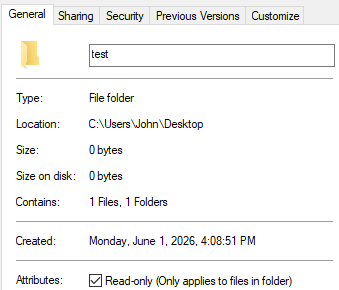
@Lindon So the JUCE function
hasWriteAccessis only checking for the Read-only folder flag in the general tab, it completely ignores the ACL permissions.And this flag seems to only affect files and sub-folders not the folder itself.
I'll ask Claude if there's an easy fix.
Free HISE Bootcamp Full Course for beginners.
YouTube Channel - HISE tutorials
My Patreon - More HISE tutorials -
@David-Healey well my work around might be;
to write a file to the folder - and if it fails then its not writable...
readCheck = FileSystem.fromAbsolutePath(FilePathValue.get("text")+ "\\test.txt");
testResult = readCheck.writeString("sample folder");
Console.print("and test result is = " + testResult);
HISE Development for hire.
www.channelrobot.com -
@Lindon yeah that works _ and Im guessing it works for all occasions...its a cludge but it works..
HISE Development for hire.
www.channelrobot.com -
Free HISE Bootcamp Full Course for beginners.
YouTube Channel - HISE tutorials
My Patreon - More HISE tutorials -
@David-Healey yeah that seems more comprehensive, its more or less doing under the hood what Im doing in HISEScript... so both approaches have the advantage of getting a result back for the plugin itself (no matter how the user has set up to run it..)
Thanks for looking and confirming what I'd found.

