Forum
    • Categories
    • Register
    • Login

    Directory.hasWriteAccess()

    Scheduled Pinned Locked Moved General Questions
    12 Posts 2 Posters 35 Views
    Loading More Posts
    • Oldest to Newest
    • Newest to Oldest
    • Most Votes
    Reply
    • Reply as topic
    Log in to reply
    This topic has been deleted. Only users with topic management privileges can see it.
    • LindonL
      Lindon @David Healey
      last edited by

      @David-Healey said in Directory.hasWriteAccess():

      @Lindon said in Directory.hasWriteAccess():

      Which returns a directory,

      Is it returning the correct directory?

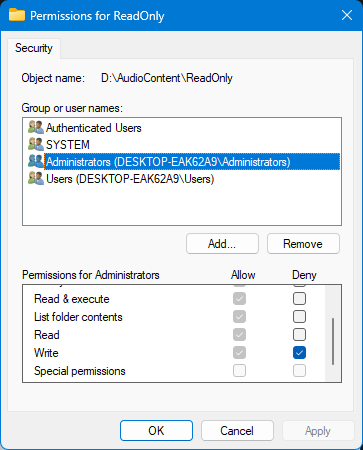
      yes - I have set up a folder called ReadOnly on my D drive so it tells me this:

      here's the Console, output:

      Interface: location:D:\AudioContent\ReadOnly
      Interface: clicked:D:\AudioContent\ReadOnly
      Interface: is a directory:1
      Interface: is a file:0
      Interface: is the full path:D:\AudioContent\ReadOnly
      Interface: read only is returning:1

      @Lindon said in Directory.hasWriteAccess():

      I've set the directory up to be read-only

      Which OS? How did you set the permission?

      Windows, setting permissions with the Properties/Security dialog
      db9efc92-b6c6-43bc-870a-9f3e667adb4c-image.png

      HISE Development for hire.
      www.channelrobot.com

      David HealeyD 1 Reply Last reply Reply Quote 0
      • David HealeyD
        David Healey @Lindon
        last edited by David Healey

        @Lindon I shall test and report back

        Did you also deny write permission for Users?

        Free HISE Bootcamp Full Course for beginners.
        YouTube Channel - Public HISE tutorials
        My Patreon - HISE tutorials

        LindonL 1 Reply Last reply Reply Quote 0
        • LindonL
          Lindon @David Healey
          last edited by

          @David-Healey I denied access for every group, and when I try to use the File Explorer to create a sub-folder I get this (correctly):

          7947acc6-6720-4cc5-8415-09d2896e9bd2-image.png

          HISE Development for hire.
          www.channelrobot.com

          David HealeyD 1 Reply Last reply Reply Quote 0
          • David HealeyD
            David Healey @Lindon
            last edited by

            @Lindon Same result here, looking for a solution now.

            Free HISE Bootcamp Full Course for beginners.
            YouTube Channel - Public HISE tutorials
            My Patreon - HISE tutorials

            LindonL 1 Reply Last reply Reply Quote 0
            • LindonL
              Lindon @David Healey
              last edited by

              @David-Healey okey-dokey...

              HISE Development for hire.
              www.channelrobot.com

              David HealeyD 1 Reply Last reply Reply Quote 0
              • David HealeyD
                David Healey @Lindon
                last edited by

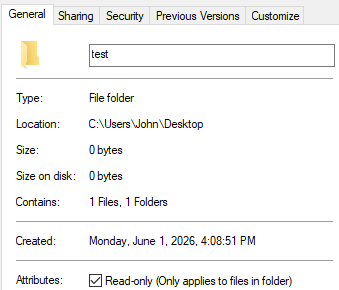
                @Lindon So the JUCE function hasWriteAccess is only checking for the Read-only folder flag in the general tab, it completely ignores the ACL permissions.

                And this flag seems to only affect files and sub-folders not the folder itself.
                dc36061e-2707-4813-ab97-c6f8c459c997-image.png

                I'll ask Claude if there's an easy fix.

                Free HISE Bootcamp Full Course for beginners.
                YouTube Channel - Public HISE tutorials
                My Patreon - HISE tutorials

                LindonL 1 Reply Last reply Reply Quote 0
                • LindonL
                  Lindon @David Healey
                  last edited by

                  @David-Healey well my work around might be;

                  to write a file to the folder - and if it fails then its not writable...

                  readCheck = FileSystem.fromAbsolutePath(FilePathValue.get("text")+ "\\test.txt");
                  testResult = readCheck.writeString("sample folder");
                  Console.print("and test result is = " + testResult);
                  

                  HISE Development for hire.
                  www.channelrobot.com

                  LindonL 1 Reply Last reply Reply Quote 0
                  • LindonL
                    Lindon @Lindon
                    last edited by

                    @Lindon yeah that works _ and Im guessing it works for all occasions...its a cludge but it works..

                    HISE Development for hire.
                    www.channelrobot.com

                    David HealeyD 1 Reply Last reply Reply Quote 0
                    • David HealeyD
                      David Healey @Lindon
                      last edited by

                      @Lindon Claude came back with this, I haven't tested it.

                      Free HISE Bootcamp Full Course for beginners.
                      YouTube Channel - Public HISE tutorials
                      My Patreon - HISE tutorials

                      LindonL 1 Reply Last reply Reply Quote 0
                      • LindonL
                        Lindon @David Healey
                        last edited by Lindon

                        @David-Healey yeah that seems more comprehensive, its more or less doing under the hood what Im doing in HISEScript... so both approaches have the advantage of getting a result back for the plugin itself (no matter how the user has set up to run it..)

                        Thanks for looking and confirming what I'd found.

                        HISE Development for hire.
                        www.channelrobot.com

                        1 Reply Last reply Reply Quote 0
                        • First post
                          Last post

                        16

                        Online

                        2.4k

                        Users

                        13.7k

                        Topics

                        119.4k

                        Posts
