Best practice for Real-Time Metering: How to pass dynamic peak values from RNBO to HISE UI?
-
Hi everyone,
I'm trying to build a Peak Meter in HISE where the UI fader/progress bar is driven by dynamic values calculated inside an RNBO patch.
I've been stuck for hours trying to bridge the gap between the RNBO C++ engine and the HISE UI Designer. My goal is simple: Read a real-time amplitude/peak value from RNBO and use it to animate a HISE component.
I've explored these three avenues, but each seems to have a "dead end" in my current workflow:
The Audio Out Way: I added extra out~ ports in RNBO (Channels 3+4) for the peak signal. My plan was to route these to a to_global_cable node in Scriptnode and read them via Globals.getValue() in the UI. However, I keep hitting "Channel Mismatch" errors or the extra pins simply don't show up in the Scriptnode UI.
The Data Port Way: Has anyone successfully used RNBO outport messages to send data values directly to the HISE message stack?
The Parameter Way: Can an RNBO param be updated internally by the RNBO logic (like a follower) and "push" that change back to the HISE parameter system so the UI can listen to it?
If you have a working project with RNBO and a dancing VU-meter, could you please share the "Golden Path"? Is the to_global_cable via extra audio channels indeed the way to go, or is there a more efficient "scripting" way?
Thanks for your help!
-
@voxuer1 yes global_cable is the best way, mod output => global_cable in scriptnode, then register the callback with
AsyncNotification, then it's automatically polled and just updated when the value changes. -
@Christoph-Hart said in Best practice for Real-Time Metering: How to pass dynamic peak values from RNBO to HISE UI?:
yes global_cable is the best way, mod output => global_cable in scriptnode, then register the callback with AsyncNotification, then it's automatically polled and just updated when the value changes.
Hi Christoph,
I'm following your advice regarding the global_cable and AsyncNotification, but I'm stuck at the very first step: getting any kind of value to show up in HISE.
I have tried every possible connection method in RNBO to send my peak-meter data (conditioned to 0.0 - 1.0) to HISE, but none of them seem to work:
Audio Outputs (out~ 3 / out~ 4): I set CompileChannelAmount to 4 and used "Wrap into chain", but the RNBO node in Scriptnode remains strictly Stereo (2 pins). No additional pins appear to connect to a core.peak.
The outport Object: I used the outport object, which is specifically designed in RNBO to send messages to the host. However, HISE doesn't seem to create a corresponding "mod output" or pin for it.
Standard Outputs (out 3): Tried the non-signal outputs as well. No luck.
Parameters (param): The parameter appears in the list, but it is static. It doesn't reflect real-time changes from the internal RNBO signal, so the global_cable gets no update.
It feels like the RNBO-exported nodes are "isolated" from HISE's modulation system. No matter what I define as an output in Max/RNBO, Scriptnode only sees standard Stereo IO and static parameters.
My Question:
Is there a specific "handshake", attribute, or naming convention required in RNBO so that HISE recognizes an output as a "mod output"?Thanks for your help!
-
@voxuer1 have you checked the docs?
https://docs.hise.dev/glossary/rnbo.html
There is a specific chapter about mod outputs.
-
@Christoph-Hart Hi Christoph,
Thanks a lot for the quick response and the info!
That explains it—I'll check out the outport with the @tag mod and I think I can take it from here.
Cheers!
-
@Christoph-Hart yes that´s it Thanx!
-
@voxuer1 I hope one last question,
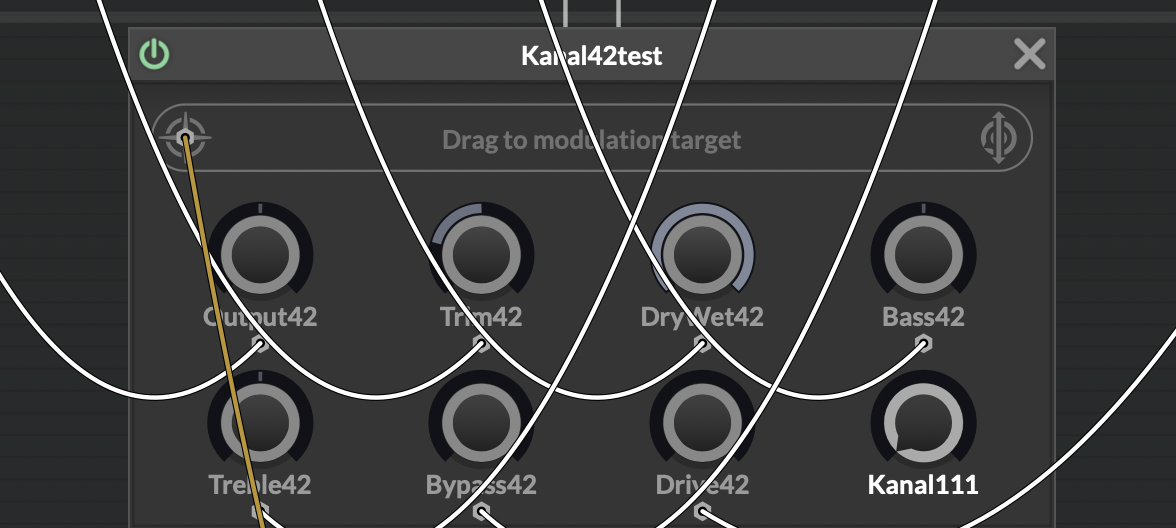
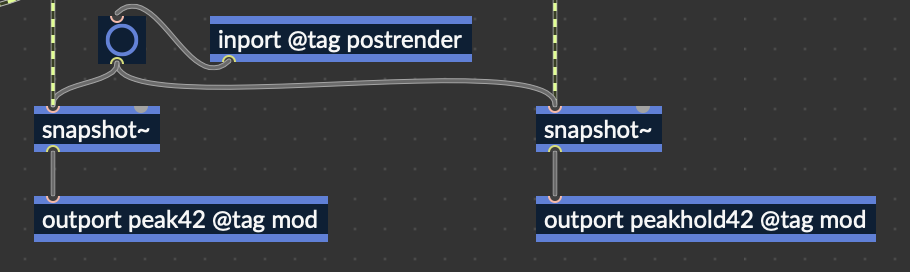
I successfully compiled my RNBO node with two outports (both using @tag mod).
In Scriptnode, I still only see one modulation target field. Right-clicking the icon also doesn't show the second port.
Any idea how to access both outputs? (See screenshots)
-
@voxuer1 ah here you hit a real limitation - multiple modulation outputs are not supported for RNBO at the moment.
According to your screenshot the second one is just a peak hold - if you replicate this in scriptnode you should be able to get by with a single output.
-
@Christoph-Hart said in Best practice for Real-Time Metering: How to pass dynamic peak values from RNBO to HISE UI?:
ah here you hit a real limitation - multiple modulation outputs are not supported for RNBO at the moment.
According to your screenshot the second one is just a peak hold - if you replicate this in scriptnode you should be able to get by with a single output.
Ah, ok, yes that´s a good idea, thanx