Forum
    • Categories
    • Register
    • Login

    Why when I build my VST and then use it on another computer, the font's don't show up as the correct ones I chose?

    Scheduled Pinned Locked Moved General Questions
    11 Posts 3 Posters 39 Views
    Loading More Posts
    • Oldest to Newest
    • Newest to Oldest
    • Most Votes
    Reply
    • Reply as topic
    Log in to reply
    This topic has been deleted. Only users with topic management privileges can see it.
    • dannytaurusD
      dannytaurus @duma
      last edited by dannytaurus

      @duma You need to put the font in your project's Images folder and load it from there.

      Then it will be bundled in the plugin and available on all systems.

      https://docs.hise.dev/scripting/scripting-api/engine/index.html#loadfontas

      Meat Beats: https://meatbeats.com
      Klippr Video: https://klippr.video

      D 2 Replies Last reply Reply Quote 0
      • D
        duma @dannytaurus
        last edited by

        @dannytaurus So once thats done do i re export the vst move it to the other laptop along with the font ttf and install the ttf then install the plugin then it should work?

        David HealeyD 1 Reply Last reply Reply Quote 0
        • D
          duma @dannytaurus
          last edited by

          @dannytaurus Please make a video on how I should do It, I seem to be doing something wrong on my end

          1 Reply Last reply Reply Quote 0
          • David HealeyD
            David Healey @duma
            last edited by

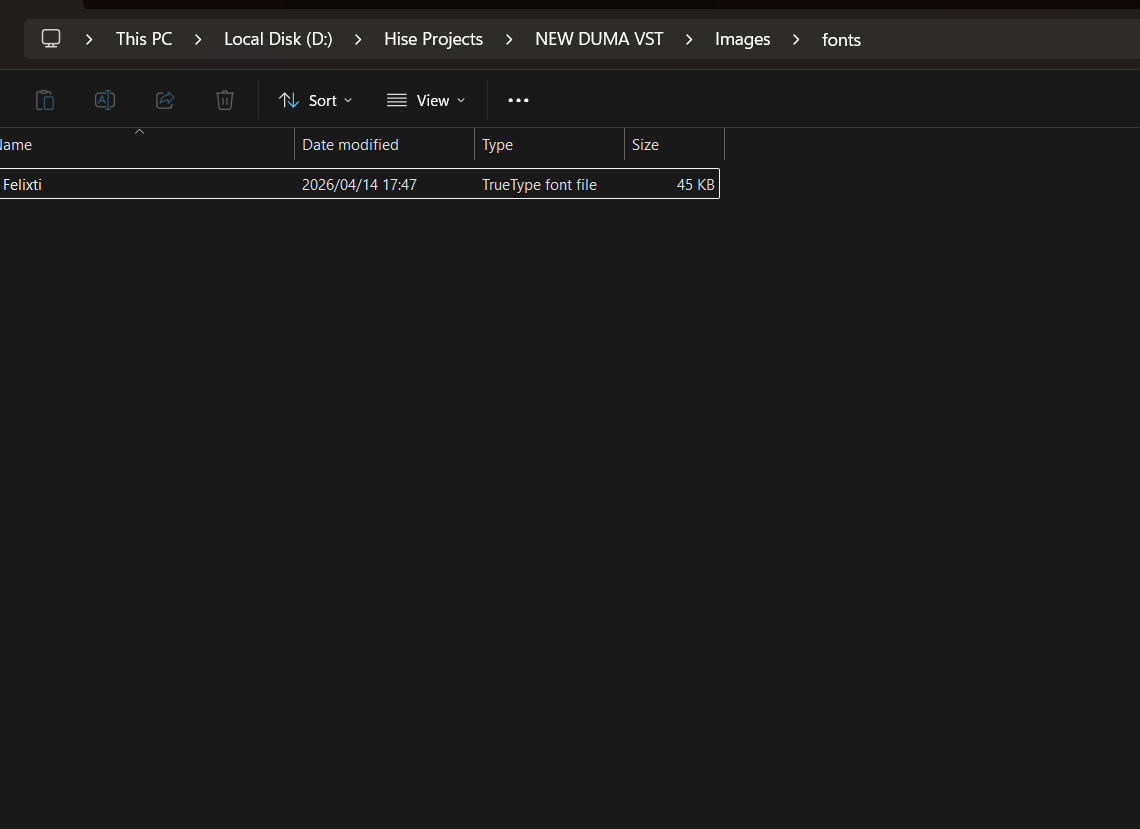
            Put the ttf into your project's Images folder.

            In your script load the font with Engine.loadFontAs()

            That should be it. You don't need to copy or install the font on the destination system it will be embedded in the plugin.

            Free HISE Bootcamp Full Course for beginners.
            YouTube Channel - Public HISE tutorials
            My Patreon - HISE tutorials

            D 1 Reply Last reply Reply Quote 0
            • D
              duma @David Healey
              last edited by

              @David-Healey so I just need to copy the Engine.loadFontAs?? or do I need to add stuff

              David HealeyD 1 Reply Last reply Reply Quote 0
              • David HealeyD
                David Healey @duma
                last edited by

                @duma You need to use that function in your script - https://docs.hise.dev/scripting/scripting-api/engine/index.html#loadfontas

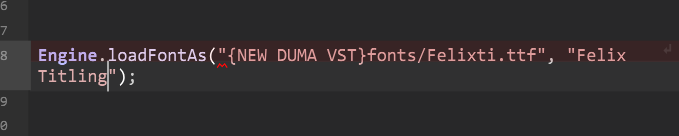
                It takes two parameters, the first is the path to the font "{PROJECT_FOLDER}MyFont.ttf" the second is a name you want to give the font for use in your script, this is usually the same as the font name but doesn't have to be, it's just an ID for scripting.

                Free HISE Bootcamp Full Course for beginners.
                YouTube Channel - Public HISE tutorials
                My Patreon - HISE tutorials

                D 1 Reply Last reply Reply Quote 0
                • D
                  duma @David Healey
                  last edited by

                  @David-Healey didnt work image_2026-04-14_190215387.png

                  4c92269f-9352-4151-8098-0838b91e34f7-image.png

                  here are my path names and heres an image of it saying it doesnt work

                  David HealeyD 1 Reply Last reply Reply Quote 0
                  • David HealeyD
                    David Healey @duma
                    last edited by

                    @duma "{PROJECT_FOLDER}" is a wildcard https://docs.hise.dev/working-with-hise/project-management/index.html#project-folder-wildcard

                    Free HISE Bootcamp Full Course for beginners.
                    YouTube Channel - Public HISE tutorials
                    My Patreon - HISE tutorials

                    D 1 Reply Last reply Reply Quote 0
                    • D
                      duma @David Healey
                      last edited by

                      @David-Healey ok so when u say this is embedded in the plugin, does that include the labels using the esame font?

                      David HealeyD 1 Reply Last reply Reply Quote 0
                      • David HealeyD
                        David Healey @duma
                        last edited by

                        @duma Yes should do

                        Free HISE Bootcamp Full Course for beginners.
                        YouTube Channel - Public HISE tutorials
                        My Patreon - HISE tutorials

                        1 Reply Last reply Reply Quote 0
                        • First post
                          Last post

                        15

                        Online

                        2.2k

                        Users

                        13.6k

                        Topics

                        118.1k

                        Posts