How to Fix Filters not working on DAW as they do on HISE
-
I have a vst demo finished but when i build it on visual studio 2022 and use it on fl studio then the filters dont work as theyre supposed to and they dnt work with the xy pad. On his on the other hand when i use filters i can change the tempo at which they pulse/pulsate depending ont he position of the dot on the xypad and the filters work as they supposed to on hise but not fl studio how do i fix it?
-
@duma said in How to Fix Filters not working on DAW as they do on HISE:
the filters dont work as theyre supposed to
Explain in detail, I couldn't make out what I should be looking for in your video.
-
@David-Healey In the HISE Video the filter diagram shows that the filter is "moving" when its on and it creates a pulsey type of effect on the sound i've selected, but when I put it in fl studio it doesn't work the way it works in hise, it doesnt create that "moving-pulsey" effect when i turn it on.
-
@David-Healey you can also see on hise that depending where on the xy pad I put the dot it makes the "pulsey" motion have a different "tempo" it just pulses at diferent speeds depending on the position of the dot on the xy pad
-
@duma said in How to Fix Filters not working on DAW as they do on HISE:
when I put it in fl studio it doesn't work
Does it work if you compile it as a standalone?
-
@David-Healey I don't know, it doesnt show the option to compile as a standalone
-
@duma said in How to Fix Filters not working on DAW as they do on HISE:
it doesnt show the option to compile as a standalone
You don't see - Export > Export as Standalone Application?
-
@David-Healey Oh i do let me export as standalone right now
-
@David-Healey I got this error
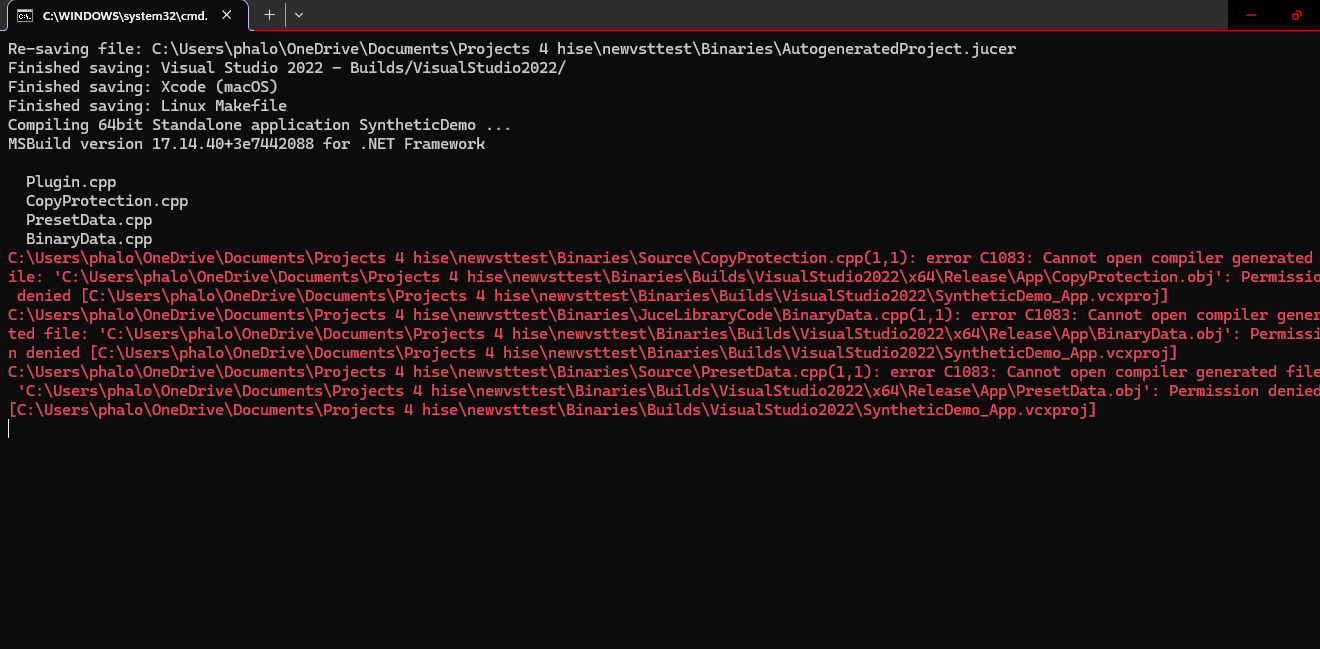
-
@duma clean the build folder and try again
-
@David-Healey the problem is percisting
-
@duma Does the filter modulation work at all in the exported plugin? Probably worth creating a separate project with just filter modulation and exploring where it is breaking. That way you can isolate the issue (does your XY pad overwrite the control)?
There's too much context for anyone to provide any useful advice.
-
@duma Try using the latest develop branch
-
@David-Healey U mean vs 2026?
-
@HISEnberg it works a little but not how its supposed to or how it does in hise 4.0, no my xypad doesnt overwrite the control ive used the filters before including the xypad and it worked flawlessly but now when i export it doesnt, im guessing previous versions or newer versions of hise ive downloaded and deleted and new versions and old of visual studio have messed it up when exporting even when i eport of vs 22
-
@duma said in How to Fix Filters not working on DAW as they do on HISE:
U mean vs 2026?
I mean the latest develop branch of HISE, but yes it will require VS26
-
@David-Healey No, I can't i tried filters wayy before on the newest branch of hise and it didn't work as hise 4.0 does, in 4.0 they kind of pulsaete depending on wherre the xy dot on the pad is (the pulsating tempo depends on the position) but with the newest branch it doesnt make any sort of pulse effect at all it just plainly and boringly filters the sound
-
@duma That probably just means you need to adjust your script. Test in a minimal project without the XY thing as @HISEnberg suggested.
-
@David-Healey In the video the filter diagram shows its moving on hise but when exported and in fl studio it doesnt move, did u see that?
-
@duma said in How to Fix Filters not working on DAW as they do on HISE:
did u see that?
I saw it in your video. Does it happen in a standalone minimal project?

