Forum
    • Categories
    • Register
    • Login

    Remove Sample Install Dialog

    Scheduled Pinned Locked Moved General Questions
    9 Posts 3 Posters 42 Views
    Loading More Posts
    • Oldest to Newest
    • Newest to Oldest
    • Most Votes
    Reply
    • Reply as topic
    Log in to reply
    This topic has been deleted. Only users with topic management privileges can see it.
    • D
      Daanyoo
      last edited by

      Hello everyone,

      I want to remove the install samples dialog on startup of the plugin, as I'm implementing my own initialisation flow using Expansions.

      I researched the forum and found some posts regarding removal of the dialog and tried adding these preprocessors to my project:

      HISE_DEACTIVATE_OVERLAY=1
      HISE_SAMPLE_DIALOG_SHOW_INSTALL_BUTTON=0
      HISE_SAMPLE_DIALOG_SHOW_LOCATE_BUTTON=0

      Option 1 seemed to the latest approach to this problem, but I also saw some people using Option 2+3 for this. Unfortunately none of these options seem to work as my compiled plugin still prompts me to install the samples on the first startup...

      What am I missing here?

      Would really appreciate some input on this :)

      David HealeyD 1 Reply Last reply Reply Quote 0
      • David HealeyD
        David Healey @Daanyoo
        last edited by

        @Daanyoo For Rhapsody I just use HISE_DEACTIVATE_OVERLAY=1 and it's working. Did you clean your project's build folder before recompiling?

        Free HISE Bootcamp Full Course for beginners.
        YouTube Channel - Public HISE tutorials
        My Patreon - HISE tutorials

        D 1 Reply Last reply Reply Quote 0
        • D
          Daanyoo @David Healey
          last edited by

          @David-Healey Do I need to remove the entire build folder? I just used to go into the Release folder and delete the .lib and .vst3 before recompiling

          David HealeyD 1 Reply Last reply Reply Quote 0
          • David HealeyD
            David Healey @Daanyoo
            last edited by

            @Daanyoo Yes but I usually do it from within HISE. Export >> Clean Build directory

            Free HISE Bootcamp Full Course for beginners.
            YouTube Channel - Public HISE tutorials
            My Patreon - HISE tutorials

            D 1 Reply Last reply Reply Quote 0
            • D
              Daanyoo @David Healey
              last edited by

              @David-Healey Oh, thats a good hint - but it still didn't remove the dialog after recompilation..
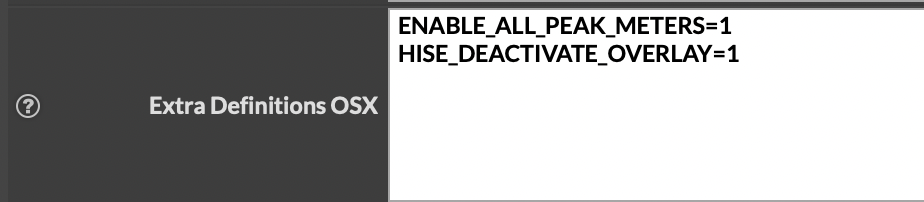
              This is the right place to put the definitions, isn't it?
              77088d9b-d913-490f-98c4-f419781148fa-image.png

              David HealeyD dannytaurusD 2 Replies Last reply Reply Quote 0
              • David HealeyD
                David Healey @Daanyoo
                last edited by

                @Daanyoo said in Remove Sample Install Dialog:

                This is the right place to put the definitions, isn't it?

                Yes, if you're on OSX

                Free HISE Bootcamp Full Course for beginners.
                YouTube Channel - Public HISE tutorials
                My Patreon - HISE tutorials

                1 Reply Last reply Reply Quote 0
                • dannytaurusD
                  dannytaurus @Daanyoo
                  last edited by

                  @Daanyoo Are you sure the DAW is detecting the new version of the plugin?

                  Meat Beats: https://meatbeats.com
                  Klippr Video: https://klippr.video

                  D 1 Reply Last reply Reply Quote 1
                  • D
                    Daanyoo @dannytaurus
                    last edited by

                    @dannytaurus I mean I'm removing the .vst3 from the VST3 folder and copy the new version into it - usually the DAW should detect the new version if the plugin has the same name... thats at least what it used to do

                    David HealeyD 1 Reply Last reply Reply Quote 0
                    • David HealeyD
                      David Healey @Daanyoo
                      last edited by

                      @Daanyoo build a standalone version to take the DAW out of the equation

                      Free HISE Bootcamp Full Course for beginners.
                      YouTube Channel - Public HISE tutorials
                      My Patreon - HISE tutorials

                      1 Reply Last reply Reply Quote 0
                      • First post
                        Last post

                      16

                      Online

                      2.2k

                      Users

                      13.4k

                      Topics

                      116.6k

                      Posts
