Forum
    • Categories
    • Register
    • Login

    Exporting problems

    Scheduled Pinned Locked Moved General Questions
    20 Posts 3 Posters 71 Views
    Loading More Posts
    • Oldest to Newest
    • Newest to Oldest
    • Most Votes
    Reply
    • Reply as topic
    Log in to reply
    This topic has been deleted. Only users with topic management privileges can see it.
    • David HealeyD
      David Healey @duma
      last edited by

      @duma Is your HISE source code in Documents\HISE or Documents\HISE-4.1.0\HISE-4.1.0?

      Free HISE Bootcamp Full Course for beginners.
      YouTube Channel - Public HISE tutorials
      My Patreon - HISE tutorials

      D 1 Reply Last reply Reply Quote 0
      • HISEnbergH
        HISEnberg @duma
        last edited by

        @duma A few issues here:

        1. You have your project in the HISE folder. It should be in it's own separate location
        2. You're Faust path is directing to HISE 4.1 (but you said you are working on HISE 4.0).
        3. Only keep one active copy of HISE on your OS. This relates to the second issue.
        4. The filters don't change from 4.0 to 4.1 as far as I know.

        Sonic Architect && Software Mercenary

        D 1 Reply Last reply Reply Quote 1
        • D
          duma @HISEnberg
          last edited by

          @HISEnberg Yes they do for #4. On 4.0 when you use an xy pad and waveforms then they pulse depending on the position and depending on the filter chosen, i tried the same hting on hise 4.1. and there was somthing wrong, it didnt make my sounds pulse it only slightly filtered them which was why i went back to 4.0. Back to the hise duplicates on my laptop I think i only have 1 as i deleted the 4.1 file and everything from it. Im also not compiling with faust so i dont use faust, what do u mean by point number 1 saying it should be in a different location, why do u say so?

          David HealeyD 1 Reply Last reply Reply Quote 0
          • David HealeyD
            David Healey @duma
            last edited by

            @duma said in Exporting problems:

            what do u mean by point number 1 saying it should be in a different location, why do u say so?

            He's saying don't put your projects in the same folder as the HISE source code.

            Free HISE Bootcamp Full Course for beginners.
            YouTube Channel - Public HISE tutorials
            My Patreon - HISE tutorials

            D 1 Reply Last reply Reply Quote 0
            • D
              duma @David Healey
              last edited by

              @David-Healey yes

              1 Reply Last reply Reply Quote 0
              • D
                duma @David Healey
                last edited by

                @David-Healey oh, so i should move it to a different spot on my pc?

                David HealeyD 1 Reply Last reply Reply Quote 0
                • David HealeyD
                  David Healey @duma
                  last edited by

                  @duma Yes keep HISE and your projects separate.

                  Did you install the community edition of Visual Studio 2022?

                  Free HISE Bootcamp Full Course for beginners.
                  YouTube Channel - Public HISE tutorials
                  My Patreon - HISE tutorials

                  D 2 Replies Last reply Reply Quote 0
                  • D
                    duma @David Healey
                    last edited by

                    @David-Healey how do i check if i nstalled it

                    1 Reply Last reply Reply Quote 0
                    • D
                      duma @David Healey
                      last edited by

                      @David-Healey Im on vs 2026 by the way

                      David HealeyD 1 Reply Last reply Reply Quote 0
                      • David HealeyD
                        David Healey @duma
                        last edited by

                        @duma said in Exporting problems:

                        Im on vs 2026 by the way

                        Then you need to use the latest version of HISE. That's the path it can't find.

                        Free HISE Bootcamp Full Course for beginners.
                        YouTube Channel - Public HISE tutorials
                        My Patreon - HISE tutorials

                        D 2 Replies Last reply Reply Quote 0
                        • D
                          duma @David Healey
                          last edited by

                          @David-Healey how do i downgrade to vs 22

                          David HealeyD 1 Reply Last reply Reply Quote 0
                          • D
                            duma @David Healey
                            last edited by

                            @David-Healey i moved my project so a seperate folder and now it wont open like its legit not opening how do i route it to the oflder i moved it to

                            1 Reply Last reply Reply Quote 0
                            • David HealeyD
                              David Healey @duma
                              last edited by

                              @duma said in Exporting problems:

                              how do i downgrade to vs 22

                              Uninstall VS26 and install VS22

                              @duma said in Exporting problems:

                              i moved my project so a seperate folder and now it wont open like its legit not opening how do i route it to the oflder i moved it to

                              What do you mean by it's not opening?

                              Free HISE Bootcamp Full Course for beginners.
                              YouTube Channel - Public HISE tutorials
                              My Patreon - HISE tutorials

                              D 1 Reply Last reply Reply Quote 0
                              • D
                                duma @David Healey
                                last edited by

                                @David-Healey this is what i made by doesnt open, also how do i downgrade from visual studio 2026 to 2022 HISE - 2026-02-04 22-39-16.mov

                                David HealeyD 1 Reply Last reply Reply Quote 0
                                • David HealeyD
                                  David Healey @duma
                                  last edited by

                                  @duma That's the Create a New Project Dialog
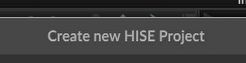
                                  2a25cb76-8c74-4b52-a277-286118da1974-image.png

                                  To open an existing project go to the File menu.

                                  @duma said in Exporting problems:

                                  how do i downgrade from visual studio 2026 to 2022

                                  Like I said above, uninstall VS26 and install VS22

                                  Free HISE Bootcamp Full Course for beginners.
                                  YouTube Channel - Public HISE tutorials
                                  My Patreon - HISE tutorials

                                  1 Reply Last reply Reply Quote 0
                                  • First post
                                    Last post

                                  16

                                  Online

                                  2.2k

                                  Users

                                  13.3k

                                  Topics

                                  116.2k

                                  Posts
