Show value on knob, but not editable
-
@David-Healey needed some time to figure it out

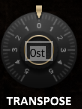
-
@svkpowa Noice, what was the secret?
-
@David-Healey i created a second "knob" with the scale of 0.001 to make it invisible and scaled the tile to fit into the real knob, then - linked to it. one knob makes as a controller, the second one as display. had to make it with every knob, but hey - it's just 10 minutes
-
-
@David-Healey hope it won't cause the gpu eating, there are twice as many knobs

-
@svkpowa It's not the best way of doing it, but have fun, if you hit problems you'll learn something new.
-
@David-Healey today I learned how to edit knobs in knobman. knob jumping through actual values is much better looking than a normal 0-10 scale like in the original
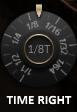
I'm addicted to it right now
-
A little update.
I plotted 16 VSTs with all 23 (46) knobs, with automation on every channel, playing like 50+ sounds at the same time, and nothing happened - for three hours of work I didn't even have a single RAM glitch, which is sometimes happening on a single channel with Serum, for example...
HISE is wonderful and perfectly optimized, so my way on displaying values is doing great. Editing knob's value is also very comfortable, you don't need to try hard to twist on the exact number you want.
Thanks for your help David!
-
@svkpowa That was a major hack job tho tbh. You can do it a lot easier with script and a label. End user would never know the difference but just for your own sanity a simple script would have worked. There are enough posts about it floating around the forum to help you figure it out.
-
@Chazrox said in Show value on knob, but not editable:
You can do it a lot easier with script and a label.
If you're going to add a label for each knob might as well add a knob for each knob. There's no real benefit.
-
@David-Healey @svkpowa I was referring to this Spire example you posted which only needs one label no? js.


