Forum
    • Categories
    • Register
    • Login

    Can't build AU on macOS Tahoe

    Scheduled Pinned Locked Moved General Questions
    16 Posts 3 Posters 79 Views
    Loading More Posts
    • Oldest to Newest
    • Newest to Oldest
    • Most Votes
    Reply
    • Reply as topic
    Log in to reply
    This topic has been deleted. Only users with topic management privileges can see it.
    • dannytaurusD
      dannytaurus @xxx
      last edited by

      @xxx HISE 4.1.0 sounds like you might be using the downloaded release from GitHub.

      Did you build HISE from the source code? If so, which branch and which commit?

      Meat Beats: https://meatbeats.com
      Klippr Video: https://klippr.video

      xxxX 1 Reply Last reply Reply Quote 0
      • xxxX
        xxx @dannytaurus
        last edited by

        @dannytaurus

        yeup built from source. hm i've been compiling plugins just fine for a while but the other day i upgraded to macOS Tahoe 26.2 and I can't compile anymore :(

        works fine on windows !

        xxxX 1 Reply Last reply Reply Quote 0
        • xxxX
          xxx @xxx
          last edited by

          i get this error

          ❌ error: Cycle inside a single target; building could produce unreliable results.

          or

          Compilation error. Check the compiler output.

          David HealeyD 1 Reply Last reply Reply Quote 0
          • David HealeyD
            David Healey @xxx
            last edited by

            @xxx said in Can't build AU on macOS Tahoe:

            ❌ error: Cycle inside a single target; building could produce unreliable results.

            Try a different version of xcode

            Free HISE Bootcamp Full Course for beginners.
            YouTube Channel - Public HISE tutorials
            My Patreon - HISE tutorials

            xxxX 1 Reply Last reply Reply Quote 0
            • xxxX
              xxx @David Healey
              last edited by xxx

              @David-Healey

              i tried downloading an older version but i guess since i updated to the new macOS i am forced to use the latest version of Xcode
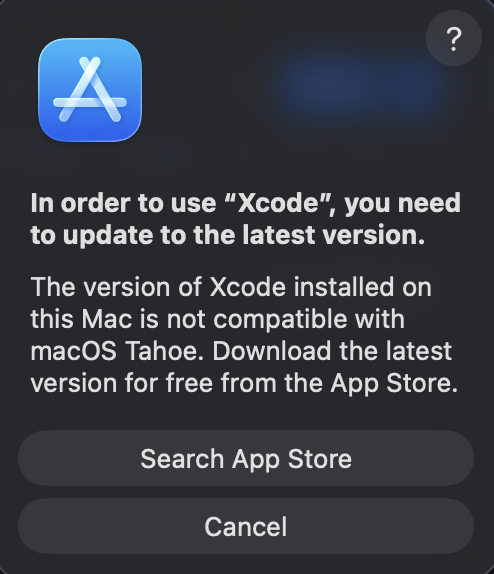
              Screenshot 2026-01-15 at 5.13.21 AM.png

              😞

              David HealeyD 1 Reply Last reply Reply Quote 0
              • David HealeyD
                David Healey @xxx
                last edited by David Healey

                @xxx Try here https://xcodereleases.com/

                Free HISE Bootcamp Full Course for beginners.
                YouTube Channel - Public HISE tutorials
                My Patreon - HISE tutorials

                xxxX 1 Reply Last reply Reply Quote 0
                • xxxX
                  xxx @David Healey
                  last edited by

                  @David-Healey

                  i already tried downloading the version i was using before but i get that message ^

                  David HealeyD 1 Reply Last reply Reply Quote 0
                  • David HealeyD
                    David Healey @xxx
                    last edited by

                    @xxx said in Can't build AU on macOS Tahoe:

                    the version i was using before

                    Which version was that?

                    Free HISE Bootcamp Full Course for beginners.
                    YouTube Channel - Public HISE tutorials
                    My Patreon - HISE tutorials

                    xxxX 1 Reply Last reply Reply Quote 0
                    • xxxX
                      xxx @David Healey
                      last edited by

                      @David-Healey

                      i think Xcode 16.4

                      i'll try installing hise again maybe this was fixed already 🤞

                      David HealeyD dannytaurusD 2 Replies Last reply Reply Quote 0
                      • David HealeyD
                        David Healey @xxx
                        last edited by David Healey

                        @xxx said in Can't build AU on macOS Tahoe:

                        installing hise

                        This makes no difference. If your compiling from the same source code then you'll get the same error.

                        @xxx said in Can't build AU on macOS Tahoe:

                        i think Xcode 16.4

                        That's quite an old one. Try just going one down from the latest version, if it lets you. Tahoe was released in September so I suspect it would need to be a version of xcode released after that.

                        Free HISE Bootcamp Full Course for beginners.
                        YouTube Channel - Public HISE tutorials
                        My Patreon - HISE tutorials

                        xxxX 1 Reply Last reply Reply Quote 0
                        • dannytaurusD
                          dannytaurus @xxx
                          last edited by

                          @xxx FWIW Xcode 26.1.1 works fine for me, but I'm on Sequoia 15.7.3, not Tahoe.

                          Meat Beats: https://meatbeats.com
                          Klippr Video: https://klippr.video

                          xxxX 1 Reply Last reply Reply Quote 0
                          • xxxX
                            xxx @dannytaurus
                            last edited by

                            @dannytaurus

                            i gotcha it must be something with Tahoe then . out of ideas :/

                            1 Reply Last reply Reply Quote 0
                            • xxxX
                              xxx @David Healey
                              last edited by

                              @David-Healey

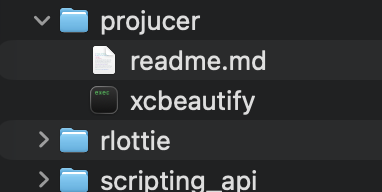
                              i am rebuilding hise but i don't see projucer in the tools folder for some reason

                              Screenshot 2026-01-15 at 2.33.19 PM.png

                              dannytaurusD 1 Reply Last reply Reply Quote 0
                              • dannytaurusD
                                dannytaurus @xxx
                                last edited by dannytaurus

                                @xxx The Projucer file you need to open is in projects > standalone > Builds > HISE Standalone.jucer
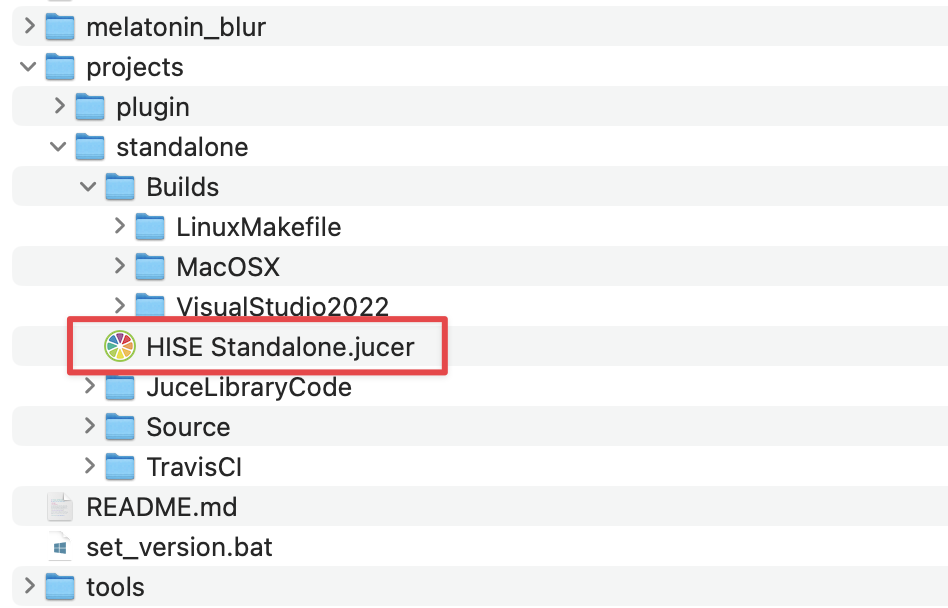
                                CleanShot 2026-01-15 at 20.44.52@2x.png

                                After you've opened that once, and saved it to create the Xcode project, you don't need to open it again to rebuild HISE. You can just launch Xcode and open the recent Xcode from there, and build.

                                The only time I open the Projucer file is to add/remove preprocessors. Which is rarely.

                                Meat Beats: https://meatbeats.com
                                Klippr Video: https://klippr.video

                                xxxX 1 Reply Last reply Reply Quote 0
                                • xxxX
                                  xxx @dannytaurus
                                  last edited by

                                  @dannytaurus

                                  Ah yes, I was looking for Producer . It was in Tools before but now its in the JUCE folder

                                  1 Reply Last reply Reply Quote 1
                                  • First post
                                    Last post

                                  19

                                  Online

                                  2.1k

                                  Users

                                  13.2k

                                  Topics

                                  114.8k

                                  Posts