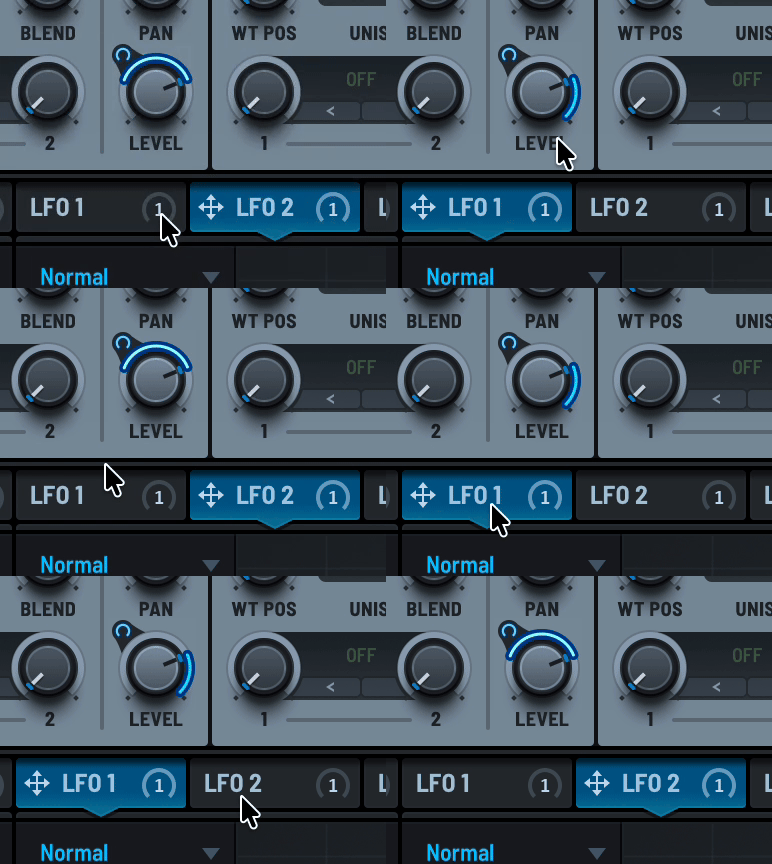
Matrix Modulation System - Last Call for bugs fixes & changes!!
-
@Christoph-Hart has mentioned that finishing the new Matrix Modulation system is part of the forthcoming Hise 5.0 release and therefore will be completed soon. Any bugs should be reported on github. Any last minute feature requests / ideas / changes can be gathered here for Christoph's consideration (no guarantees!).
@Oli-Ullmann & @ustk have been testing the system thoroughly of late, as have I, and I'm sure others too.
DHPlugins / DC Breaks | Artist / Producer / DJ / Developer
https://dhplugins.com/ | https://dcbreaks.com/
London, UK -
A big one for me is how to display the
modulation draggers(the intensity controls). Currently as you add sources to targets you get a 'dragger' for each connection, which appear on mouse hover:
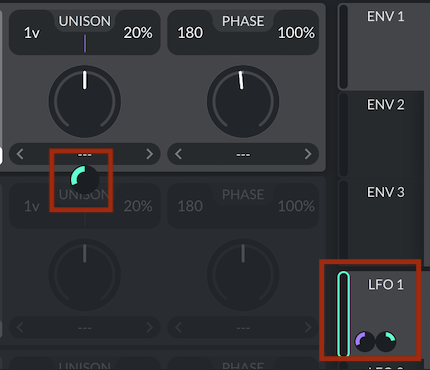
Which is similar to what Vital does aside from one key difference which is that Vital will display just the draggers of a selected source. So click on LFO 1 and all the UI controls which are connected to LFO 1 will show their dragger:
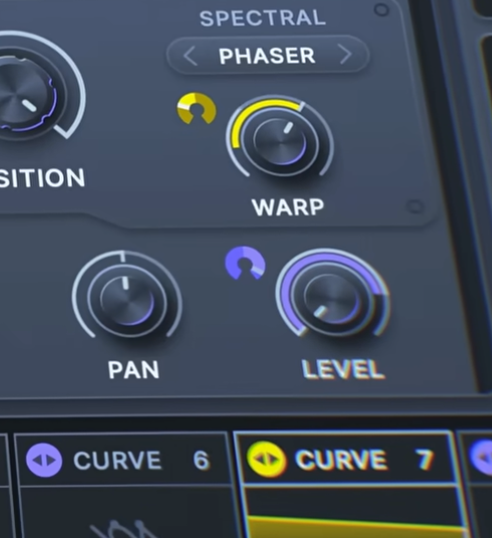
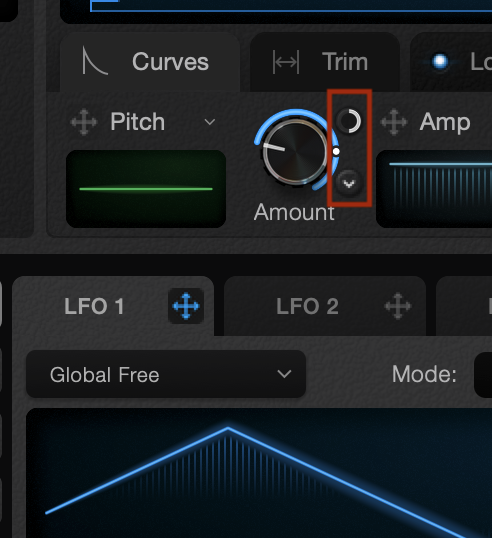
But most other devs seem to prefer a permanent control which sits beside each target and reflects the selected source - so no large amount of draggers under each control, just one dragger for each connected UI control, which only appears after a connection is made. This would be my preferred approach.
Firstly, the floating draggers can obscure parts of the UI, creating a slightly messy look.
Also, if UI controls are placed at the edges of their parent panels the dragger positioning needs some sorting out.
Lastly it can be confusing as to which dragger is for which connection. The 'one dragger' approach seems a much simpler approach (but perhaps more complicated to implement! in the source!).
And finally (!) it would solve another issue relating to displaying the modulation range - if more than one source is connected I'm not sure the mod range is accurately displayed, particularly with positive and negative intensities combined.
At this point we have one approach but adding this would make for a more flexible system. Here are some examples from Serum, Current and the new Ultrawave synth:
DHPlugins / DC Breaks | Artist / Producer / DJ / Developer
https://dhplugins.com/ | https://dcbreaks.com/
London, UK -
@DanH isn't this precisely what this example is doing?
https://docs.hise.dev/tutorials/ui/index.html#exclusive-matrix-modulation-source
-
@Christoph-Hart the control isn't permanent though, is it? And is the range displayed just the range of the selected source?
In fact to show anything you have to select the source and then hover over the control - but how do you know which controls are connected to which source?
DHPlugins / DC Breaks | Artist / Producer / DJ / Developer
https://dhplugins.com/ | https://dcbreaks.com/
London, UK -
@DanH ah yes, so they are still created & deleted on hover / exit. I need to check the code, but it should be possible to remove that logic and move it to the selection, so we get this behaviour:
if(EXLUSIVE_MOD_SOURCE == true) { onSelectMod => show / hide mod sources } else { onHoverOrExit => show / hide mod sources } -
@Christoph-Hart yup I think that would work. How about the ranges though? I think it makes sense to have an option to display just the range of the selected source...
DHPlugins / DC Breaks | Artist / Producer / DJ / Developer
https://dhplugins.com/ | https://dcbreaks.com/
London, UK -
@DanH what do you mean? the range is a property of the target, no?
-
@Christoph-Hart ah nevermind I read your previous post. No that's a separate fix and involves fiddling with the math that calculates the mod value. If you can come up with a minimal example that breaks the range display for multiple mod sources, it would help.
-
@Christoph-Hart Will do - but currently to show the range on a UI control we show the combined range of all sources which are connected. Unless I'm missing something, there's no way to show just the mod range of the 'currently selected source'
-
@Christoph-Hart check the pitch slider, the gain seems to behave ok, but the pitch shows no mod range at all, yet has a larger modulation.
HiseSnippet 6262.3oc67z7iabceCkDU7xX6XmXTTTzB7LcsEWItTj6WZ0tvc+fqVKFsq1UKWKEGGGqGm4Qxw6v4QOyvkKkfJbARN2dnWxkfbH8ZAZOkbJ9VPQuTfBzBzSBnm5s7ef5ueu2al4MCGt6J4UQoEg1lly6yee+06M6ddbSluO2yHWgCF0mYj60y2bjaP25co1tFM1DaXGZfm8wGv7CL1XTepuOyxHWtK9Q3HxM0kLDe9cqtA0g5Zxhaxv39baS1118rChacu0tisiyVTK1A18zF87q0vj6Vm6vG.PyEyW0nO07PZG1co3vtPdiaS86Zj6p4Wxrk0h2zhdiVKtXqaTyz5lsqV6lTFq0bKrzbrELWzrV6EoUMxc4aYYGv8ZFPCX9F4tzFbqQM6xG5J2f6a6a2xggOTynIryxl2h6XgnH1pQ8t1NV6ERl7MfEcuXh1EkDs2I+N1V1QsGS7dKQGj3YnS.ycgjf2ES.d0zAupZfWFfTNMP5RRP5sy2zzytePbOH77sy2vMf40lB7IcPQNViK7IWK+0u5UI6vsF3PAPSx5Irio856vH2tQyaQVnRUBB31b2BENnqsOA9WJ4Hl2HRKpGalVbWVzTB5RCH9.R4SfuHAbx.erUFombs6EtW9Xm13j5wbCfUzZjKsmsY3Hv8yeje.qWERi1jQ7ADSdu9vNBKG.BQ6HWr788XGYyG3GujhkfvaK28nEUAHkwU7JNNDelBpggUnG8K3d1AiBmlI2hQrcIcYv1Ba5WLvOfTuYSx0Iau9VD+fQN1tcHyHAI3eawLogXL.C1vzZOv0D2XpCrvkIVz.J.Ctfnt.w+fBebCXK.1DULLRWJtLLWQic7.gEKhK.5GwbFgswk7EpqEoCznufz3wnVilIfOCt4sF.RLHb0xgadnOoM2CGj23j12sPgFtonmBbURl8XInb9vZ.RWKWnvLjs2ZW360u8lM2G9+2mA6DfdEJrN.ViMw.pWGV.NwZUH61rdMBZMovrpG1yNvrag4TOsOCjsZgxZ.sy1CH3AC4YrZBXbLopxjgcsM6R5wnt9QLVjg1l4IXKsG.bcskyi4ycFHHJevGP5ycF0uK2EDD8GzuO2KnBAgDfF4YMNTDITPId.Gg2SxbDiCDJodf0Lf0BRHfTDxBLoJoigvjo83CbCJ.BaThuPvEfFD6UK.t0vFfRDtIHA9N7fx.eNfzZDHAGDfbabUenjfbf.3ZX8PPuf2m4oKQ65xLQYpOtQgCc4sP.C6vNzRAwNfLDrYCBg.zzwFjS7fgCv.0RZGf5jAgPR1CmXWfX3.yB.Obw8Ax.QJxgKDppUDDYcJR.iG9UH2kGvjFLB0zZQ8sMoNfHOf4V.PXK0hfEOXHpc.izOTFMThPgJhMGoHe.g1uOCXBfip2svUudg5b.KcCpzidHaKO3gH6ikpUqZ0xjEqVc5UJT35f9MK3J9DS.JAPiFJnIwKOBu0W.TQo7kIEgJzPmEZMBn3fVaOXBJDvDlTGFtle4.zpYJ6QJNB7S+J3fDzBwBCTJeNLBpTGWAKBsU09GxpnN9bxPvxE6DVcowCre.T8PKlfjCti9bMEETqB5Azk.zwj64Ay1YTkBvBAh4GQ8TjhaqnDeH4VtcrcYUjf2NQaszYRohejCuEHwD4jgfLAP8m4UqnhVqruOjB1CAPDHlt7.611nXWKNHkGiEJpoeYIIAH8zf.JH4QIH0lBdPCINnnTgD.aE.gqGsT0gw2BB5nTnE5RRCbkUxSkA4v5gpKSW3wElBdBrUvpz2CHkpQCnPp1kyd710WsUJ7DEtW2ADPAFnSBVUog.CAMEjnUDk6Rsj7bWPcoE53C0bsB8CZJ2xoSg3l3trtiSL16WpXH4WXjIkTLnqChQZtu7i1AvbGXmqOu+f9fYV2ADg8KvKlvbhPRBCQv22tiqZwz87.anjBMNuAiyHhq7oE6MB28CAudfcihkIEofXAvUkO+YkifsR1tVriyfEIaOhX+tBe2adqsZb2FGzX261j7gei9TPpuNDLleEfT0gKLCGGyiKaHosCmJMOaChlLYrI9Jykwdk5w8Qw7d83tfICOFXpvGYqsAkpAf9nl9mCsMn0EZJSp1sMGj92lyOD7+tEi4TRwZaBlM08oCAdLhTxgBRRASqXk1OJzQnXSAUKosUD5AtJF0EXkFA51bGG.aoHYbFAfph.RX3ZKaWg8NJFMhO5YfC8S8B.5gz+js+6V.fdjU2vElGqILcVytLVPoh.7Bwhh9ZQ1eGOv0nE3A0k4HBfINFxJDvRdE4uQVtojRrL4JWAz4hm7xj2at4lCah6Yw7lwiZYOveYxb8OFZrO5MysyxjZUwmehb6azViXAddz09FxDQ1B3GqWeviZOHPaHJNcvYYYOOlTf.S0g6AvvhKt3JxmCAy6lXcqT4JP+v9CjEpGDHziSgDKrvB.71CzYrcgnsC.VVHTGiEKHdrKytSWXKlU16Ig3y3vZGfqS0i5tBRDkP6Mu4MWQCXVd4VLf5yNI57L18.xvxnrYoYlwFF1zI6ObsWZokfNFZaEzMdik3kBAfM98DlpxhTjZcRgqgqSM8GgHh6uLQmAePbpHABmEcgHmAqOHSLnKv4zI8APjC9XJGtAqPdxYP.0xi1Qvn8.ME0p9dwOOFqUJelRTLa1VaG1wyXY6IkZVl3wGNiHXQel.4hgNDH5HvsjZuBKygdMsf3BgfuDFmUltkBxhYmFTCI8dcZQKAgIo92Jygb51vxLSaH2MmQfrw1fO9qDKPIlwrKrP4v+Cl0MlNVLfNHfONJuP02Wmt.jkPZi4.OebcgPrZ0B5Dw8PXd4tbzi4iCU8.arALjwEM.LEqiXvHDbVfqAZR9fkSVoatz6O8JOo.DRc.PcO0EZBpESkEQSN6Iqwfq4dzftZTkYmOgLcntQfUYREoyysosXNxsWSwUxK7seDr30BmU5YDp.NWndQEeGaqLjNme94mjzXHjMqjonfgVsZoufRqg5.IZKTe.Sz5hBFAViYIIU5Hpy.1zjqhFNd+o0z+wmy1dyMtwMPoHtusTkg1RjoGKCJakAt1PpezHPBHzsR1BBj3+b8qJCAGgMLlFlHeFhZzDAjCeCe4ygrdnVGgoeXUXJBQD9AX8oKjsMF9suHWtCgn47EJegncO5wkDnt3qpUV.xeTmJDQFJSHh0M7S7jRPzlAT5VHZRSuRxIMQTB8PHhKIjDFlDoXYInoHHVbGoGvoj9S5Y6VZhbsxnh8zBBtODIjYvyiHWFB5CUh.s3NVPaAriClg5.gctr.1mnW9M8nCU1qAqfV7gPVDdfAUAhHgLctNNEjygAHAFf0rj52mYZ2FC4QI9FmuMLYIUFi3puOafEOL5unXjEUXPEvcKYzEtRhYRsAIHrGDRMlhKkrA0ms37PvUdXbUnyGwlfBVggZwvPubsndVxJRfFXPfDrqEnbLkgAoeTwkluRPUG5Q9abuarXkf5C2pRk6u489AW6lsqOr1C99ar48b+hJlP68W3S13dyc2teY8gNipNrx8dzN0MEi2px8N39U5.+dyEgw.H+Q0Gd+.bMcqrNrlZq+N2+S9QEEn3D71jx2w7SGQOZxBjk9KT5DcloTwixoEyPl6dEH1ZHMxnDfQIELDOpjPjoIhIDmxRBgQOofmtP0NzCkQ8KDkHN3HHPJR.PHbmjgvkzOS1tZUdMfEW5SJspBjd9jzTxPiJoxSrz0tsaeEoAPHCs9NPvki6GPrSZQ+.pTW2i0C.8qKhUiHAPoIrJpnclIFpUDxaHcfiqx9XkGBSWMoZiVsHHbfJi4THYWf9hkseeH2El03JIhHnCcea1kYdHXxMs0kPrWRKjAeoQKbuhJRpDIFa6qW+5n3oTYvIq0MECGSnHxvZQnUtBgi.b9XsZcwPsBSATKiNUc2iSpqCVmB0FUpnraDnj+ByeZrD9f7pxBpw7yagtkhy2T1yD3hXwlFxvRJ4STA63mnLWnIy9fIKbntiv8KJyev.mOFTsseWoEQEQXLLsdTDwmBNGOvXrOtsShNDukMEgZbJjX8Agak9ymL49cQ7+N2c2MDmHv2z5IDC1HIc6yZl9wSa88qCSY1JfRuFI3f02+.n4YfdWI4f+7GzXyCtsXJUA2zoFvA2tQ86b2aA999PRs4qTE1Jr49viO9IqPR9ADE1y17Prjtp.E7YKWneka4ZUm1WjpOLuhBkQlUwUjS4SKhBdX0c7+xAfIY7WgC4yfY+84fU6nI2Bx3wQLYwT6YKJNMNGHwfiveEMDbxfpf4gtPfVvbivE.IrEUeHp9Qnj9vc3VRtdoNkwRHJJmjCRsAg4ODrYoh1oDzWEz2wzUfsd.DZWonk95yRtFYVzEkbhtIlX0Jhjlfupo9B4cpgBYj.ztzbazsMvgk8hBhafjF+RhTrkMBJxq6YVxsrjMOCrAKn9M.LQr3qgsKcdZ2VfCw0jChGpi3XImtvT.ReBC.DvA7CFBNro5HKnJdFthIf0kS9XMbml5Iv+wb7YYM9pGO+7aI9DMzB3HZCQCeKGGaHpgRzHJ7L5j3YH0lFmzSjAjmbUuwMpJ9fCnClu1PAMTPqJSnkikCjDCI0GP08w5JOQFP3.RyChZOEa.H8JR3N1t2WDu7UiYFkQpwTX3goGL83wFrf9HGcZjc1YiIgZHaHPkDeA51r53rLJ9IgvhdSisxFyFUE8cWHkZHB7GANHFGcCGMXVsaEOD.ERMhDvsjnsbofMP7Xr1xzYQPJbZBfZjjijqWJ5w75ziftC50ZxZfXuioAJZ74ldHRHqZsTjkSaRWSLIIDqi3x+meEQDioE6Q.Tf18CmH125NhZye.DWUonscce7YwfKZBD.zvpb4zE4VXgzhboWrfzqxFhZVVTl3mH.k3itKxDb3IGFd.DVr1nIZQnJQGhWFGmuVrVxhJf0VGhzRbVIhvqgcTTNGpLLEQDYYeBYBnyJL4vhwwNVLbikEFRd1GkrcMcFXElukTcxAqxxzSxAil4zMhVbc+MJKuhsQYLVJb53MlOHwVsN5HB8hjhMs0VyK9HzUjVU2W5UMdQb7JSlS3DZ7Yut3ipKD5mzrC8ikdI1bSMq6YKnHvxlhSQCu0Of.dwkIEUZBhNkBjNdQ9AlGLILcJ4ymnDqvy+COwjvnv03wpHYQ4JOFfFxp0VDkGJFU7V7bzb8wawvoy85jYXB.uH6HEV4L4kObPgED7zFm3vUhdBvKgFt+P75TD5.Ozkt3dGTcYzhi7LYBiFDZ.lo5QL5kv3.guiLMHFVK.FNbkv0pVh0pp1Bc5yc1kO4QGAgnrEzqD0hWEgi+PpjlM4PZc5nkBauvXh4ytD9ORaYIh7PMiIqVHEo0GerlfFvo7MHp0PjPLHAKPwxHlMVjbiMVjyTFITognH8DxpDLXf1hOjkgGpUS9PLpEGFjRZpIjFEjkrn8EPE4hEgMKKLOxCCX5bmANA18crYVq6zuKMkaWgJQESGaL+a.pP9G.NUVZ5T.RDA5L.KOQOAmM2e8O5ya13GdKP9XtEWITyWV2xD0CBMLG6uHNaVsLbOU61PVhQWbATueSZf.k0z5C3ATmGHp56GJwdsy1yg41A53pjRwv80jgcnMuqgYWUUKTjiGyLhz2lTd9Sq9YR5bhFq8YJKmIZcNXnw6T4XxGBB31bbEAs0CuQFVO.Xv1thMTdrWxUQp6.1IKIJ.YJjDSG.aBIvn6H+J8G32szwUjkWXKOdusYsCho.wINM6zxkdrwVqpriD94PnEq8FKXfm.JDhFpDkqDdWk1J7RATT51BTzFISrCRSLQhdvVbxSdRdriWnL69DW2rjnf0KqleNguN5XXx1SVifOtwmiEr.Sp+SytbHx6fGnBVfj4mrmk3d787NI7l.Vb5OC.PT95PT9JD9.AqCyr3KJpxzqDomxcwqM0ttkDJlfXAIcWsamYewUSJytwKsr2IMwRtP.1Lvtm7jNBGnQtKk719lex21W8KirpZjZCj61v0NX29L2IcEkMTDVCX.JnB9Uf3dA+lp6ErTf2v1xH2kyKtJ2B3U+1aabFl62JufG+hM4WKuTrJ8re5pFebCTdGuZyJbYOY8fsQRWtMYGYaxjWz4oxuIy+v.deibEhjhLx85ApalsbW2RcoaNvFHwx8VVKOiii22+x0FE8vZCVSTl5nFd5e2ZxCXLdH70T.mDR9t4SeW2LZ0I7BsO0kML9qESK12nrUiTsNqdyXpSiOXAsI2Sx+XPwpXDmugEFs7Ic65PEwhMvq.ELxphm1RbCdd.26P+9TSFzdapiOSzmjUIJ0Ftx2l6Y+HbwbJV3IHC9LSr+t4SWoVcx96nQ1+p0SRS+yGilpsFIotFmuT2e7KQpKP9TBW4y8OeACiPAq74lUp5DQYeySSqcBhujGtVO8WOiO4q6Q0F5eJzqkkCaOUjQ5ZtXNBR0JSavOaJJZse9+xyxfhdk+leon4j5LFeRZcFnkdbHi9lhDqrOBRtJtuKsVxKqL99JDc4vSPVdqS0fTLx90szUqSQWVJIcYoSft.da62z9QL824E+AsaCp44xmGheOEk5u+dewyxTHKK5GctMeYP+d87w2m9DDvuyoaTNlrP7znfODnfBIj+j7wkkZOlGl.NsCyHjjbw7uuwjHlOc09wpUF4di7Z2yein6HO1Ug7O.b2iEvOE08m9S2NK5X61KKZNMgH4V7MjJ+7X5CnvZmbjFQ8oORinZ7ieNckbNar6m+pyUhnaINF0chCeK1XohX8K9Io4WeU6D7j2PxSdCEOQbOmTx1heWaRVM+p6uFRkPYaERGdq4tCDfouAdGSjuNZWNOds1DMjzlP00DsgXBNpM3NVoA+QqwfHAohf8xcQc95ctyc9mvgjVbb90Rx7d1yd1uxHkmhSComcRxdQH82QIppNS1yIr8m7JAamaRrX3AI19WoohQhuE7jMCqJvGn2p16mU.m6bNIJ.wT9pf3L+jHNOzWQb9d5DmySwgySLd7W5w2JejsJ82ASL7gX7IwK9XivR7p6U+b6Ey7rBhusLnkrgwKjALBIF8x.FUuNquQ9a0tMH3GCfWJ+V+fWNu6p5a+qI29+r7RGOwDpP2NBX4uH+I3W5DdCk+2Nqugx8Oyugxoyo+Rmsb5OkWv3K8x5EL9RmMlzICdmUY5u2XrI+meMumaBZ0Sif91RPNe9s2ZWAbJ+0oBYaHuMuX+aIduXbM00GWCEWZjHegGPOBuSe8TkoHZk1l0Asdp0xALvzcyQtl5M1rGmi0dsSRgPCis4792xEsfZoO985R8whZ4yBzGMtrGv2gh0JrN91+p2YiNtbOlrPY5sWW7Z.Eh.hW99lP1OxXE+z7KNeE3S6qgeey5vWys64yyOOV0pcxuR7W3LKlBreRDKGkVOWESeYnXgPbjP3ef.wJ8puc9sbXGKdKvE.62Ju725.3NbWt7MpVWlaeFDkAF40Dz5xDsVGeUOOTuTR2Fi4PaY2jYRCmxW8O7zubslfrcreg0lat+8U2m4v.km3JF3s1NxhfjZijIhNVy0waZld1shMcrVUayXsetIzmguzB4CeS7ErCsGedr38w9rCjgroY6PdywSSrwRFkj3YX7RAAGyP9kweM64tk709aW6kik72YsmGK4Oc0+nk7+nk7W0P7IlnxEOSIpbtCuu3Isb9.J6yGfU7Skkbt72cPO4UXBfDWWlCdVe4t.pKJetJ9rHzLlqk3AHi1mo5rF9bNUm0B6zPt3piD6Rw0k.bvlcwxklfUKk.ZD0pKbqGiSs+u5+Z00GbrZPQRa+FQaYvUis9m6hFeyfmKlA770r1+G+lya3IQwvCAnKb1.nu5c9G+sq9pBfxhi8vB+m+qu3THM0m2LLvsl3qeO929Kk2TD198a5z6ZF.NpNP7NVy8SrvMY8rO.+SCidiPXInwy8QKQIb5ww2W7L552s5V.Rl4bZh+UUPXRacweCdRXB6h+epz7eoWtpWgUTKwepylJ7O0YRyiQPp5O0YwVedAy9HSTQFQEp9BwRc+zW6gIDqWi0RKC8hGCrXOE2lez4ZC29CBjOk6xm7Q9paAX7Cyzv3.QYVUuPn5m.7jOSTicGDDu+4Sr+3gvcrdf0m19CpyfTd31rt+Oj4wSas5kbvImOxkENI4xDF8eIkV7e.Kil+jO98SVFASvJgLJ30BbLDHbLbhxhe84ir3EdEWs7rL+8lfma7uTbpy1FAfjm1sNjrOm2SCW+E+re1+ypaR60GjFhqHx+8pQG5tdQM7FMVaOP6vcDqE3ak8HlVA.fV+0qd9IX86ifs++K6QOpoG+yUu90nvyqIZAnsthiwaJv9D7Lo132dOvhu8maZlboFahy9hNw4dQm37unSbgWzIt3K5DuwK5DW5zmHFL35C.S7R2bFF6r2sjkzIWT8j.+l+u.LneasBDHPlugins / DC Breaks | Artist / Producer / DJ / Developer
https://dhplugins.com/ | https://dcbreaks.com/
London, UK -
there's no way to show just the mod range of the 'currently selected source'
Ideally the ring around the knob shows the accumulated mod value while the hover popup shows the range for the selected source.
-
@Christoph-Hart the hover popup / permanent 'dragger' will show the intensity rather than the range, would it not? It would be nice if the ring could show either the accumulated range or selected range.
DHPlugins / DC Breaks | Artist / Producer / DJ / Developer
https://dhplugins.com/ | https://dcbreaks.com/
London, UK -
@DanH but in all the examples you showed the mod dragger also shows the intensity range not the mod value, no?
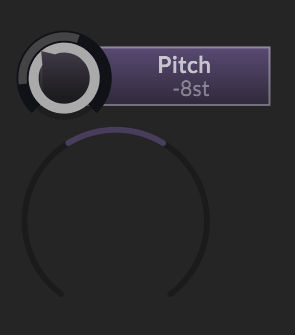
This shows a bipolar mod range for this given mod, just like the other examples.
-
@Christoph-Hart we might be describing the same thing, yeah. Ring around knob = modulation range. Popup = intensity range / amount.
If Ring around knob could show either accumulated range or selected source range, that would be ideal.
So we'd perhaps need some more objects other than obj.modMinValue / MaxValue like obj.modMinValueSelectedSource or something....
DHPlugins / DC Breaks | Artist / Producer / DJ / Developer
https://dhplugins.com/ | https://dcbreaks.com/
London, UK -
-
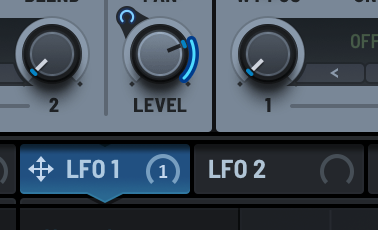
Currently it's like this (or it's supposed to be like this minus a few glitches):
I'm referring to the default LAF seen below, but all that can be customized
grey ring around knob = modulation range of all connections combined. This factors in all intensities and applies them correctly using their respective mode.
bluish ring around knob = current modulation value (not present here as there is no voice currently but you get the point)
purple ring around popup slider (the big thin ring on the bottom) = modulation range of the current selectionI don't think you need to switch the display on the knob between the modulation of the selected source, as this is covered by the (now permanent) hover popup.
-
@Christoph-Hart Ah now I understand yes that might make sense.
So basically would could happen is that we use some kind of "solo" mode for the modulation ring display around the knob:
- if a exlusive source is selected, then it will show the modulation for the given source only
- if no exclusive source is selected, then it will show the entire modulation
For this to work you need to be able to untick the exclusive source, but I've added that anyways to the matrix draggers now.
I'll post an video to show how this would work...
-
Ideally the ring around the knob shows the accumulated mod value while the hover popup shows the range for the selected source.
Well it shouldn’t be a straight accumulation (aka addition) because a positive value can compensate a negative one perfectly, drawing no arc at all, while the modulation actually moves following the combined value
The range should instead cover from the lowest min to the highest max
-
Alright, so now it looks like this:
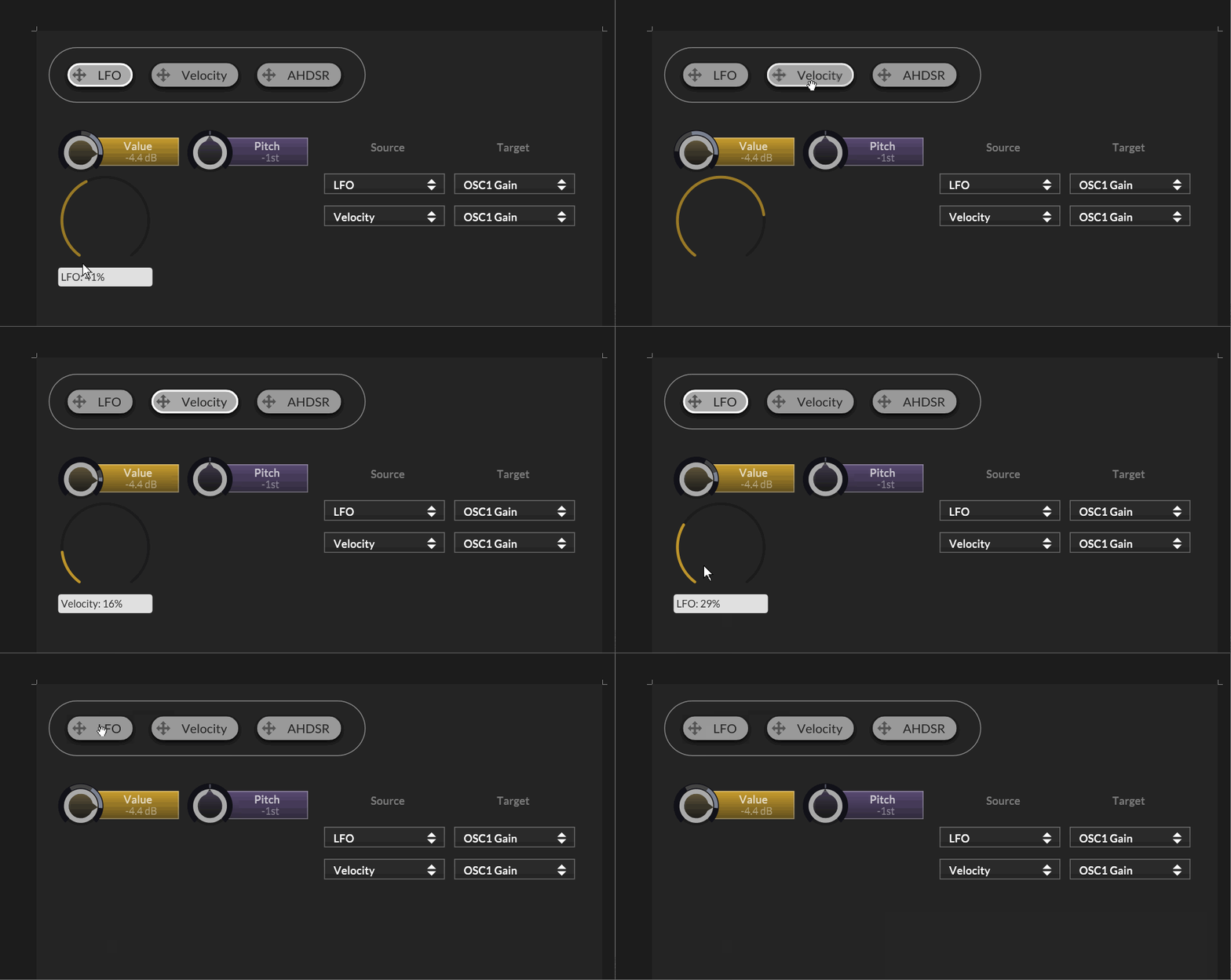
- When you select any source, it will show persistently only the draggers for each target that is associated with the source without hovering / exiting.
- The modulation display will switch from showing the entire range & value to the currently selected source
- Click on the selected source to switch back to showing the entire modulation value.
This mode is only engaged once you define a function for the
setExclusiveSourceCallback()method of the script matrix so the default behaviour won't change. -
Well it shouldn’t be a straight accumulation (aka addition) because a positive value can compensate a negative one perfectly, drawing no arc at all, while the modulation actually moves following the combined value
The range display covers the min max value while the modulation value combines it.
If you have two modulators, one set to -25% intensity, the other to 25% intensity (both in unipolar mode), and the value is at 50% position, then the modulation range will cover 25% to 75%. If both modulators crank out 1.0 as mod value, then the modulation value will sit right in the middle where the value is supposed to be.
That being said there might be a few edge cases and combination of modes & intensity where the math doesn't math, but in general that should already be the case.