Forum
    • Categories
    • Register
    • Login

    Design feedback - velocity indicators

    Scheduled Pinned Locked Moved General Questions
    6 Posts 4 Posters 79 Views
    Loading More Posts
    • Oldest to Newest
    • Newest to Oldest
    • Most Votes
    Reply
    • Reply as topic
    Log in to reply
    This topic has been deleted. Only users with topic management privileges can see it.
    • dannytaurusD
      dannytaurus
      last edited by dannytaurus

      This is (or at least it started as) a simple, free bass synth called Sublime.

      As feature-creep always dictates, I've added more stuff than I intended, and afraid it's getting too busy for the small size.

      The thing I'm working on now are the velocity switches and arc indicators around the relevant knobs.

      Here, all velocity switches are active for the 5 available knobs:
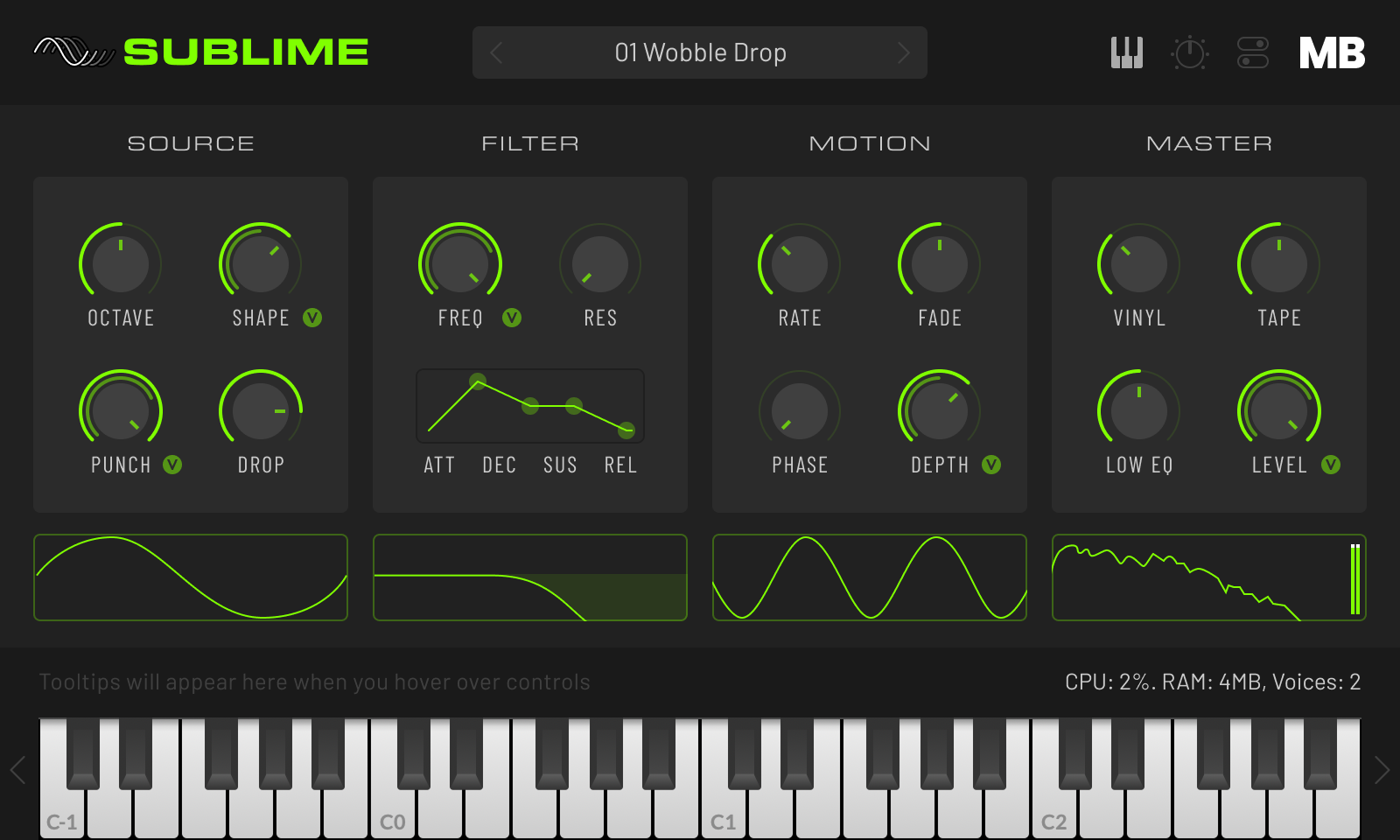
      Sublime-Velocity-Active@2x.png

      And here's the same with all velocity switches inactive:
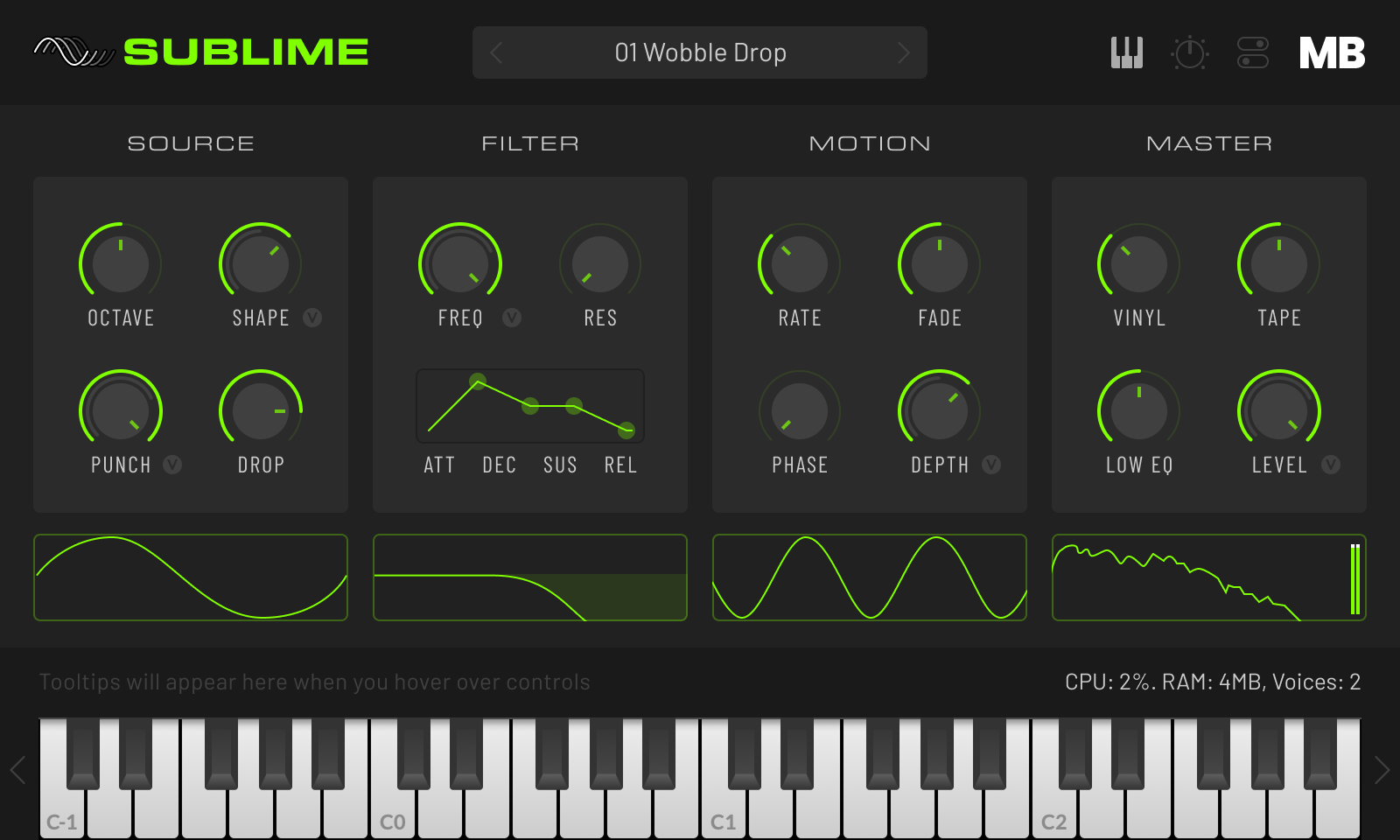
      Sublime-Velocity-Inactive@2x.png

      Does it make sense? The velocity arcs are drawn inside the main value arc, and are scaled within the arc value. So, if the knob is at 50% and the current velocity is 64, the velocity arc will be 25% of the full arc.

      Does it all make the UI look too busy?

      Meat Beats: https://meatbeats.com
      Klippr Video: https://klippr.video

      B 1 Reply Last reply Reply Quote 1
      • B
        Bolle @dannytaurus
        last edited by

        @dannytaurus Not in the slightest, in my opinion. The UI looks really good and the velocity indicators hare small enough not to create clutter. Nice design!

        dannytaurusD 1 Reply Last reply Reply Quote 1
        • dannytaurusD
          dannytaurus @Bolle
          last edited by

          @Bolle Thanks! 🙌

          Meat Beats: https://meatbeats.com
          Klippr Video: https://klippr.video

          David HealeyD 1 Reply Last reply Reply Quote 0
          • David HealeyD
            David Healey @dannytaurus
            last edited by

            @dannytaurus Looks good to me, might need a tooltip to explain how it works, but design wise it's nice.

            Free HISE Bootcamp Full Course for beginners.
            YouTube Channel - Public HISE tutorials
            My Patreon - HISE tutorials

            dannytaurusD 1 Reply Last reply Reply Quote 1
            • dannytaurusD
              dannytaurus @David Healey
              last edited by

              @David-Healey Cheers. Yeah, tooltip on the V button for sure. A different one for each button too, to describe what it's doing.

              Meat Beats: https://meatbeats.com
              Klippr Video: https://klippr.video

              1 Reply Last reply Reply Quote 0
              • ChazroxC
                Chazrox
                last edited by

                Looks great and makes sense to me. Tooltips for sure! 👍

                1 Reply Last reply Reply Quote 1
                • dannytaurusD dannytaurus referenced this topic
                • First post
                  Last post

                31

                Online

                2.1k

                Users

                13.2k

                Topics

                114.5k

                Posts


