LAF documentation?
-
Where is the documentation for local Look And Feel?
I'm trying to create a LAF for a floating tile MIDI keyboard but I don't know where to find the functions that draw the parts of the keyboard.
I want to customise the octave number text because it doesn't work well with different key widths, but I really don't know where to start.
I feel like there must be a reference somewhere for what I need, but I don't know what to search for.
HISE dev latest / herdr + Claude Code / Figma + Affinity
Meat Beats: https://meatbeats.com
Klippr Video: https://klippr.video -
@dannytaurus I don't think there is dedicated docs for this. But there are only two functions.
drawWhiteNote,drawBlackNoteI also made a video about it
Free HISE Bootcamp Full Course for beginners.
YouTube Channel - HISE tutorials
My Patreon - More HISE tutorials -
@d-healey Great, thanks! But my real question is - how do you know what functions there are?
HISE dev latest / herdr + Claude Code / Figma + Affinity
Meat Beats: https://meatbeats.com
Klippr Video: https://klippr.video -
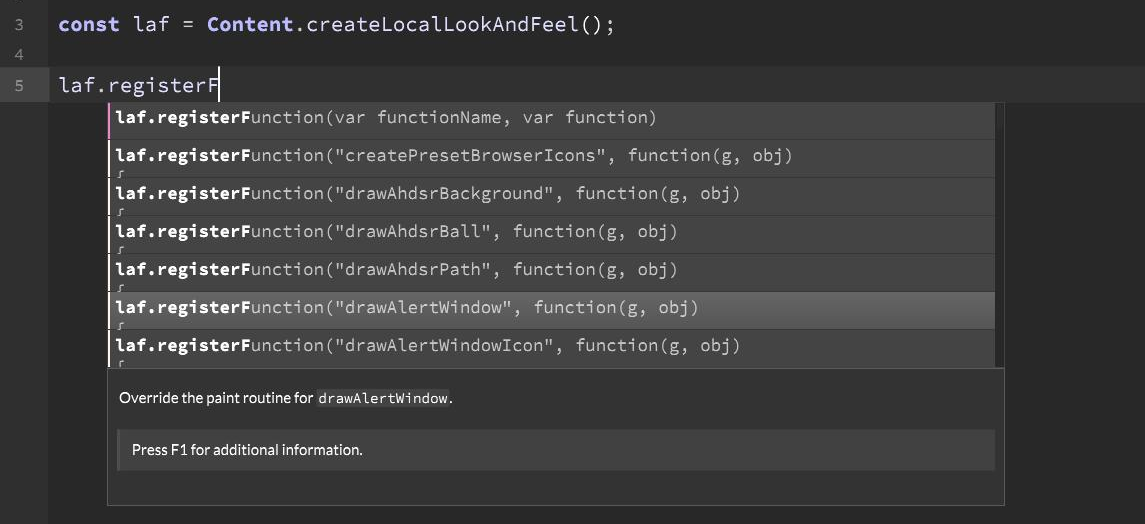
@dannytaurus autocomplete popup. Some of the functions are documented, but not the keyboard ones.
Free HISE Bootcamp Full Course for beginners.
YouTube Channel - HISE tutorials
My Patreon - More HISE tutorials -
@d-healey Autocomplete popup from what? What would I type to trigger the autocomplete that shows the available LAF functions?
HISE dev latest / herdr + Claude Code / Figma + Affinity
Meat Beats: https://meatbeats.com
Klippr Video: https://klippr.video -
Free HISE Bootcamp Full Course for beginners.
YouTube Channel - HISE tutorials
My Patreon - More HISE tutorials -
@d-healey Right, that's what I tried but wasn't seeing any autocomplete for
laf.registerFbut I just figured it out.I have to hit F5 after creating a new variable before the autocomplete will work.
So, in terms of available versus documented functions - are all the available functions listed in the autocomplete but some of them just aren't in the docs? Or are there available functions that don't even show in the autocomplete?
HISE dev latest / herdr + Claude Code / Figma + Affinity
Meat Beats: https://meatbeats.com
Klippr Video: https://klippr.video -
@dannytaurus As far as I know all laf functions show up in the autocomplete.
Free HISE Bootcamp Full Course for beginners.
YouTube Channel - HISE tutorials
My Patreon - More HISE tutorials -
@d-healey In this case I ended up adding some new data properties to the keyboard floating tile that allow me to customise the octave number text.
Fun exercise, but not worth a PR, right? Since I assume most folks would use LAF for this?
{
  "KeyWidth": 26.0,
  "DisplayOctaveNumber": true,
  "OctaveTextHeight": 14, 👈
  "OctaveTextMargin": 6, 👈
  "OctaveTextColour": "0x55000000", 👈
  "LowKey": 24,
  ...
}
HISE dev latest / herdr + Claude Code / Figma + Affinity
Meat Beats: https://meatbeats.com
Klippr Video: https://klippr.video -
@dannytaurus said in LAF documentation?:
Fun exercise, but not worth a PR, right? Since I assume most folks would use LAF for this?
Yes a fun exercise,
but why you do it?Oh I see, you didn't want the bother of using laf? Maybe it is worth adding then.Free HISE Bootcamp Full Course for beginners.
YouTube Channel - HISE tutorials
My Patreon - More HISE tutorials -
@d-healey Mainly because the default method of showing the octave numbers doesn't really work for small and large key sizes, but also partly to avoid using LAF.

Since I know I'll want control over octave numbers in every plugin I create - and I probably won't want to override anything else about the already-very-nice-looking keyboard - it made sense to me to bake it into HISE rather than using LAF every time.