Forum
    • Categories
    • Register
    • Login

    callWithPOST change content type

    Scheduled Pinned Locked Moved General Questions
    29 Posts 3 Posters 2.2k Views
    Loading More Posts
    • Oldest to Newest
    • Newest to Oldest
    • Most Votes
    Reply
    • Reply as topic
    Log in to reply
    This topic has been deleted. Only users with topic management privileges can see it.
    • David HealeyD
      David Healey @Daanyoo
      last edited by

      @Daanyoo Are you using the same version of HISE on both systems? I'm not aware of any Windows specific limitation.

      Free HISE Bootcamp Full Course for beginners.
      YouTube Channel - Public HISE tutorials
      My Patreon - HISE tutorials

      D 1 Reply Last reply Reply Quote 0
      • D
        Daanyoo @David Healey
        last edited by

        @David-Healey Yes, both are running on the latest version of HISE - I also didn't expect any OS specific differences here..

        D 1 Reply Last reply Reply Quote 0
        • D
          Daanyoo @Daanyoo
          last edited by

          No Matter how I try passing the JSON object into the callwithPOST function, it always arrives in this URL-encoded format, which makes my request for the license activation fail.

          One for Christoph I guess...

          Christoph HartC 1 Reply Last reply Reply Quote 0
          • Christoph HartC
            Christoph Hart @Daanyoo
            last edited by

            @Daanyoo have you tried trace(ob) before passing it in? There is some funkiness going on with Post parameter handling. You might also have to call a header that sets the json content type.

            D 1 Reply Last reply Reply Quote 0
            • D
              Daanyoo @Christoph Hart
              last edited by Daanyoo

              @Christoph-Hart I use trace(data) and it works perfectly fine on OSX.

              local jsonData = trace(data);
                          
                          Server.callWithPOST(endpoint, jsonData, function(status, response) {
                              if (status == 200) {
                                  currentHttpCallback(true, response);
                              } else {
                                  currentHttpCallback(false, {"error": "HTTP " + status});
                              }
              

              However when executing the same function on my Windows HISE build the typecheck fails and String is rejected:

              Interface:! LicenseManager.js (767): Illegal type: string, expected: JSON

              The json content type is also being correctly passed, as the request is successful on OSX.

              David HealeyD 1 Reply Last reply Reply Quote 0
              • David HealeyD
                David Healey @Daanyoo
                last edited by

                @Daanyoo set the content type header

                Free HISE Bootcamp Full Course for beginners.
                YouTube Channel - Public HISE tutorials
                My Patreon - HISE tutorials

                D 1 Reply Last reply Reply Quote 0
                • D
                  Daanyoo @David Healey
                  last edited by

                  @David-Healey I already did:

                  Server.setBaseURL(MOONBASE_API);   
                          Server.setHttpHeader("Content-Type: application/json\nAuthorization: Bearer " + currentAccessToken); 
                  
                  D 1 Reply Last reply Reply Quote 0
                  • D
                    Daanyoo @Daanyoo
                    last edited by Daanyoo

                    As already mentioned, the request using the same function with the JSON string is delivered perfectly fine on OSX:
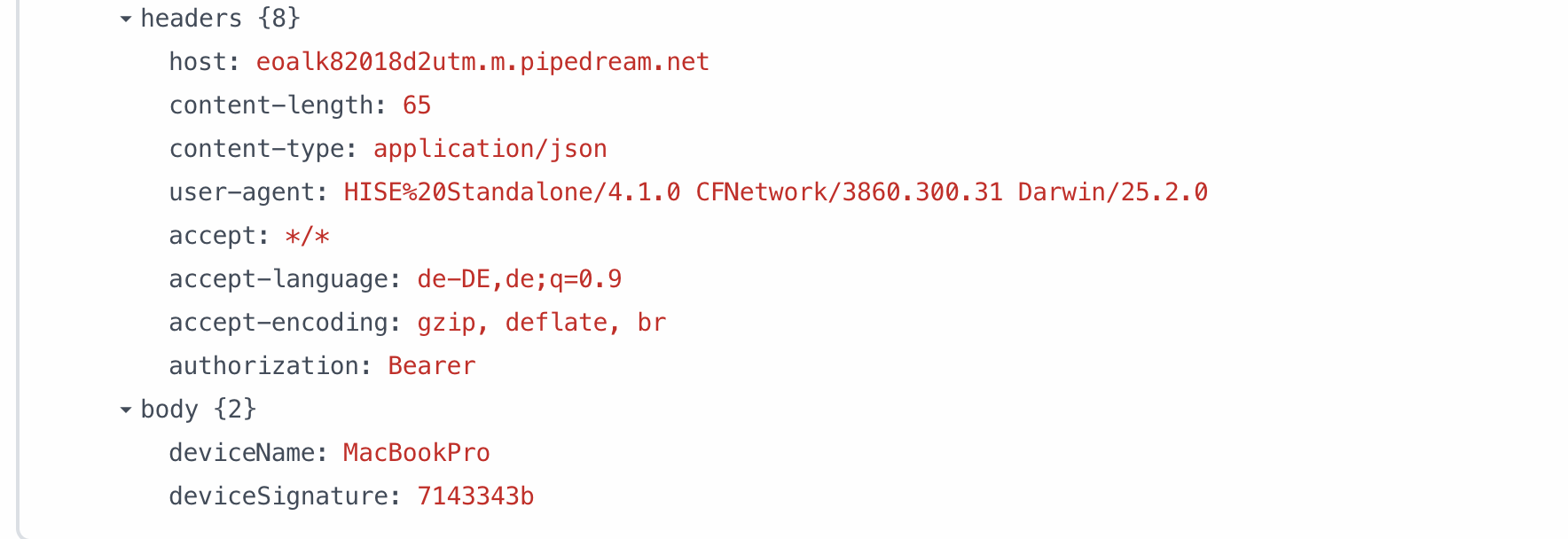
                    2019e1bc-04d3-4a60-82a2-b1b13744982b-image.png

                    I cant figure out why it wouldn't work on WIN, even though the code is identical.

                    D 1 Reply Last reply Reply Quote 0
                    • D
                      Daanyoo @Daanyoo
                      last edited by

                      @Daanyoo I just tried to reproduce it on a empty project on WIN, it worked there and all of the sudden it worked in the regular project as well... I am so confused haha

                      But at least its fixed, thank you guys for your help!!

                      1 Reply Last reply Reply Quote 0
                      • First post
                        Last post

                      17

                      Online

                      2.2k

                      Users

                      13.6k

                      Topics

                      117.9k

                      Posts
