Make the Gain knob smooth the gain?
-
@d-healey When I only use one Sampler, it can achieve that when the second note appears, the previous note will no longer sound, but when I add a second Sampler, it needs to be triggered at the same time with the KeySwitch below, which makes the script completely illogical and gives me a headache.
-
@CatABC said in Make the Gain knob smooth the gain?:
When I only use one Sampler, it can achieve that when the second note appears, the previous note will no longer sound
Share the snippet you have made for one sampler and we'll go from there.
Free HISE Bootcamp Full Course for beginners.
YouTube Channel - HISE tutorials
My Patreon - More HISE tutorials -
@d-healey
This is my method using only one Sampler, I used artificial notesHiseSnippet 1352.3oc4Ws0aaTDEdVaOHrSnkhpP73REOjhJQdcb7EPQ04hcZTqaCYcaAwCUS1cV6QY8LK6NaRrphTE+R3m.Oxi7Sp+CfyryZ60tNEWqREB1Ghx41b9lybt4iCENznHQHxnTuQATjw5X6Qb4f8GPXbzQGfLVC+P5H6KXRmAn8FEPhhntHCi7GpTvnXATx2qu+dDeB2gNkEB8LAyg9H1PlbJ2ia8PlueGhKsGaXFsq15HGAeeguHF.SdbYT.w4LRe5iIJ0xgQOfDM.Y703sqrkSU25tUprcyZNjZzldDOOqsbqVsVilVa0jTsQMZ4sQFeTaWlTDZKIRZDxnvdB2Q1CDWv0N3YrH1o9TEgExF7rlcGguq5Jp3h1e.y283wQoHDx.e7zXVdcL613tLW1D9SiceZh.yoVjM.ZjaV3keF3YkEdky.uE.IiLPpfFR2Ba6DxBjSkneKOhKogdD3cJKTz5hx8JC79BPCtbygjyncBAhIVrQsxkumI7m69ckJUJj12jdNn4QtQl6X9MVJlvmWL2QxDbSA+wBI8I7MtaoWVpHyaiIZ+kJ0uaoh.6hIIaaxUZ54s2n1ZclnK3phWUrTwLdpKbcfzhD.tanj4wbXD+M.Mupj47d2yah6uN6L2YmIWjTPM28p3U.u4NcUXJT36SC0NXNwpb6EKI0vM3wCOkFdOyyI9wzIJBueylTfu9jhr4rN5WsLJJ3GwYxmDP4WWlLJ8oF9umdzADIQkIkxCzKfBAIEDLNfdNTGqyqJhOfFclTDjn6v.AWcBFqKSKDzYRc7EDIi2uGCfJCRwtINKKKzkYaSLZBwuNp0ELW4fIL9ieo0.Jq+foMPd022JEiZ.UR0d5TAIzEcZ+wsOVGWsRip0q0bqFkQLIc3XAqgqtcklMp1XKqL7qnsnY0l0pWo41HI8RY1NQIAmb+nA9kkLMuC3umq.4c9VSqpaV9dJdGvhB7IidhijbN8wIOsJwIxdj3BvDfrYB4CXZJqJ0Sn2ONRJFdXHIX.yIBD3Q7in5Sk5Qh8k6FDPIgplqfTYXrV3d9P+Q3nNABqBPP4Mq0L4qQix0aVtt148D866S6Jboybxp1RPaJNm5OAmOMh9LpCj6kAKS7FHriOQZKG4O2Icb6wO.yyGxgCkS8Rkw7aycy36ZktBlJ7FMvfVmB2Xvky1OUM0IU.TOMSSLUiJdDSNJ6To4axVX4Zx91mArrv8V3iUiMWLdys.7BUf+Si2zQVeBtsmG7ZOErEvc9g257o26P4FZnrF1lwoICBR.xmmPa9bnRx7PJmFpBpVW2tGl+zu+aK6tGAK8tG5B4dPQWTfHZlC1lNj0CZ6Ekkop7Hj9yI0hY4uOTWrPQu99cfK4BswlHiCSRW1cnHlKmI8H+R+l7NrRSg+cuRS9w4IJO2MFVGIAIqOkd1ri4CR4WtfzaaBoQtz41fp5Qc2HcT2dwRITXqFxcCLqOWDRSYkLYO6iGZINiah8XWZKicNSs+RzBNjOXsJe+73UbLFsYCC7os4mS8gcKRv3mgSmvMl6ruicEbQv.Am4jM.bBUFx52mFlE6K7BsqTBiHmx41sNg5SIYKm+pVOBJCIgpAjqXrv5cd27E9d8EXMbMUslL+uwHt7++bD2IhX0ltcIPhJrnKF1GzFlr3PS25QsVuQNU+.McYEsdzB2Mg3OguTgVJZiTgViE9AwGCINghW3naZoxk+3DNv8lm7axKh6pnMsdytTCgNyuvwY1i5MLrxpZ3VqpgUWUC2dUMr1pZX8U0vF+8FpFbtaL7yNzkrHDrUdxOxwvnMm.Y7IUGn+Bn0aimN -
@CatABC You can use
Message.getEventId()to get the event ID if you don't want to make the note artificial.Now modify this script so that when you press a keyswitch key (whichever key you want), while another is held down already, it turns off the note that is held down and plays a new note of the one that was held.
For example, if you're holding down C3 and you play C0, you turn off C3. Then you play a new C3 note. - And you ignore the C0 note.
All of this in a single sampler, for now.
Free HISE Bootcamp Full Course for beginners.
YouTube Channel - HISE tutorials
My Patreon - More HISE tutorials -
@d-healey
When I use Message.getEventId();, and play two different notes, the previous note does not close.And I don't know how to convert the events into notes
function onNoteOn() { if(eventIds != -1) { Synth.noteOffByEventId(eventIds); } eventIds = Message.makeArtificial(); if (Message.getNoteNumber() == 36) { Message.ignoreEvent(true); Synth.playNote(60, 20); } } function onNoteOff() { if(Message.makeArtificial() == eventIds) { eventIds = -1; } if(Message.makeArtificial() == 0) { Engine.allNotesOff(); } } -
@CatABC
This returns an event ID that you need to store, so that you can turn the note off when the key is lifted. Otherwise you'll get hanging notes.
Synth.playNote(60, 20);@CatABC said in Make the Gain knob smooth the gain?:
if(Message.makeArtificial() == eventIds)
Here you should use
Message.getEventId()instead ofmakeArtificial@CatABC said in Make the Gain knob smooth the gain?:
if(Message.makeArtificial() == 0)
{
Engine.allNotesOff();
}What's this meant to do?
Free HISE Bootcamp Full Course for beginners.
YouTube Channel - HISE tutorials
My Patreon - More HISE tutorials -
@d-healey
Synth.playNote(60, 20);The 60 here should be the note that was pressed before,
Synth.playNote("eventIds's note", 20);I can't stop the artificial notes
function onNoteOn()
{

	if(eventIds != -1)
	{
		Synth.noteOffByEventId(eventIds);
	}
	eventIds = Message.getEventId();

	if (Message.getNoteNumber() == 36)
	{

		Message.ignoreEvent(true);

		Synth.playNote(60, 20);

	}

}

function onNoteOff()
{


	if(Message.getEventId() == eventIds || Message.getEventId() == Message.makeArtificial())
	{
		eventIds = -1;
	}


}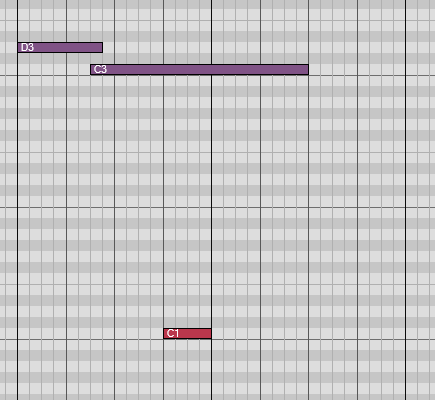
In this case, the D3 note cannot be turned off//I am a new student at HISE._
//Windows11 & MacOS Ventura 13.6.7_ -
@CatABC said in Make the Gain knob smooth the gain?:
Synth.playNote(60, 20);
You need to store the ID of the note in a variable so that you can turn it off later.
@CatABC said in Make the Gain knob smooth the gain?:
Message.makeArtificial()
I think you're misunderstanding the purpose of this function.
Free HISE Bootcamp Full Course for beginners.
YouTube Channel - HISE tutorials
My Patreon - More HISE tutorials -
@CatABC Here's a basic example using a sine-wave generator.
I've put everything in the interface script but in a real project it should be in a separate MIDI processor.
HiseSnippet 1122.3oc2Ws0aZbDEdVr2ntj1nlpnp73Vo9.T4ZAXLwnHqXaLNEUiMx33z2hlL6YgQdYlMyNKsnJ+er+Txq8o1yrKW10F4hQsMpkGPbNy4x245LzSIYPTjTQrJd4jPfX8418mHzCaMjxEjNGSrdhcWZjFTtorNZRHMJB7HVVa7ZCCKmMIIe93qNhFPELXAKB4JImAmxGw0K316fejGDbB0CtjOJiz0OnCSJZICjwHd1vtBIjxtlN.NiZDqfM4GnQCIVem8t01gU26Ed0psayFLZCnoO02u5Nd0q2XulU2oIs9dMfJ6RrdTaOtVp5qoZHBM5QRuI8GJ+YQpCthGwee.XHpR5idNkMo0PdfWuYImHBwxt2hT0FoopmY2k6wmyeQJ6KSNvcgFYSZVEtOHU8A.IqLPZyTH8T69LEOTu3DCddrcGAVA8oXsIKTRkkT32KX2RhRHzaOhdMbhBIlqQoFUprkK9U4WVrHVehztWG4tuas5yogwnpc7LbaKFvEv1LEfQmIKbJORWBUclLa6i09ReeylFyofAtAX20YRM7R+XASykBWovPetnT4h+ZQm.IiF3JPa2EiHraX6APhBmEO58fxXamhNbe2RnL6iXqbQGTsDNycJpxUzfXnzLuU18a120fBTRizNIc8aKLN12+nIsS079rfwwN2TD+ZtPQ2VnsbSsaX.chgNyAYhlq.LH45IkJiF0wwXREniUh4BwGHjJHATkzpXv36aLw8L6goGAx6tHQrvSlZ6gJM2my3zfRoAPwaJ5d6Luu+CM0e2zjHSF1jfW47qnbZvkGWl9SkLHv3UCzt0wlEIK+joJVRj.4sbGabxbAwAm7SiOZ0lFYoiKYDTJ5H35yCgozmHC7LSYlee2YWxz4M7WuoywTM0LNOkGJWHfkICbrNFFiKPSGtcrOFhtVKCwUn2YxG24H8hCn57KhLqnmd.lOxM8alvEQXaW1U3OfsSUt2sSqJDepcOtlMb4XrvRvHlo9m.iS2o+E1s88AldA.2z9jeZcWfu5t+Iot+w18w0mIyJIN+qSnceKcL39ZP.JSxq58bI7uspWBGtxWBeNSit+REUDEJixY39vH9kRgIKrf4ahvaPfObgoZlkeKIUszi93qNACxkpSeJtFLos3vQxXgNWavF4qCatZit4mHxH+RtgcyOAW5+2yX0mvI+buKwYFF6yGEF.sEiw65PNFL9U39LeZbfdF27M1ckBY3PofyxV0u.zJ9fAfJK1WZ.cnViOebAmmcvEP.Py1A+sGbJ14QUXdBVybwC+MZKsd8b6T35ZlFc+u6F6M9+8F6KjwZtXPWJ1D9K3eJ.eHTebQICPuKDP.ZbaqBlkcozULzoaJEdID+A9Y5gUMzVSOr5rC+WwGinLk7crz2FY5S+rDNXbKR9uVN3e5CocqRRduT1Z4HbK26Xr7l5NJVacUbm0Uw5qqh6ttJ1XcU7Eqqh68Wqn4RnCi0xQoilDR2dsSdfokUaAE6xSlHH+IYKulm -
@d-healey
I tested your snippet, but in this case the second C0 triggers the playing of C2 again, is it possible to not trigger the playing note when there is no note above?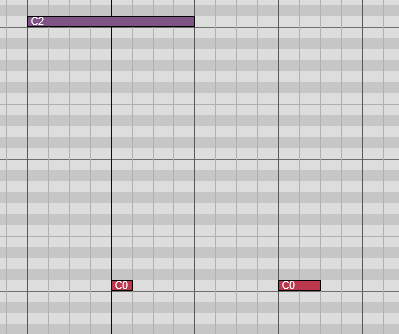
//I am a new student at HISE._
//Windows11 & MacOS Ventura 13.6.7_ -
@CatABC said in Make the Gain knob smooth the gain?:
is it possible to not trigger the playing note when there is no note above?
Yes, this was just an example to get you started.
Synth.isKeyDown()might help here.Free HISE Bootcamp Full Course for beginners.
YouTube Channel - HISE tutorials
My Patreon - More HISE tutorials -
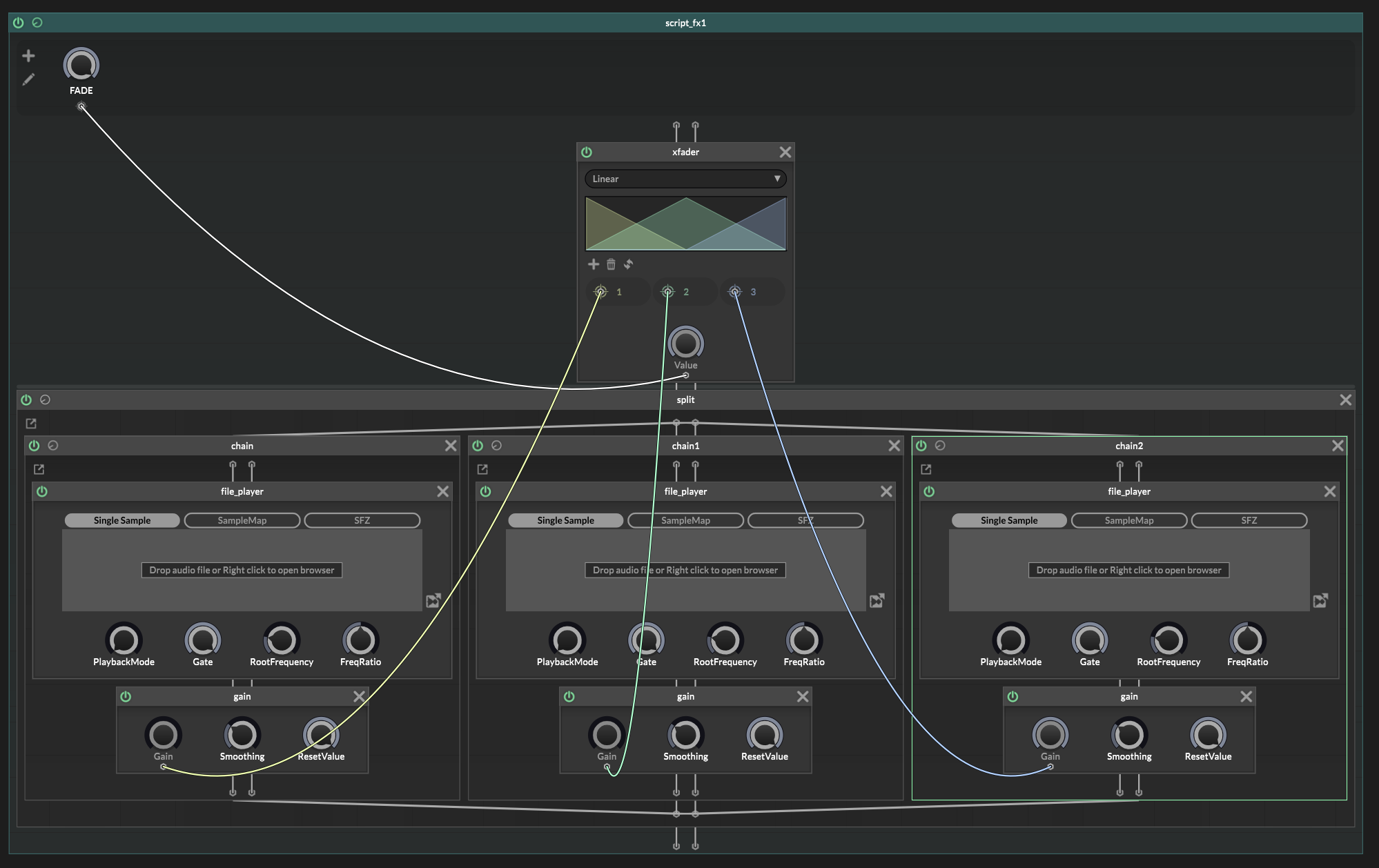
Have you messed with scriptnode fx at all? This seems like its pretty simple in scriptnodeFX. You can rig as many samplers as you need and trigger them with built in X-Fade nodes and so much more.... ??? Skim thru the documentation for the entire scriptnodeFX section and see all the stuff you have at your fingertips!
-
@CatABC for example....
wanna fade between 3 samplers that start at the same time?....different times? You can do that too...either way check this method out. The fader node has different fade modes, blend & switch modes.
-
@Chazrox This looks like a good choice. I tried it, but there is a problem. When KeySwitch is triggered, it requires the Fade knob to automatically and smoothly go from 0 to 1. How can I control it?
//I am a new student at HISE._
//Windows11 & MacOS Ventura 13.6.7_ -
@d-healey This seems to be back to the HISE snippet I provided at the beginning

function onNoteOn()
{
	local n = Message.getNoteNumber();

	local v = Message.getVelocity();

	Message.ignoreEvent(true);

	for (i = 0; i < 127; i++) {

	       // turn off previous event
	       local e = eventIds.getValue(i);

	       if (e != -1)
	           Synth.noteOffByEventId(e);
		//Synth.addVolumeFade(e, 2000, -90);
	       // play new note if key is down
	       if (Synth.isKeyDown(i)) {

	           local newNote = Synth.addNoteOn(1, i, v, 0);
	           eventIds.setValue(i, newNote);
	       }

	   }

}
I don't know where to put Synth.addVolumeFade(); to make it succeed
-
@CatABC Don't use that snippet, use the one I gave you as a starting point.
Free HISE Bootcamp Full Course for beginners.
YouTube Channel - HISE tutorials
My Patreon - More HISE tutorials -
@d-healey
I used something like this to prevent lastNote from being triggered when only ks is pressed. Now, I tried adding VolumeFade to the old events, but this doesn't seem to workfunction onNoteOn() { local n = Message.getNoteNumber(); if (n == ks) { if (Synth.getNumPressedKeys() > 1 && lastNote >= 0 && eventIds.getValue(lastNote) != -99) { //Synth.noteOffByEventId(eventIds.getValue(lastNote)); Synth.addVolumeFade(eventIds.getValue(lastNote), 2000, -99); eventIds.setValue(lastNote, Synth.playNote(lastNote, Message.getVelocity())); } return Message.ignoreEvent(true); } lastNote = n; eventIds.setValue(n, Message.makeArtificial()); } -
@CatABC I was thinking more like this
HiseSnippet 1134.3oc2W01aZbDDdOfqpGoMpoJJpR8KWk5GfJWDXiIFEYE+FNEEiMx331uEsYu4fU9X2K6sGsnJ+er+Tx+f1YuiWtyl35fZpZJe.wL6L67ryKO6RekjAQQREwp7ESCAh0WXOXpPO5vQTtfz8Hh0Cs6QizfxMU0ASCoQQfGwxp3KLJrbJQR97tme.MfJXvRUDxkRNCNgOlqWps+dujGDbL0CtfONi0M2qKSJNTFHiQ7TztNIjxthNDNkZLqfM4mnQiHV+f81atEqo2S81bysa2hQaAs8o99M1xqYyV6ztwVsoM2oETeah0m0wiqkpAZpFhHVkNP5McvH4uJRCvk7H9aB.iPCx.LxopOVF3YNhFsjCGwC75OOQEQHV18Wl1Jll1drcOtGeg9kouuJYA2kdjMAZUHO7JlCdMxBu5Yf2JfjUFHUJEROxd.SwC0KWwfmGX2UfUSeJVmxBkTaIE91h1GJQKD5ZioWAGqPgEdToU85a3heU8YkKi0pHs6UQt65tYyExvDz0tdFscDC4BnFSA3oyjENgGoqftN2lZ9XePkercay1ofgtAXm1oRM7L+XASykBWovHelnR0x+dYm.IiF3Jv8tGdhvNiZCgDGNMd7a.kYucJ6v8cqf1rKhspkcP2RzrHnnKWRChgJyiVU2uaWWCJPKMV6jLATSXBru+AS6j54csCl.6bc4YgJ0edzKgoGg0xLlY18EaSzM2lMbS8LLfN0HmYgLm2KALMv0SqTECqiiInJPGqDKLhOTHUPBrqnUwfAcWaxLy2OLAJPc2FIhkQxT82Wo49bFmFTI8HV95xt2r136+gVbtchTjoFXJA26JfnZ5gKOtLcvJYPfIpFncikMzNqdkYNVQj.4MbmXBxBCwQq7yq1u+40rzIrzApLFJEcEb8Ygf38QxPlMEh+5UcOhpolg7Y5P6BArzXff0QvDjhMcj2w9HH5JsLDIYuEe.xDI8hCn57zSFR7YKf4fbbBl4dQD1pkkj+eLNq6KDejcetlMZ0XrvJvHlo9XfwYL8eocGeefoWBvR1G+Kebn0yF9GlF9GXO.IUSlORB9SRjc+Y5Dv8Ef.TljWi63Z5+39dMc389Z5yXZL7WnnhnPYTtMd.LlegTXxBKU9pH7dE3smaplY0enjpV4Ru64GiGxU5y.JR8kzVr+XYrPmqMn3cc6ei071+R+m61+OAF1y8.Em4Xb.ebX.zQLAuRC0Xv3WiTX9z3.8bs46k6IExvQRAmksPeNnU7gCAUVruxCz9ZM9lxkZd7dmCA.MaS62u2IXyFUg4IXMyEM9fer1JqWeicJbcMCfte5RRW7+2jzmKi0bwvdTrI72vGEfu2Y.xMx.L5BADXdnfUAC+VpbcibJ4nvKQ3OwOyVrgQ1Z1hMlu3+JwXLkojulk9DHSe5mmnAO2hj+.lC9OAQY2FjjmEksVNFY4dMikeqtkiattNt055Xy00wsWWGastN9z00wc96czbIz9wZ43zQSBoW+NIuozxpifhc4ISDj+R75.WQFree HISE Bootcamp Full Course for beginners.
YouTube Channel - HISE tutorials
My Patreon - More HISE tutorials -
 D David Healey referenced this topic on
-
@d-healey Yes, it is indeed more logical to use isKeyDown,
I put the code into the MIDI processor of the two waveform generators, but now I can't control the fade-out of the sound of the previous generator and the fade-in of the sound of the next generator when the KeySwitch is triggered. I used MIDIMuter, but I found that this is the wrong way to do it. When I use two waveform generators, I need to ensure that only one generator makes a sound at a time. Once I use MIDIMuter, they either make no sound or the sound can't be stopped.HiseSnippet 1587.3oc6Y8tbSaDDWx1hAInzRKszOJX5GrYRShTbBICCC4eNPJXhm3Pnei4P5j8MQ9N2SmB3oCOK8snO.8YnO.7HvzWf18jjsjRTLNdRfIzjYfI2d6t29ua2emRKNyAGDv3JpF6MnOVQ85ZsGPEc2nKhPU1dSE0qo8T7f1ugHb5pr9f9nf.rqhpZ4GKYPUuhRzOe3Qqi7QTGbJIEk8YDG7yH8HhTpsV8oDe+sPt38H8xvc8U21gQ2f4yBAior17J8QNGf5feNRxVIMkmfB5pndOsEsWvot68cssWbkkbPKgWwC44Ysfa85Ks7JVKrBp9xKgmeQE0qzvkHX71Bj.GnnVYcl6f1cYugFe.6SBHu1GKWXozFN4Xxaw7cktnjpxFcI9tsFFkBT.k1JMlUNNlcKslDWxH5owtuIZCyTIxF.UKk27Jmy7rxZdymw7JvjTyXRUhMoap01gS5KR2INWtMUf4dHHOk0Th4UQ8uz1fALPEy1Cc.dKNrXj.UWZ94mwD9uZOvvvKj5HHLpIi9bl.uCsZMie2P23cFlGcKOuB2SdPbluOlW31xhC93DrJMr2qw7YLOD4GhGwHD.xGU0N4nZ1jtSremgQFcaJQrSeL8jJETRBVvu8hs2DIPxTQBMfu9XtfHMA0MwGBWDhSL5ZahCNPv5CWENVVCpWXtg9HQ9hH4UsjMfXPtLmL8PCHhAYuJdzJqJSVk03K7mTy8lZsj8JJ1dKUf8BQsya6M4d5Wo0vyC6HRM1JZa8qi8R4YtobiXS4ZZsITbTq1HC4GhVa9RzgXyGioXtLnZcRMbW8ed5eNoMb6OwMb2wQ.G+dbDMnOKHmhai6Q1iQkQjThuH.ZQf+sckY4rz2fg3Et0GdzVfSVnLsQhPdT4xZ8XgTQtxixSbN4TzGuxmg93ViuOdoiaRWK5jaFBMgirjqmtNe0wQCRSsUj1USsTRuVfUQj0bijoJqGJDvEahqjDoCkwwIjh5FmMiqLA53q07HussHz4.4DifipjB68T7.tuKgZZpxpnAck96xZlP0efv7f.yGZZW+AFlFITvGBd+1tR5MncfB1Yc3XHnJC7OiDHpBC.Gwzrdvkqp+7JqTKRCbbGSeTfP5GvXxXEdHhall0.0Fcse1NXQtxsp2Mko6V6AmvHVelCx2jBZoIHEfORpGICOOZdnz3zMzIdlUAddH3d0LzAwzmatTsOa.VrlPvIuFVVMC8roxYLilzqGoqQtKbX6KyNUG5k0LuyCMk9Ovo7bzicNZ7n+0GzHVxwoAoIqCFs96Fdbw5fD.HO2DpfyvZBm5iTWvQU2LIg299nAx0Y1HSDaeLDHgwPUqAGerJg+wwPWH5H9hCGQdPUAGPY.F56Lzm6dF5X+.rIwCBx2ISP9TGhshT48lSlyFZmPpkBTOtGRS8.I7r0.3EdDGBxuZs3r9XweM4ENGOUQyjkk94Dmio0hiYWh86yE1uylWUnOzFaS502G2fdHb+AnHswuE7JOTnuXH07sbaxnr9cYThS1N56hg6Fc5f4Ys8BcH3VD7PvTJ2Z0cw9XTV7I+zpOCZSi3PbBOkwBqS8KrJLe8iZwlqorF17KCL6k++Il8cYgBBsSSDTn9VnWBzlrM.U1ACVBkB8+AZpkjcBhWOubcLVYpazh+E9IYSK4Z0jMsFtYV281Cw6IeBP56B99n0dLduI3YAu+Wdxebt+r.qBeWPNpGQB6BkHG0MgAuz7pNlTNtjghsfPQF9t5pCIZmkXKDMmxf04zTSYJc3x2+nFTDTfzFCdt6NANPfQFmyofPXf+KIthtVYELkrcVxOAwcgbnyj+JlKReMpSwqXNkf0sKDr9UpjGr9hmKf0Goxbv0smD351mqv0sOArj1E.W+SFZ84lKVRjq69L+vdXYmjwI1LlKK+9gwA+KbP8OB79IMkXknlyD.9FQ.7uDd+EL38e7Oji8EfOjSh5NG9PNe47tG6Ke2yku64Ko+VEi+FJfg9hSl91Z.tdaynzs4m+78mhGW9o3L5gb3rW4DOYP1v3pQT.+lF8msWWqobso0wGEzCF+8JGm7p5XBZOsBtvzJX8oUvEmVAWZZE79SqfK+wEThNYsPAqW78D3IysZDADRUM90xQWYT9OfKn+WO -
@CatABC said in Make the Gain knob smooth the gain?:
I put the code into the MIDI processor of the two waveform generators,
Why?
Free HISE Bootcamp Full Course for beginners.
YouTube Channel - HISE tutorials
My Patreon - More HISE tutorials