Forum
    • Categories
    • Register
    • Login

    Saturator bypass button

    Scheduled Pinned Locked Moved Scripting
    11 Posts 2 Posters 586 Views
    Loading More Posts
    • Oldest to Newest
    • Newest to Oldest
    • Most Votes
    Reply
    • Reply as topic
    Log in to reply
    This topic has been deleted. Only users with topic management privileges can see it.
    • ChazroxC
      Chazrox
      last edited by Chazrox

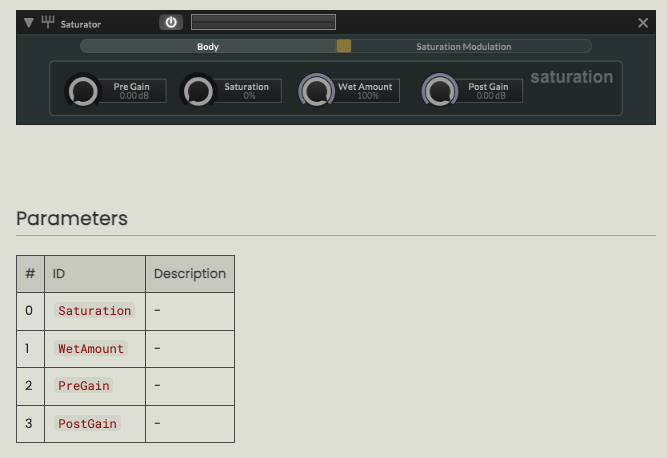
      How do I go about a enable/bypass button for the saturator? I dont see it in docs and I cant find anything obvious to me in the api library. Can somebody kindly point me in the right direction please. Thanks in advance!

      I have to code it because I have the button also scripted to an indicator light.
      Screenshot 2025-03-01 at 10.45.32 AM.png

      David HealeyD 1 Reply Last reply Reply Quote 0
      • David HealeyD
        David Healey @Chazrox
        last edited by

        @Chazrox setBypassed

        Free HISE Bootcamp Full Course for beginners.
        YouTube Channel - Public HISE tutorials
        My Patreon - HISE tutorials

        ChazroxC 1 Reply Last reply Reply Quote 0
        • ChazroxC
          Chazrox @David Healey
          last edited by

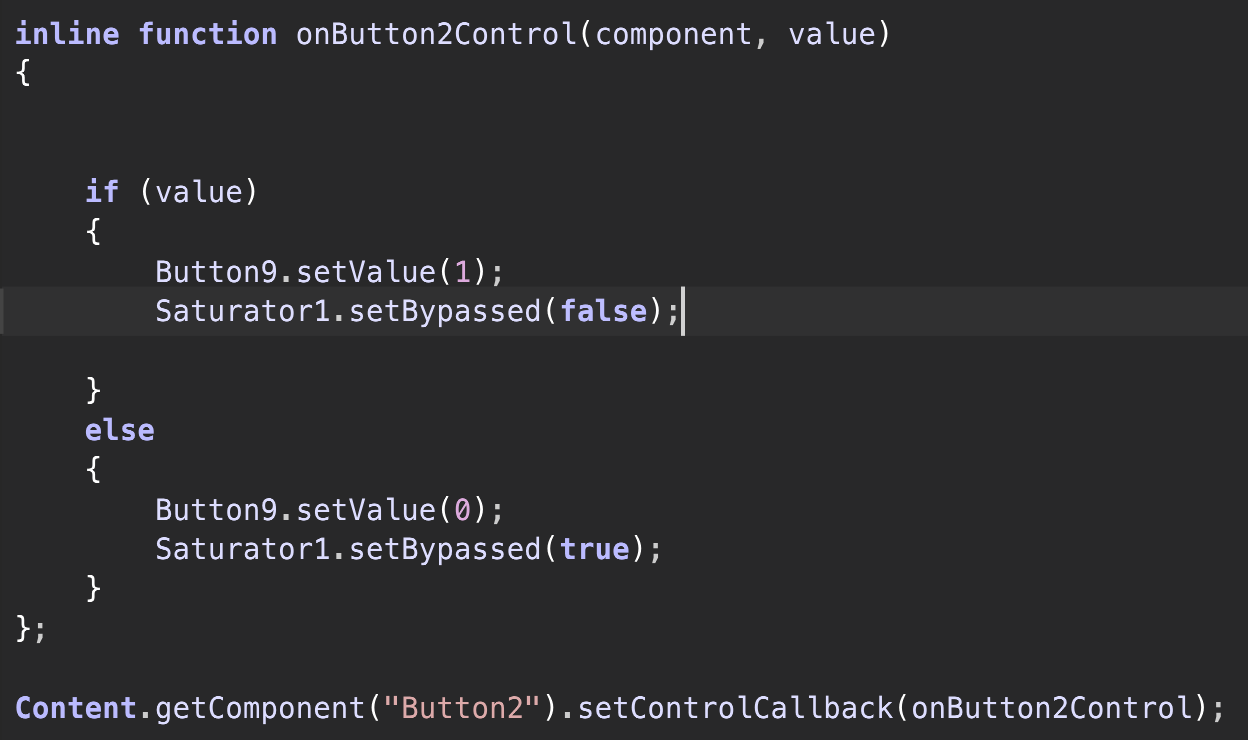
          @d-healey like this?

          this is what I did but somethings not right.
          Screenshot 2025-03-01 at 11.02.57 AM.png

          ChazroxC 1 Reply Last reply Reply Quote 0
          • ChazroxC
            Chazrox @Chazrox
            last edited by

            button 9 is my indicator light

            David HealeyD 1 Reply Last reply Reply Quote 0
            • David HealeyD
              David Healey @Chazrox
              last edited by

              @Chazrox What is Saturator1 referring to in your control callback?

              Free HISE Bootcamp Full Course for beginners.
              YouTube Channel - Public HISE tutorials
              My Patreon - HISE tutorials

              ChazroxC 1 Reply Last reply Reply Quote 0
              • ChazroxC
                Chazrox @David Healey
                last edited by

                @d-healey Saturator module

                David HealeyD 1 Reply Last reply Reply Quote 0
                • David HealeyD
                  David Healey @Chazrox
                  last edited by

                  @Chazrox So what's not working?

                  Also, you don't need the if statement, you can do the whole thing with two lines.

                  Button9.setValue(value);
                  Saturator1.setBypassed(!value);
                  

                  Free HISE Bootcamp Full Course for beginners.
                  YouTube Channel - Public HISE tutorials
                  My Patreon - HISE tutorials

                  ChazroxC 2 Replies Last reply Reply Quote 0
                  • ChazroxC
                    Chazrox @David Healey
                    last edited by

                    @d-healey ok I figured you're last response was one of those 'the answer is in the question' situations lol so I figured out that I didn't declare the Saturator module. I did that and it works. *slaps forehead. Its been a long morning. Thank you Dave.

                    1 Reply Last reply Reply Quote 0
                    • ChazroxC
                      Chazrox @David Healey
                      last edited by Chazrox

                      @d-healey im still gaining my confidence to take on ternary statements. Im for sure taking the elementary route right now. I'll watch your video again just to brush up on that and i'll come back and fix all of these.

                      David HealeyD 1 Reply Last reply Reply Quote 0
                      • David HealeyD
                        David Healey @Chazrox
                        last edited by David Healey

                        @Chazrox No ternary statement here, I'm just using the value directly instead of checking the value and then writing a number.

                        This is what you are essentially doing

                        if (the value is one)
                            set the button to one
                            set the saturator bypass to zero
                        otherwise if the value is zero
                            set the button to zero
                            set the saturator bypass to one
                        

                        You see how many times I wrote one and zero there? Each time you see one or zero within the if statement you can replace it with value (1) or !value (0). Which allows you to get rid of the if statement and use just two lines.

                        Free HISE Bootcamp Full Course for beginners.
                        YouTube Channel - Public HISE tutorials
                        My Patreon - HISE tutorials

                        ChazroxC 1 Reply Last reply Reply Quote 0
                        • ChazroxC
                          Chazrox @David Healey
                          last edited by

                          @d-healey I seeeee! I'll start doing it like this. I've been using if statements alot because im comfortable but I can see that I may be complicating things in some situations. Thanks Dave.


                          1 Reply Last reply Reply Quote 1
                          • First post
                            Last post

                          42

                          Online

                          2.1k

                          Users

                          13.0k

                          Topics

                          113.2k

                          Posts