Forum
    • Categories
    • Register
    • Login

    errSecInternalComponent error with Developer ID Application certificate G2 Sub-CA

    Scheduled Pinned Locked Moved General Questions
    11 Posts 3 Posters 22 Views
    Loading More Posts
    • Oldest to Newest
    • Newest to Oldest
    • Most Votes
    Reply
    • Reply as topic
    Log in to reply
    This topic has been deleted. Only users with topic management privileges can see it.
    • resonantR
      resonant
      last edited by resonant

      When I try to create a new Developer ID Application certificate for Apple, I'm presented with two options:

      • Previous Sub-CA
      • G2 Sub-CA

      The previous Sub-CA expires in January 2027. But unfortunately, that's I was able to get to work.

      The G2 Sub-CA requires XCode 11 or later, with an expiration date of 2031. I have XCode 13, but I get errSecInternalComponent error when signing the plugin.

      Has anyone experienced this problem before?

      dannytaurusD 1 Reply Last reply Reply Quote 0
      • dannytaurusD
        dannytaurus @resonant
        last edited by

        @resonant Did you do the 'intermediate certificate' thing? I recall having to add something like that to keychain.

        Meat Beats: https://meatbeats.com
        Klippr Video: https://klippr.video

        resonantR 1 Reply Last reply Reply Quote 0
        • resonantR
          resonant @dannytaurus
          last edited by resonant

          @dannytaurus said in errSecInternalComponent error with Developer ID Application certificate G2 Sub-CA:

          @resonant Did you do the 'intermediate certificate' thing? I recall having to add something like that to keychain.

          No I didn't? Does yours work like that? There was no such need before.

          dannytaurusD 2 Replies Last reply Reply Quote 0
          • dannytaurusD
            dannytaurus @resonant
            last edited by

            @resonant I think that was part of the change in the new 2031 method. You install an intermediate cert that actually issues your cert.

            My Keychain, filtered for 'developer':
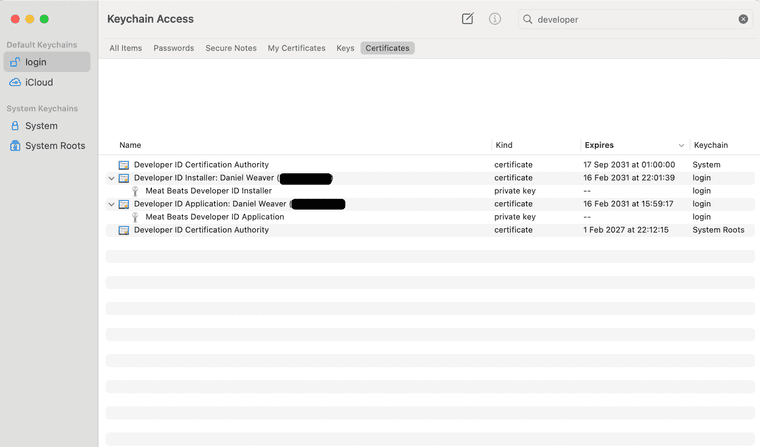
            CleanShot 2026-06-08 at 13.41.04@2x.png

            There's an older 2027 entry at the bottom, but the top ones are for my working cert.

            Meat Beats: https://meatbeats.com
            Klippr Video: https://klippr.video

            resonantR 1 Reply Last reply Reply Quote 1
            • dannytaurusD
              dannytaurus @resonant
              last edited by

              @resonant Claude recommends running these commands to make sure everything is working:

              $ xcodebuild -version
              Xcode 26.1.1
              Build version 17B100
              $ sw_vers
              ProductName:		macOS
              ProductVersion:		15.7.4
              BuildVersion:		24G517
              $ security find-identity -v -p codesigning
                1) XXXXXXXXXXXXXXXX "Developer ID Application: Daniel Weaver (XXXXX)"
                   1 valid identities found
              

              Meat Beats: https://meatbeats.com
              Klippr Video: https://klippr.video

              1 Reply Last reply Reply Quote 1
              • resonantR
                resonant @dannytaurus
                last edited by

                @dannytaurus

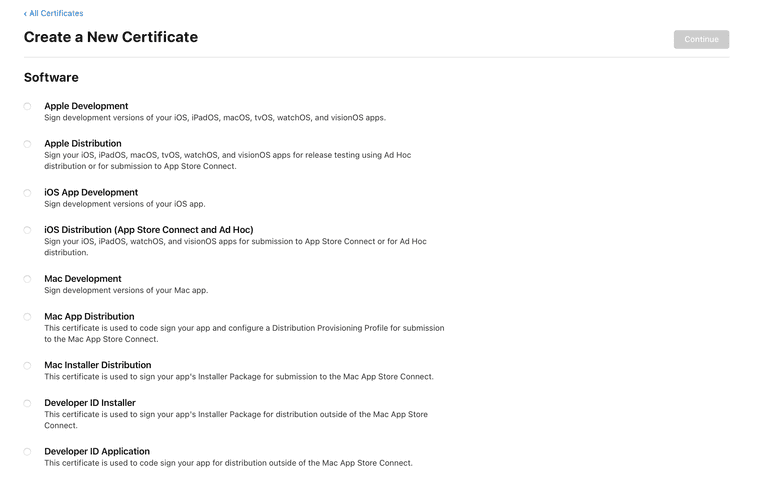
                Thank you for the tip! Which of these is the "intermediate thing" option?

                Screen Shot 2026-06-08 at 15.45.18.png

                dannytaurusD David HealeyD 3 Replies Last reply Reply Quote 0
                • dannytaurusD
                  dannytaurus @resonant
                  last edited by

                  @resonant You need the bottom two, but I'm not sure which is first. Claude should be able to guide you through it.

                  Meat Beats: https://meatbeats.com
                  Klippr Video: https://klippr.video

                  David HealeyD 1 Reply Last reply Reply Quote 0
                  • dannytaurusD
                    dannytaurus @resonant
                    last edited by dannytaurus

                    @resonant Claude says:

                    For VST3, AU, AAX, standalone apps, and notarization, you create Developer ID Application first.

                    The normal sequence is:

                    1. Developer ID Application
                      * Used to sign:
                      * .app
                      * .component (AU)
                      * .vst3
                      * .aaxplugin
                      * frameworks, dylibs, helpers, etc.
                      * Required for notarization.
                    2. Developer ID Installer (optional)
                      * Only needed if you’re distributing a signed .pkg installer.
                      * Signs the package itself, not the plugin inside it.

                    Meat Beats: https://meatbeats.com
                    Klippr Video: https://klippr.video

                    1 Reply Last reply Reply Quote 0
                    • David HealeyD
                      David Healey @dannytaurus
                      last edited by David Healey

                      @dannytaurus said in errSecInternalComponent error with Developer ID Application certificate G2 Sub-CA:

                      You need the bottom two, but I'm not sure which is first.

                      Order you create them doesn't matter. One is for signing plugins, the other is for the installer.

                      Free HISE Bootcamp Full Course for beginners.
                      YouTube Channel - Public HISE tutorials
                      My Patreon - HISE tutorials

                      dannytaurusD 1 Reply Last reply Reply Quote 0
                      • dannytaurusD
                        dannytaurus @David Healey
                        last edited by dannytaurus

                        @David-Healey You don't even need the Installer one if you're not creating installers.

                        All you need is the Application one if you're just signing the plugins themselves.

                        Meat Beats: https://meatbeats.com
                        Klippr Video: https://klippr.video

                        1 Reply Last reply Reply Quote 1
                        • David HealeyD
                          David Healey @resonant
                          last edited by

                          @resonant Just plugging my wares, I have a workshop that will walk you through the process: https://audiodevschool.com/courses/packaging-for-macos/

                          Free HISE Bootcamp Full Course for beginners.
                          YouTube Channel - Public HISE tutorials
                          My Patreon - HISE tutorials

                          1 Reply Last reply Reply Quote 3
                          • First post
                            Last post

                          20

                          Online

                          2.4k

                          Users

                          13.8k

                          Topics

                          119.7k

                          Posts