Forum
    • Categories
    • Register
    • Login

    Switch to the same panel with different buttons (different buttons send to, toggle the same panel)

    Scheduled Pinned Locked Moved General Questions
    9 Posts 3 Posters 31 Views
    Loading More Posts
    • Oldest to Newest
    • Newest to Oldest
    • Most Votes
    Reply
    • Reply as topic
    Log in to reply
    This topic has been deleted. Only users with topic management privileges can see it.
    • Y
      Yannrog
      last edited by

      Hi,

      Just wondering a question,

      How can I manage toggling a panel with 4 different buttons (they are the same but not in the same page/panel).

      By example the setting page, the X page, the Y page... have all 1 button in each called Panel1 (Total 4 buttons called each Panel1). *Panel1 is the destination.

      How to manage them so they toggle the panel1 (is it possible without array?)

      David HealeyD 1 Reply Last reply Reply Quote 0
      • David HealeyD
        David Healey @Yannrog
        last edited by

        @Yannrog Each component needs to have a different name.

        There are different ways to do this depending on how your project is set up and how you want things to behave.

        The simplest is to have a single callback function applied to all the buttons. Then in the callback you can check the value of all the buttons, if any of them are 1 you show the panel.

        Free HISE Bootcamp Full Course for beginners.
        YouTube Channel - Public HISE tutorials
        My Patreon - HISE tutorials

        Y 1 Reply Last reply Reply Quote 0
        • Y
          Yannrog @David Healey
          last edited by Yannrog

          @David-Healey Hi,

          Thank you for your response, wow this is great. Ok, can the second part be done. If any of them is 1,

          show the panel?

          David HealeyD Y 2 Replies Last reply Reply Quote 0
          • David HealeyD
            David Healey @Yannrog
            last edited by

            @Yannrog Not sure what you're asking

            Free HISE Bootcamp Full Course for beginners.
            YouTube Channel - Public HISE tutorials
            My Patreon - HISE tutorials

            Y 1 Reply Last reply Reply Quote 0
            • Y
              Yannrog @Yannrog
              last edited by Yannrog

              @David-Healey I would like to achieve something like on your video,

              https://www.youtube.com/watch?v=akMfRpFYOP8

              However the name of the buttons are specific to the panel

              Is it possible without a loop?

              1 Reply Last reply Reply Quote 0
              • Y
                Yannrog @David Healey
                last edited by

                @David-Healey Or maybe, I should rethink my interface.

                Buttons below and panels switching above. It would be easier.

                David HealeyD 1 Reply Last reply Reply Quote 0
                • David HealeyD
                  David Healey @Yannrog
                  last edited by

                  @Yannrog It's always easier if you name your components consistently.

                  Think like this for panel names, pnlPage0, pnlPage1, pnlPage2, etc.

                  Free HISE Bootcamp Full Course for beginners.
                  YouTube Channel - Public HISE tutorials
                  My Patreon - HISE tutorials

                  Y dannytaurusD 2 Replies Last reply Reply Quote 0
                  • Y
                    Yannrog @David Healey
                    last edited by

                    @David-Healey Ok

                    Thank you

                    1 Reply Last reply Reply Quote 0
                    • dannytaurusD
                      dannytaurus @David Healey
                      last edited by dannytaurus

                      @David-Healey I think the OP has one panel and 4 buttons in different places, and each button needs to show/hide the panel.

                      Like a global Settings panel that can be opened by a button in the main UI, or a button on the Effects page, or a button on the Arpeggiator page.

                      @Yannrog is this what you're trying to do? If so, something like this will work:

                      const pnlSettings = Content.getComponent("pnlSettings");
                      const btnSettings = Content.getAllComponents("btnSettings");
                      
                      for (b in btnSettings) b.setControlCallback(btnSettingsControl);
                      
                      inline function btnSettingsControl(component, value) {
                      	if (value) {
                      		for (b in btnSettings) {
                      			if (b != component) b.setValue(0);
                      		}
                      	}
                      
                          pnlSettings.showControl(value);
                      }
                      

                      Your buttons can be btnSettingsMain, btnSettingsEffects, etc.

                      Or, simpler: btnSettings1, btnSettings2, etc. as long as they all start with btnSettings

                      Same code, but fully commented, in case it helps:

                      # Find the panel you want to show/hide
                      const pnlSettings = Content.getComponent("pnlSettings");
                      
                      # Find all the buttons that need to toggle the panel:
                      # btnSettingsMain, btnSettingsEffects, etc.
                      const btnSettings = Content.getAllComponents("btnSettings");
                      
                      # Set the function that is called when any of the buttons are clicked
                      for (b in btnSettings) b.setControlCallback(btnSettingsControl);
                      
                      # The function that shows/hides the panel when a button is clicked
                      inline function btnSettingsControl(component, value) {
                          # If the button is clicked 'on', turn off all the other buttons
                      	if (value) {
                              # Check every button in btnSettings
                      		for (b in btnSettings) {
                                  # If it's a different button, turn it off
                      			if (b != component) b.setValue(0);
                      		}
                      	}
                      
                          # Set the panel visibility to the value of the button:
                          # Button on gives value of 1, which shows the panel
                          # Button off gives value of 0, which hides the panel
                          pnlSettings.showControl(value);
                      }
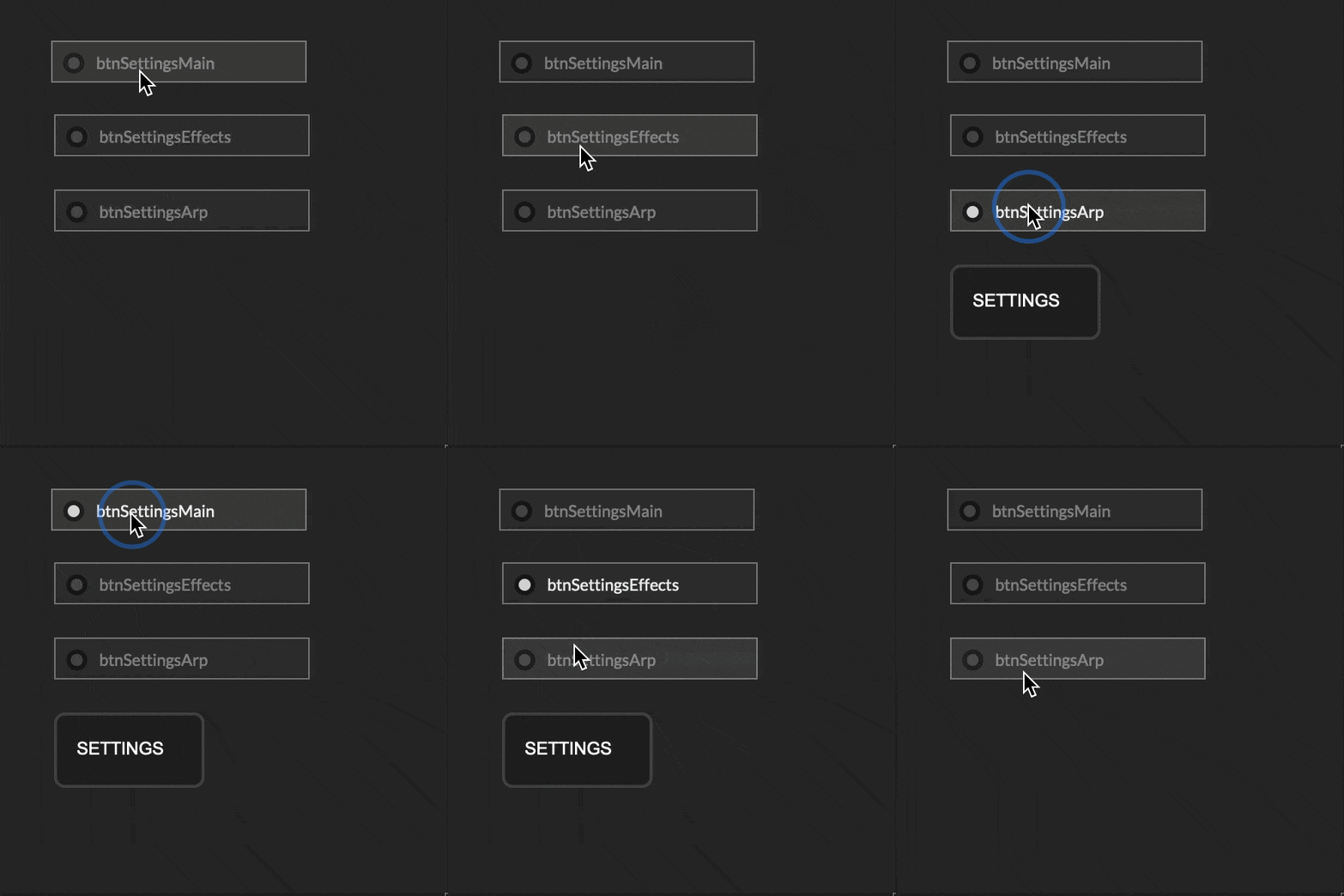
                      

                      CleanShot 2026-05-13 at 22.43.38.gif

                      Meat Beats: https://meatbeats.com
                      Klippr Video: https://klippr.video

                      1 Reply Last reply Reply Quote 0
                      • First post
                        Last post

                      9

                      Online

                      2.3k

                      Users

                      13.7k

                      Topics

                      119.0k

                      Posts

