Full Instrument Expansions - how, what where....
-
@Lindon Ah ok I understand. When you load a full instrument expansion it completely replaces the entire plugin UI, it doesn't load within it. It's like you're launching a completely different plugin.
You might find this video informative: https://www.youtube.com/watch?v=x4b8WlStG40
Free HISE Bootcamp Full Course for beginners.
YouTube Channel - HISE tutorials
My Patreon - More HISE tutorials -
@David-Healey okay, watched that...
Nooooooooooooooooooooooooooo!!!!!!!!!!!!!!!!!!!!!!!!!!!!!!! Surely to God its more sophisticated than this???
Now I have to duplicate all my Library(expansion) management display and functionality in every Full Instrument I ship......God help me.
HISE Development for hire.
www.channelrobot.com -
@Lindon Yes if it's a custom preset/expansion manager and you want it in all of them then you need to duplicate it. Or you can do like Rhapsody and have a button that unloads the current expansion and returns you to a dashboard type page where you select your expansion.
I think maybe the regular expansion system might be more suitable in your case.
Free HISE Bootcamp Full Course for beginners.
YouTube Channel - HISE tutorials
My Patreon - More HISE tutorials -
@David-Healey said in Full Instrument Expansions - how, what where....:
I think maybe the regular expansion system might be more suitable in your case.
In what way? I need each expansion to have its own UI, its own widget set, its own samples and its own functionality. I cant see how I get there with anything other than a Full Expansion approach
HISE Development for hire.
www.channelrobot.com -
@Lindon Yeah if each UI is totally unique then yes the full expansion is probably the better option.
What I do for shared stuff that is reused across all my expansions is I put it into a set of scripts that are loaded at the beginning.
Free HISE Bootcamp Full Course for beginners.
YouTube Channel - HISE tutorials
My Patreon - More HISE tutorials -
@David-Healey yes that will have to be my approach....luckily this compartmentalising of functionality has been my std. approach for some time.
HISE Development for hire.
www.channelrobot.com -
Ok on to the next round of questions:
(forgive me I havent built one yet as Im busy trying to build the player functionality)
What does FileSystem.getFolder(FileSystem.AppData) return?
- The Players AppData folder?
- AppData/Expansions/ExpansionName ?
- something else?
- nothing?
HISE Development for hire.
www.channelrobot.com -
@Lindon The player's app data folder
Free HISE Bootcamp Full Course for beginners.
YouTube Channel - HISE tutorials
My Patreon - More HISE tutorials -
@David-Healey great!
HISE Development for hire.
www.channelrobot.com -
@Lindon Ok here I am back again ... so I've built my player(well enough for the purpose of demoing to myself that I can in theory load and unload instruments using it..)
..and I've built an Full expansions, well again caveats: its trivially simple a background image and a single Sampler loaded with one sample map....
..so I've read as much of the documentation as I can find, so this (unsurprisingly) has generated a bunch of questions, but lets start with a simple question:
Is there a "how to" anywhere that walks thru the steps to build a full instrument expansion and get it to load in a "player"?
How far have I got? Well as I say I built the player and in the settings I set Expansion Type = Full and added a (trivial text) Encryption key... I did the same in the expansion project...
Then in the expansion project I ran Export>Export Project as Full Expansion
This gave me a info.hxi file in the root of my expansion project
So of course this gave me at least a couple of questions:
What the *** do I do with this info.hxi file?
-- I assume I put it somewhere in the player project but that then leads to another questionI want to have tone of Full expansions, surely these dont all get called info.hxi - unless they are placed in some sub-folder structure in the player project (like say the Expansions folder)???
Al help appreciated.
HISE Development for hire.
www.channelrobot.com -
@Lindon said in Full Instrument Expansions - how, what where....:
Is there a "how to" anywhere that walks thru the steps to build a full instrument expansion and get it to load in a "player"?
I think I covered this in the Expansion Installer video I posted on Patreon in February.
@Lindon said in Full Instrument Expansions - how, what where....:
I want to have tone of Full expansions, surely these dont all get called info.hxi - unless they are placed in some sub-folder structure in the player project (like say the Expansions folder)???
Yes all are info.hxi in there own subfolders.
Free HISE Bootcamp Full Course for beginners.
YouTube Channel - HISE tutorials
My Patreon - More HISE tutorials -
@David-Healey said in Full Instrument Expansions - how, what where....:
@Lindon said in Full Instrument Expansions - how, what where....:
Is there a "how to" anywhere that walks thru the steps to build a full instrument expansion and get it to load in a "player"?
I think I covered this in the Expansion Installer video I posted on Patreon in February.
Thanks yes you did, but it makes some assumptions, mostly that I want to use this expansion handler way of installing the expansions, and I dont - I have a fair bit of meta data to install as well so I want to use the powerful installer I've already written..so basically Im asking : what needs to go where in a finished completely installed Full Instrument Expansion?
part of this is clearly the (non standard) way I work with file based expansions, in Im installing them in the finished plugin myself...
So to be clear:
I have an installer system that will put (I think) any file anywhere I want it....
so what does an installed Full Instrument Expansion look like? ..and if I copy all this stuff in myself where does this Full Instrument expansion look for the samples?@Lindon said in Full Instrument Expansions - how, what where....:
I want to have tone of Full expansions, surely these dont all get called info.hxi - unless they are placed in some sub-folder structure in the player project (like say the Expansions folder)???
Yes all are info.hxi in there own subfolders.
-- so I think this leads me back to the question above....
HISE Development for hire.
www.channelrobot.com -
@Lindon In the project's app data folder there should be an Expansions folder. Inside there create a sub folder for your expansion.
In that sub folder drop your hxi. Add a subfolder called UserPresets and another called Samples. Put your Link file in the Samples folder.
Free HISE Bootcamp Full Course for beginners.
YouTube Channel - HISE tutorials
My Patreon - More HISE tutorials -
@David-Healey golden, as it happens I dont have any expansion presets, so do I need the UserPresets Folder?
HISE Development for hire.
www.channelrobot.com -
@Lindon Only if you're using the preset browser and the user might make presets.
Free HISE Bootcamp Full Course for beginners.
YouTube Channel - HISE tutorials
My Patreon - More HISE tutorials -
@David-Healey OK well there no way in the instruments to open the preset browser (yeah strange I know) so crossing that off the list.
HISE Development for hire.
www.channelrobot.com -
Ok some progress...
My player now loads a very simple test full instrument expansion....but the expansion cannot seem to find its sample maps....so Im doing something wrong...
So how I have this set up:
In my HISE project for the Player I have an Expansions folder, in there is an expansion folder (named for the expansion)
inside the individual expansion folder I have the classic folder structure...
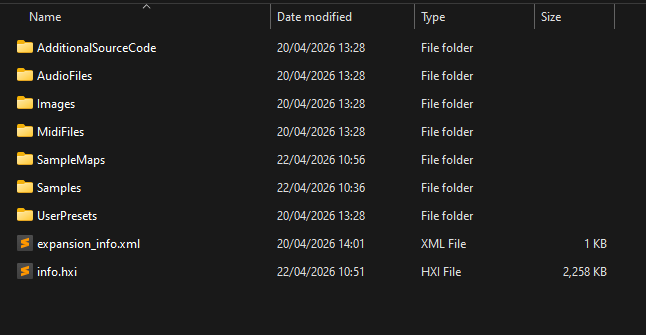
..as well as the info.hxi file
In the Samples folder here I have a LinkWindows file (only)
and in the SampleMaps folder I have all the xml sample maps for my expansion, but when I load my expansion using the player I get this in the sampler:
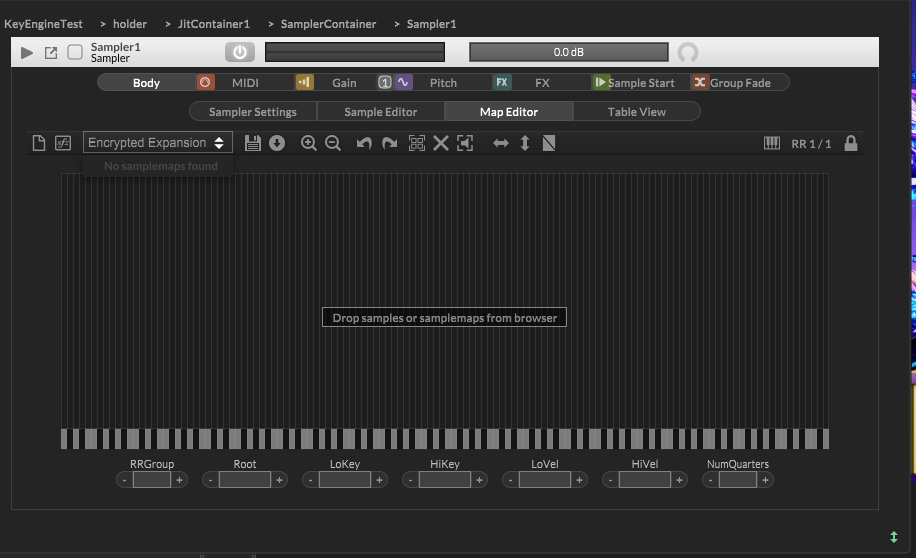
So no sample maps found...
How I set up my info.hxi file:
I loaded my expansion as its own project, with sample and sample maps set up.. and generated the hxi using the export menu...
What is it Im doing wrong?
HISE Development for hire.
www.channelrobot.com -
@Lindon said in Full Instrument Expansions - how, what where....:
In my HISE project for the Player I have an Expansions folder, in there is an expansion folder (named for the expansion)
The expansions should be completely separate HISE projects
Free HISE Bootcamp Full Course for beginners.
YouTube Channel - HISE tutorials
My Patreon - More HISE tutorials -
@David-Healey it is... I have a seperare expansion project...which is where the hxi is being generated - then Im copying over to the player (in the Players exapnsions sub folder structure)..
HISE Development for hire.
www.channelrobot.com -
@Lindon Nothing goes in the player project's Expansions folder. Put your hxi, UserPresets, and Samples folder (with Link file) in the player's AppData Expansions folder.
Free HISE Bootcamp Full Course for beginners.
YouTube Channel - HISE tutorials
My Patreon - More HISE tutorials

