Forum
    • Categories
    • Register
    • Login

    project build failed (codesign command failed)

    Scheduled Pinned Locked Moved General Questions
    18 Posts 2 Posters 56 Views
    Loading More Posts
    • Oldest to Newest
    • Newest to Oldest
    • Most Votes
    Reply
    • Reply as topic
    Log in to reply
    This topic has been deleted. Only users with topic management privileges can see it.
    • David HealeyD
      David Healey @Jimi_Jay
      last edited by

      @Jimi_Jay That's a warning, not an error, it should still have compiled I think.

      Free HISE Bootcamp Full Course for beginners.
      YouTube Channel - Public HISE tutorials
      My Patreon - HISE tutorials

      J 1 Reply Last reply Reply Quote 0
      • J
        Jimi_Jay @David Healey
        last edited by

        @David-Healey oh yeah so sorry I just realised this was just a warning... This was the error I think :

        ** BUILD FAILED **

        The following build commands failed:
        CodeSign /Users/jay/Documents/HISE\ Projects/reverb1/Binaries/Builds/MacOSX/build/Release/reverb1.component (in target 'reverb1 - AU' from project 'reverb1')

        David HealeyD 1 Reply Last reply Reply Quote 0
        • David HealeyD
          David Healey @Jimi_Jay
          last edited by David Healey

          @Jimi_Jay Ah ok, someone else posted this problem (and solution) a few days ago, I wonder if this is something specific to Tahoe or the latest xcode versions

          https://forum.hise.audio/topic/14592/command-codesign-failed-with-nonzero-exit-code

          Wait a minute, that was you 😱

          Free HISE Bootcamp Full Course for beginners.
          YouTube Channel - Public HISE tutorials
          My Patreon - HISE tutorials

          J 1 Reply Last reply Reply Quote 0
          • J
            Jimi_Jay @David Healey
            last edited by Jimi_Jay

            @David-Healey Yeah but that was a problem with building hise but now I'm exporting my project as fx plugin in hise and this error comes up in the terminal, I never open xcode in this process. I don't really know what makes this happen... If there is a way to build a project as an fx plugin in .au inside xcode (not going through hise)? Because if it's the same problem as when I was building hise, I know how to fix it in xcode... I just don't know how to export my plugin through xcode

            David HealeyD 1 Reply Last reply Reply Quote 0
            • David HealeyD
              David Healey @Jimi_Jay
              last edited by

              @Jimi_Jay All that happens when you select export from HISE is it creates a JUCE project and runs xcode in a terminal. You can close the terminal and open the JUCE project manually in Projucer then open that in xcode just like building HISE. The auto generated juce project file is in your project's Binaries folder.

              Free HISE Bootcamp Full Course for beginners.
              YouTube Channel - Public HISE tutorials
              My Patreon - HISE tutorials

              J 1 Reply Last reply Reply Quote 0
              • J
                Jimi_Jay @David Healey
                last edited by

                @David-Healey The build finally succeeded, I just did the same thing as when I was building hise. Now that it succeeded though, where can I find the au plugin ?

                David HealeyD 1 Reply Last reply Reply Quote 0
                • David HealeyD
                  David Healey @Jimi_Jay
                  last edited by

                  @Jimi_Jay Somewhere in the Binaries folder, it will have a .component extension

                  Free HISE Bootcamp Full Course for beginners.
                  YouTube Channel - Public HISE tutorials
                  My Patreon - HISE tutorials

                  J 1 Reply Last reply Reply Quote 0
                  • J
                    Jimi_Jay @David Healey
                    last edited by

                    @David-Healey okay and do you know how I can use it in logic ? I've never done this. If not thanks for the help anyway !

                    David HealeyD 1 Reply Last reply Reply Quote 0
                    • David HealeyD
                      David Healey @Jimi_Jay
                      last edited by

                      @Jimi_Jay You need to place it in the AU plugins folder, it's alongside the VST3 folder, I think it's in Library/Audio/Plug-ins/AU - remember that macOS has two Library folders, you want the system one I think.

                      Free HISE Bootcamp Full Course for beginners.
                      YouTube Channel - Public HISE tutorials
                      My Patreon - HISE tutorials

                      J 1 Reply Last reply Reply Quote 0
                      • J
                        Jimi_Jay @David Healey
                        last edited by

                        @David-Healey I found the .component file and tried moving it to the /audio/plugins/components/ directory and it said
                        "The operation can’t be completed because “reverb1.component” needs to be downloaded."

                        David HealeyD 1 Reply Last reply Reply Quote 0
                        • David HealeyD
                          David Healey @Jimi_Jay
                          last edited by

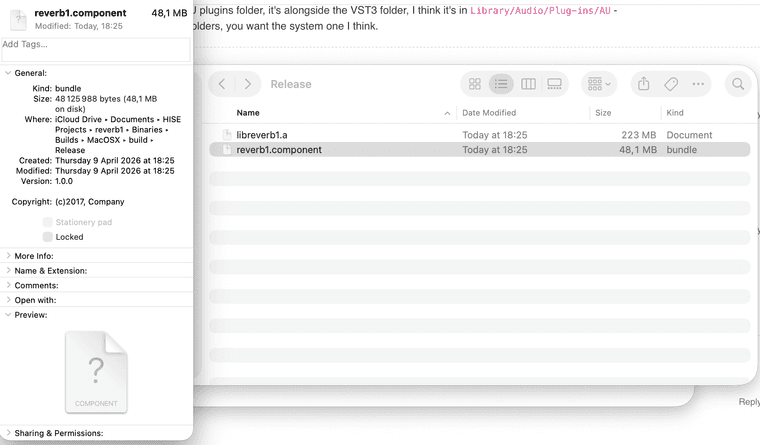
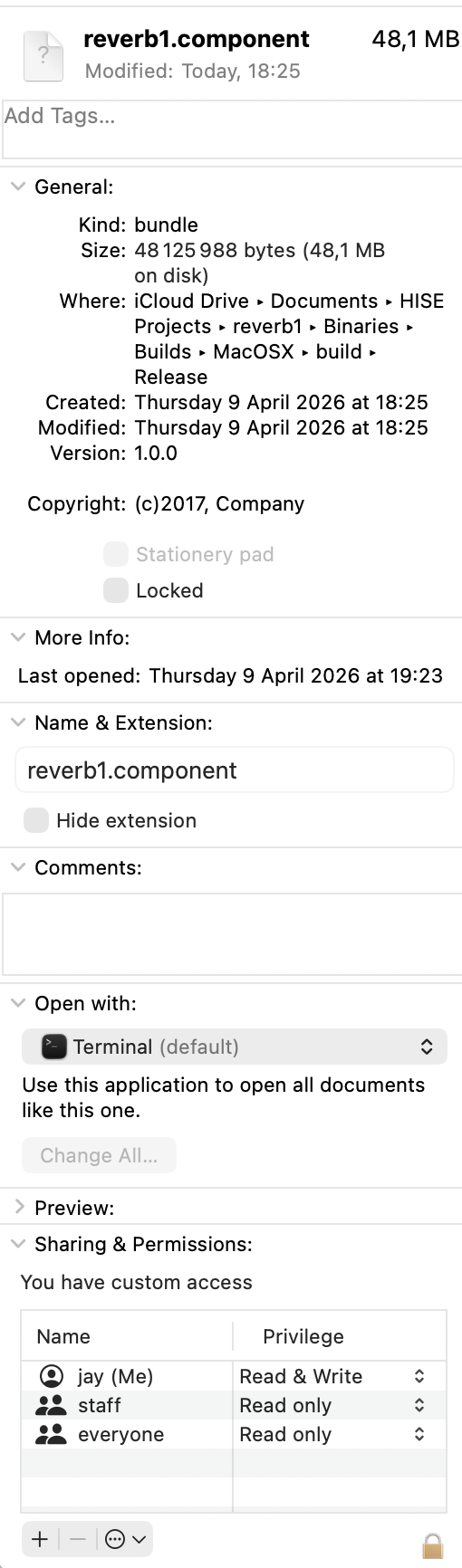
                          @Jimi_Jay Might be a permission issue, not sure. Or is it an alias rather than an actual binary? Show me a screenshot of the .component file.

                          Free HISE Bootcamp Full Course for beginners.
                          YouTube Channel - Public HISE tutorials
                          My Patreon - HISE tutorials

                          J 1 Reply Last reply Reply Quote 0
                          • J
                            Jimi_Jay @David Healey
                            last edited by

                            @David-Healey Screenshot 2026-04-09 at 19.43.01.png Screenshot 2026-04-09 at 19.43.35.png

                            David HealeyD 1 Reply Last reply Reply Quote 0
                            • David HealeyD
                              David Healey @Jimi_Jay
                              last edited by

                              @Jimi_Jay Looks like it's on an external drive (iCloud Drive)? If so, probably a permission issue.

                              Free HISE Bootcamp Full Course for beginners.
                              YouTube Channel - Public HISE tutorials
                              My Patreon - HISE tutorials

                              J 1 Reply Last reply Reply Quote 0
                              • J
                                Jimi_Jay @David Healey
                                last edited by

                                @David-Healey I copied and pasted it and it worked but now when I try to open it in logic there is no ui and no knob or button ( I recreated your reverb with 1 knob and 1 button and an Analyser) and when I enable the plugin it mutes the track it's on.

                                David HealeyD 1 Reply Last reply Reply Quote 0
                                • David HealeyD
                                  David Healey @Jimi_Jay
                                  last edited by

                                  @Jimi_Jay Did you definitely export as an effect?

                                  Free HISE Bootcamp Full Course for beginners.
                                  YouTube Channel - Public HISE tutorials
                                  My Patreon - HISE tutorials

                                  J 1 Reply Last reply Reply Quote 0
                                  • J
                                    Jimi_Jay @David Healey
                                    last edited by Jimi_Jay

                                    @David-Healey Well originally I tried exporting as fx plugin in hise and then selecting au but this didn't work because of a codesign error.
                                    I then went and opened the .juce file from the binaries folder in the project and built it in xcode.
                                    And finally, I copied and pasted the .component file that was in this directory :
                                    /HISE Projects/reverb1/binaries/Builds/MacOSX/build/Release/reverb1.component

                                    David HealeyD 1 Reply Last reply Reply Quote 0
                                    • David HealeyD
                                      David Healey @Jimi_Jay
                                      last edited by

                                      @Jimi_Jay So it should be an effect then, I'm not sure why it's not working.

                                      Free HISE Bootcamp Full Course for beginners.
                                      YouTube Channel - Public HISE tutorials
                                      My Patreon - HISE tutorials

                                      1 Reply Last reply Reply Quote 0
                                      • First post
                                        Last post

                                      19

                                      Online

                                      2.2k

                                      Users

                                      13.6k

                                      Topics

                                      118.1k

                                      Posts