@dannytaurus hey thanks for the updated fix! You are right the knob movements weren't being recorded with mine. I haven't got around to integrating your fixed version yet but appreciate you sharing it.
@AxiomCrux this is my first HISE plugin so not sure when the issue appeared with Ableton, and I would look at that other PR if you want knob movements recorded - my proposed fix indeed broke that.
J
Posts
-
RE: Opening plugin UI disables active automation in Ableton Liveposted in Bug Reports
-
RE: Opening plugin UI disables active automation in Ableton Liveposted in Bug Reports
I'm not going to pretend I came up with this myself or understand the underlying JUCE implications, but this seems to have fixed it.
In this file:
HISE/JUCE/modules/juce_audio_processors/processors/juce_AudioProcessor.cppModify the setValueNotifyingHost function to abort if the value hasn't actually changed:
void AudioProcessorParameter::setValueNotifyingHost (float newValue)
{
    // Abort if the value hasn't changed. This prevents redundant DAW notifications
    // during UI initialization that cause Ableton to incorrectly disable automation.
    if (getValue() == newValue) return;

    setValue (newValue);
    sendValueChangedMessageToListeners (newValue);
}
I haven't noticed any other side effects so far

-
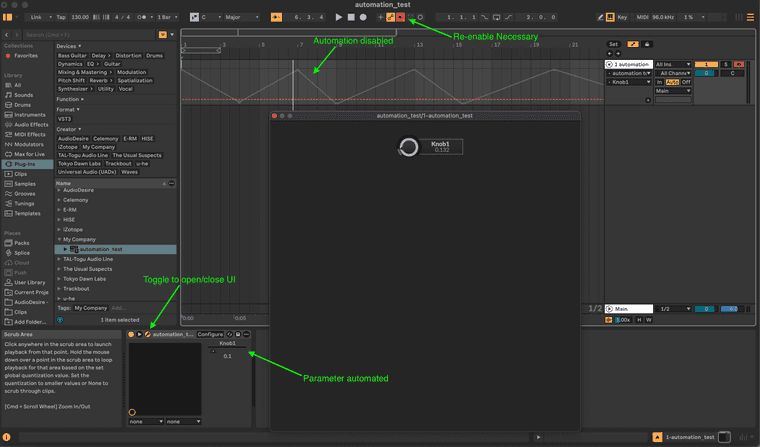
Opening plugin UI disables active automation in Ableton Liveposted in Bug Reports
Observed Behavior:
When opening the plugin UI during playback, Ableton Live instantly disables active parameter automation lanes. The DAW behaves exactly as if a parameter was manually adjusted by the user, terminating the automation playback and illuminating Live's "Re-Enable Automation" button.Minimum Reproducible Example:
This behavior can be reproduced from a new project without any scripts.
Create a new HISE project.
Add a single UI Slider (Knob).
Enable isPluginParameter for the knob.
Export as a VST3 / AU.
In Ableton Live, configure the parameter, draw automation on the timeline, and press play.
Open and close the plugin UI window repeatedly.Result: The automation lane will eventually disable upon opening the UI.
Reproduction rate: With a simple 1 knob UI, the failure rate is approximately 1/30 attempts. It may depend on the rate of change of the parameter. With a complex UI (60+ parameters) the failure rate is approximately 1/3 attempts.
HISE 4.9.3
Commit Hash 5d34685f
Live 12.4.3
MacOS 15.7.9
VST3 and AU