Forum
    • Categories
    • Register
    • Login

    Combobox not syncing Presets properly

    Scheduled Pinned Locked Moved Scripting
    5 Posts 3 Posters 30 Views
    Loading More Posts
    • Oldest to Newest
    • Newest to Oldest
    • Most Votes
    Reply
    • Reply as topic
    Log in to reply
    This topic has been deleted. Only users with topic management privileges can see it.
    • D
      duma
      last edited by

      Hey So I use a combobox to load all my samplemaps in my preset browser, but when I add more presets it desyncs the previous presets 2026-05-12 13-52-40.mkv

      David HealeyD LindonL 2 Replies Last reply Reply Quote 0
      • David HealeyD
        David Healey @duma
        last edited by

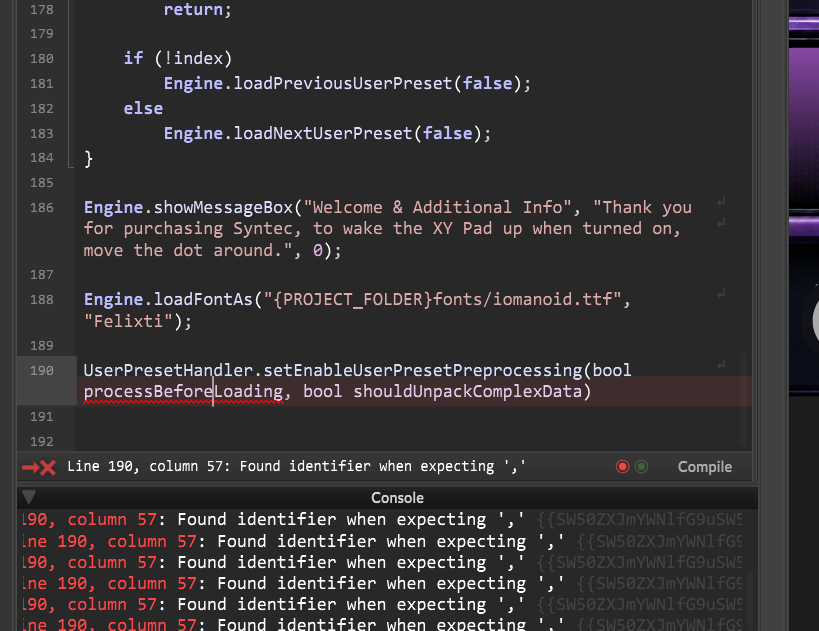
        @duma The combo box indexes will be shifted when you add new items to it. The preset will still contain the old indexes. If this is for a product update you can use the preset preprocessor to redirect them.

        https://docs.hise.audio/scripting/scripting-api/userpresethandler/index.html#setenableuserpresetpreprocessing

        Free HISE Bootcamp Full Course for beginners.
        YouTube Channel - Public HISE tutorials
        My Patreon - HISE tutorials

        D 1 Reply Last reply Reply Quote 0
        • LindonL
          Lindon @duma
          last edited by

          @duma as Dave says... and this is why most of us ran away from using comboBoxes for this, instead one alternative approach is:

          • add a TextBox to your UI, that contains the name of your preset (or sample map) and this is the saveInPreset object that loads your preset or map.

          Your Combo Box is then just there to populate this textBox and call changed() on it... the comboBox then should not be saveInPreset...

          It is also possible to set the LAF for your comboBox to show nothing in its default state...and you can then place a LAFed textBox that looks exactly like a "closed" ComboBox underneath the ComboBox, thus from the end users point of view it looks and behaves just like a regular ComboBox

          HISE Development for hire.
          www.channelrobot.com

          D 1 Reply Last reply Reply Quote 0
          • D
            duma @David Healey
            last edited by

            @David-Healey If product update means adding new presets to the preset browser than yes, that's what I mean. The code doesn't workimage_2026-05-12_144710687.png

            1 Reply Last reply Reply Quote 0
            • D
              duma @Lindon
              last edited by

              I don't want the user to see the combobox it's just to have presets stored correctly

              1 Reply Last reply Reply Quote 0
              • First post
                Last post

              16

              Online

              2.3k

              Users

              13.7k

              Topics

              118.9k

              Posts