Forum
    • Categories
    • Register
    • Login

    How to display jpanner node values in labels/panel

    Scheduled Pinned Locked Moved ScriptNode
    5 Posts 2 Posters 41 Views
    Loading More Posts
    • Oldest to Newest
    • Newest to Oldest
    • Most Votes
    Reply
    • Reply as topic
    Log in to reply
    This topic has been deleted. Only users with topic management privileges can see it.
    • J
      Jeetender
      last edited by

      how can i display jpanner nopde values in front interface using labels or panels.. ive tried using the getnode function but it doesn't seem to be working..

      David HealeyD J 2 Replies Last reply Reply Quote 0
      • David HealeyD
        David Healey @Jeetender
        last edited by

        @Jeetender How are you controlling the node's parameters?

        Free HISE Bootcamp Full Course for beginners.
        YouTube Channel - Public HISE tutorials
        My Patreon - HISE tutorials

        1 Reply Last reply Reply Quote 0
        • J
          Jeetender @Jeetender
          last edited by

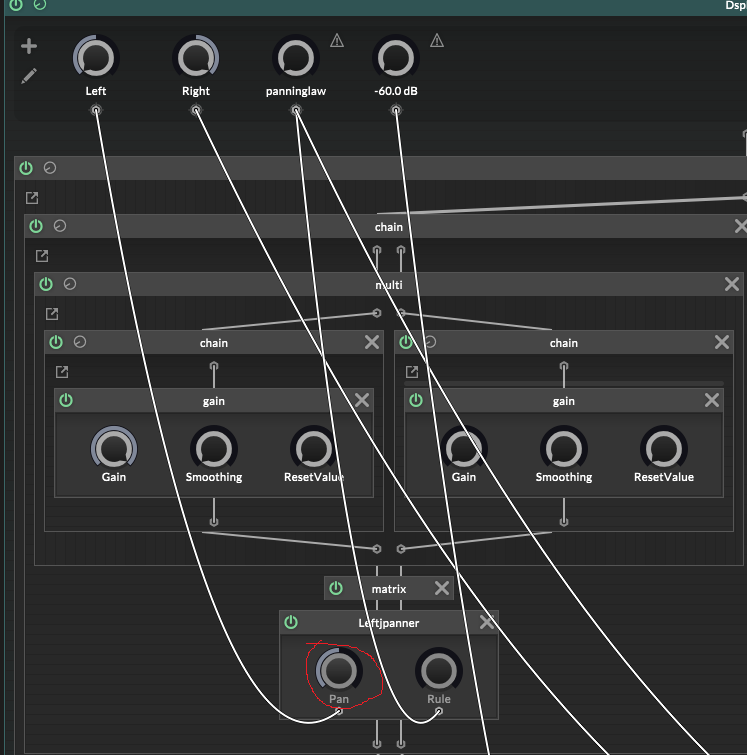
          the one in the red circle, i want to display its value from -100% to a 100%
          Untitled.png

          David HealeyD J 2 Replies Last reply Reply Quote 0
          • David HealeyD
            David Healey @Jeetender
            last edited by

            @Jeetender So what you show on your UI is the value of Left, since that is controlling the parameter.

            For example

            const ScriptFX1 = Synth.getEffect("Script FX1");
            
            Console.print(ScriptFX1.getAttribute(ScriptFX1.Left));
            

            But I'm guessing you have a knob on your UI that is connected to Left already?

            Free HISE Bootcamp Full Course for beginners.
            YouTube Channel - Public HISE tutorials
            My Patreon - HISE tutorials

            1 Reply Last reply Reply Quote 0
            • J
              Jeetender @Jeetender
              last edited by

              @Jeetender said in How to display jpanner node values in labels/panel:

              the one in the red circle, i want to display its value from -100% to a 100%
              Untitled.png

              @David-Healey said in How to display jpanner node values in labels/panel:

              @Jeetender So what you show on your UI is the value of Left, since that is controlling the parameter.

              For example

              const ScriptFX1 = Synth.getEffect("Script FX1");
              
              Console.print(ScriptFX1.getAttribute(ScriptFX1.Left));   API call with undefined parameter 0
              

              But I'm guessing you have a knob on your UI that is connected to Left already?

              1 Reply Last reply Reply Quote 0
              • First post
                Last post

              14

              Online

              2.3k

              Users

              13.6k

              Topics

              118.2k

              Posts