How to display jpanner node values in labels/panel
-
how can i display jpanner nopde values in front interface using labels or panels.. ive tried using the getnode function but it doesn't seem to be working..
-
@Jeetender How are you controlling the node's parameters?
-
the one in the red circle, i want to display its value from -100% to a 100%
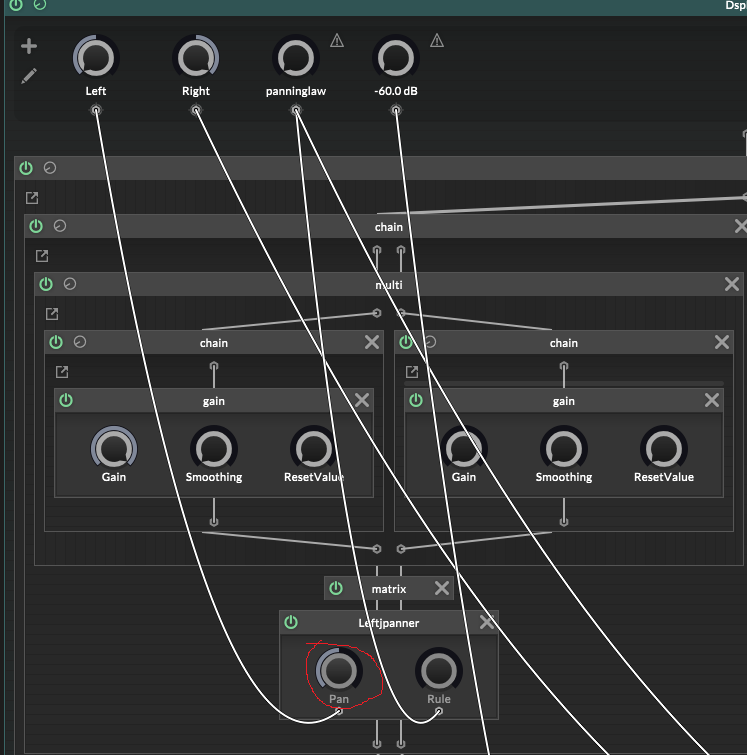
-
@Jeetender So what you show on your UI is the value of Left, since that is controlling the parameter.
For example
const ScriptFX1 = Synth.getEffect("Script FX1");

Console.print(ScriptFX1.getAttribute(ScriptFX1.Left));
But I'm guessing you have a knob on your UI that is connected to Left already?
-
@Jeetender said in How to display jpanner node values in labels/panel:
the one in the red circle, i want to display its value from -100% to a 100%
@David-Healey said in How to display jpanner node values in labels/panel:
@Jeetender So what you show on your UI is the value of Left, since that is controlling the parameter.
For example
const ScriptFX1 = Synth.getEffect("Script FX1");

Console.print(ScriptFX1.getAttribute(ScriptFX1.Left));   API call with undefined parameter 0
But I'm guessing you have a knob on your UI that is connected to Left already?
