Full Instrument Expansions - how, what where....
-
@Lindon Only if you're using the preset browser and the user might make presets.
Free HISE Bootcamp Full Course for beginners.
YouTube Channel - HISE tutorials
My Patreon - More HISE tutorials -
@David-Healey OK well there no way in the instruments to open the preset browser (yeah strange I know) so crossing that off the list.
HISE Development for hire.
www.channelrobot.com -
Ok some progress...
My player now loads a very simple test full instrument expansion....but the expansion cannot seem to find its sample maps....so Im doing something wrong...
So how I have this set up:
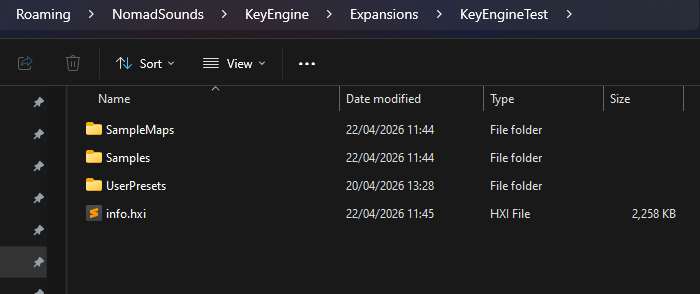
In my HISE project for the Player I have an Expansions folder, in there is an expansion folder (named for the expansion)
inside the individual expansion folder I have the classic folder structure...
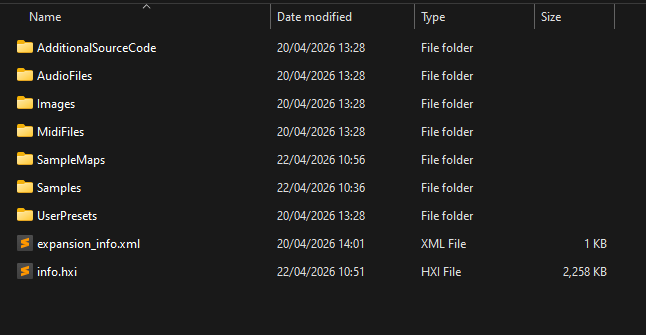
..as well as the info.hxi file
In the Samples folder here I have a LinkWindows file (only)
and in the SampleMaps folder I have all the xml sample maps for my expansion, but when I load my expansion using the player I get this in the sampler:
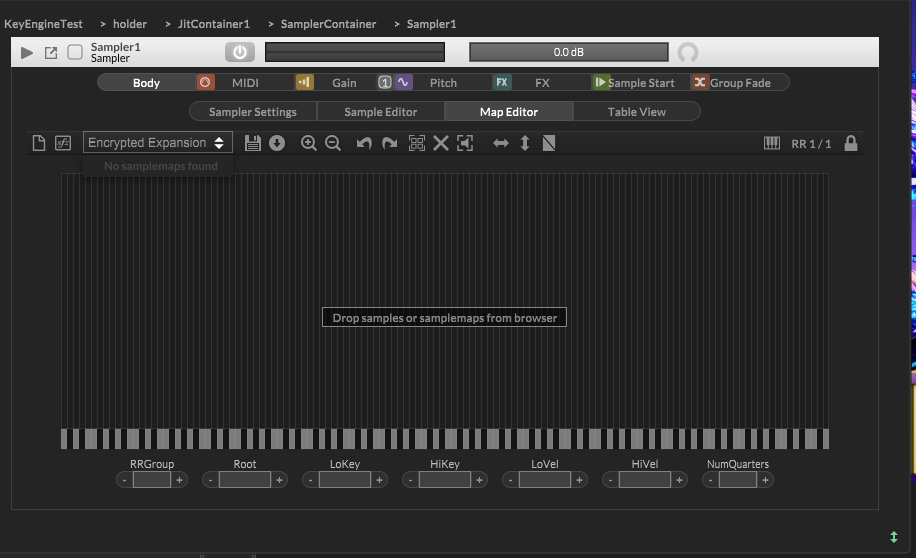
So no sample maps found...
How I set up my info.hxi file:
I loaded my expansion as its own project, with sample and sample maps set up.. and generated the hxi using the export menu...
What is it Im doing wrong?
HISE Development for hire.
www.channelrobot.com -
@Lindon said in Full Instrument Expansions - how, what where....:
In my HISE project for the Player I have an Expansions folder, in there is an expansion folder (named for the expansion)
The expansions should be completely separate HISE projects
Free HISE Bootcamp Full Course for beginners.
YouTube Channel - HISE tutorials
My Patreon - More HISE tutorials -
@David-Healey it is... I have a seperare expansion project...which is where the hxi is being generated - then Im copying over to the player (in the Players exapnsions sub folder structure)..
HISE Development for hire.
www.channelrobot.com -
@Lindon Nothing goes in the player project's Expansions folder. Put your hxi, UserPresets, and Samples folder (with Link file) in the player's AppData Expansions folder.
Free HISE Bootcamp Full Course for beginners.
YouTube Channel - HISE tutorials
My Patreon - More HISE tutorials -
@David-Healey Okay.... now nothing works from within the Players HISE project -- does this ONLY work in a compiled plugin?
HISE Development for hire.
www.channelrobot.com -
@Lindon No it will work in HISE if you've set the player project to use Full Expansions and the encryption key matches the one used for the expansion project.
Free HISE Bootcamp Full Course for beginners.
YouTube Channel - HISE tutorials
My Patreon - More HISE tutorials -
@David-Healey well I have and it doesnt....now nothing happens at all...so Im still doing something wrong..
HISE Development for hire.
www.channelrobot.com -
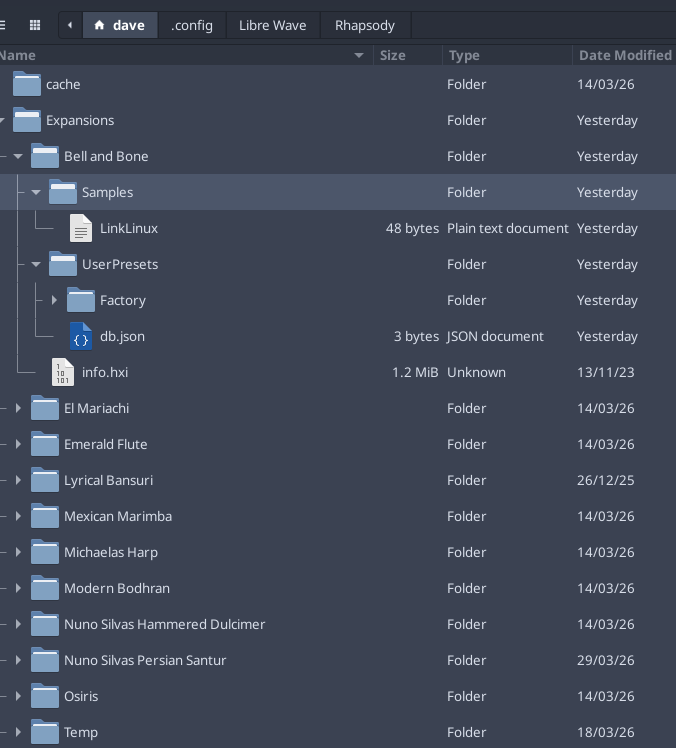
@Lindon This is how my app data folder looks for Rhapsody, is your structure similar?
Free HISE Bootcamp Full Course for beginners.
YouTube Channel - HISE tutorials
My Patreon - More HISE tutorials -
HISE Development for hire.
www.channelrobot.com -
@Lindon No need for the sample maps folder, the sample maps are embedded in the hxi. How are you expecting the expansions to show up in your player HISE project?
Free HISE Bootcamp Full Course for beginners.
YouTube Channel - HISE tutorials
My Patreon - More HISE tutorials -
@David-Healey it shows up as taking over the entire screen with a LOUD ui.....
heres what Im doing to call the expansion
reg eh = Engine.createExpansionHandler();

function instrumentMouseCallBack(event,panel)
{
	if(event.doubleClick)
	{
		pos = InstrumentPanels.indexOf(panel);
		tempMouseJSON = getJSONforInstPanel(pos);
		//Content.getComponent("Label1").set("text", "here we load an expansion called:" + tempMouseJSON.ExpName);


		Console.clear();
		Console.print("loading an instrument........." + tempMouseJSON.ExpName);
		for(e in eh.getExpansionList())
		{
			Console.print("the name of the expansion is:" + e.getProperties().Name);
		}

		eh.setCurrentExpansion("KeyEngineTest");
	}
};
..and now its not printing "the name of the expansion is..."
So its not finding any expansions....
HISE Development for hire.
www.channelrobot.com -
@Lindon right now the expansions own project cant even find the sample maps in its own project structure...this is getting silly.
HISE Development for hire.
www.channelrobot.com -
You're loading the expansion directly after that loop so the loading of the expansion probably wipes out the output, not sure.
Try putting that loop in on init right after you declare your expansion handler.
-
@Lindon said in Full Instrument Expansions - how, what where....:
right now the expansions own project cant even find the sample maps in its own project structure...this is getting silly.
Do you mean when you load it through the player project?
Free HISE Bootcamp Full Course for beginners.
YouTube Channel - HISE tutorials
My Patreon - More HISE tutorials -
@David-Healey no - just loading the expansion project...it cant find anything, rebuilding a new test expansion project now.... called Test2
..ok thats back to working at least... now:
Building the hx1 file....
Expansion type = Full
Encryption key = TestOK creating a new folder called Test2 in the AppData folder structure of the Player
Adding a Samples folder - with the LinkWindows file in it only...
Adding an empty UserPresets folder
putting my info.hxi that I just generated in the Test2 folder...to get to this:
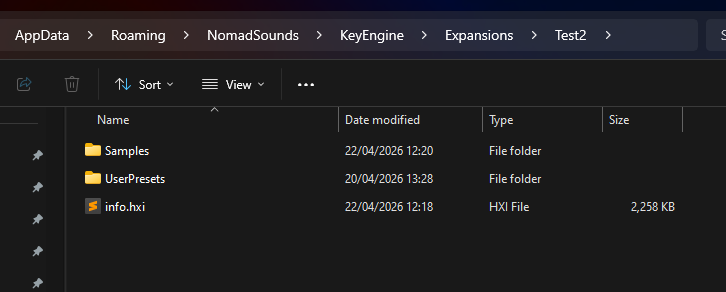
I load the Player project and execute this code:
reg eh = Engine.createExpansionHandler();
reg expansionList = eh.getExpansionList();
function instrumentMouseCallBack(event,panel)
{
	//Console.print(trace(event));
	if(event.doubleClick)
	{
		pos = InstrumentPanels.indexOf(panel);
		tempMouseJSON = getJSONforInstPanel(pos);
		//Content.getComponent("Label1").set("text", "here we load an expansion called:" + tempMouseJSON.ExpName);
		Console.print("loading an instrument........." + tempMouseJSON.ExpName);
		Console.clear();
		for(e in expansionList)
		{
			Console.print("the name of the expansion is:" + e.getProperties().Name);
		}

		eh.setCurrentExpansion("Test2");
		//Console.print(trace(eh.getExpansionList()));
	}
};
and nothing happens.......it cannot find the list of expansions in its AppData folder...
HISE Development for hire.
www.channelrobot.com -
Interface: the app data folder is:C:\Users\Lindon\AppData\Roaming\NomadSounds\KeyEngine
Interface: the number of expansions found is:0
HISE Development for hire.
www.channelrobot.com -
@Lindon Put this in
on initafter you declare the expansion handlerfor(e in eh.getExpansionList()) Console.print(e.getProperties().Name);Free HISE Bootcamp Full Course for beginners.
YouTube Channel - HISE tutorials
My Patreon - More HISE tutorials -
@David-Healey said in Full Instrument Expansions - how, what where....:
for(e in eh.getExpansionList())
Console.print(e.getProperties().Name);done:
reg eh = Engine.createExpansionHandler();
reg expansionList = eh.getExpansionList();
for(e in eh.getExpansionList())
    Console.print("we have found expansion:" + e.getProperties().Name);
and the output is.....
Interface: USER SAMPLES LOCATION:D:\AudioContent\NomadSounds
Interface: library panel repaint getting called
As I say its not finding any expansions in the AppData folder structure...