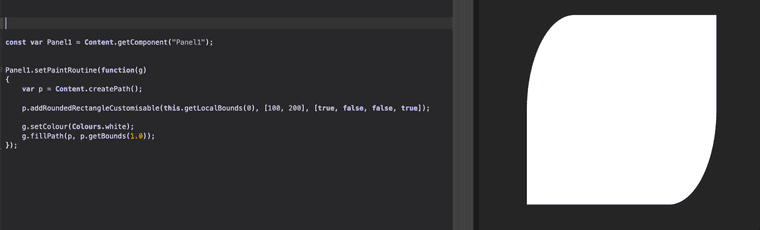
Panel paint routine - different corner radius on same panel?
-
@DanH Yes I made a video about it :)
Free HISE Bootcamp Full Course for beginners.
YouTube Channel - HISE tutorials
My Patreon - More HISE tutorials -
@David-Healey Thanks but I don't see what I'm looking for. Each corner a different radius. 10, 6, 4, 2 or something...
Probably didn't explain the question very well!
DHPlugins / DC Breaks | Artist / Producer / DJ / Developer
https://dhplugins.com/ | https://dcbreaks.com/
London, UK -
Oh I see what you mean, hmm you'd probably need to use a path for that.
Free HISE Bootcamp Full Course for beginners.
YouTube Channel - HISE tutorials
My Patreon - More HISE tutorials -
@David-Healey yep. Maybe I'll see if Claude can add to source code though...
DHPlugins / DC Breaks | Artist / Producer / DJ / Developer
https://dhplugins.com/ | https://dcbreaks.com/
London, UK -
@DanH I've added a function a while back to make asymmetric rounded corners but they all share the same curve.
Path.addRoundedRectangleCustomisable(var area, var cornerSizeXY, var boolCurves)Perhaps a mix between Dave's object and this function could unlock asymmetric curves + different curves per corner + show/hide with boolean
-
@ustk said in Panel paint routine - different corner radius on same panel?:
asymmetric rounded corners but they all share the same curve
Got an image so I can visualise this?
Free HISE Bootcamp Full Course for beginners.
YouTube Channel - HISE tutorials
My Patreon - More HISE tutorials -
Hise made me an F5 dude, any other app just suffers...
-
@David-Healey @DanH but the problem is that it's derived from this Juce path function
void Path::addRoundedRectangle (const float x, const float y, const float w, const float h,
                                float csx, float csy,
                                const bool curveTopLeft, const bool curveTopRight,
                                const bool curveBottomLeft, const bool curveBottomRight)
where we can see there's only one set of
csxandcsyso in the end it's easier to make either a specific function in Hise script that reproduces the Juce's one with more customisation, or just import a path...
-
@ustk Ah cool. I wonder if it's possible to extend the existing drawRoundedRectangle function to allow for this behaviour and what Dan wants too, through the cornerData object.
Free HISE Bootcamp Full Course for beginners.
YouTube Channel - HISE tutorials
My Patreon - More HISE tutorials -
@David-Healey I'm pretty sure all existing rectangles functions in Hise (or at least the ones with corner data) are ending their lives in this Juce function, with its limitations...
void Path::addRoundedRectangle (float x, float y, float w, float h, float cs)
{
    addRoundedRectangle (x, y, w, h, cs, cs);
}

void Path::addRoundedRectangle (float x, float y, float w, float h, float csx, float csy)
{
    addRoundedRectangle (x, y, w, h, csx, csy, true, true, true, true);
}

void Path::addRoundedRectangle (const float x, const float y, const float w, const float h,
                                float csx, float csy,
                                const bool curveTopLeft, const bool curveTopRight,
                                const bool curveBottomLeft, const bool curveBottomRight)
{
    csx = jmin (csx, w * 0.5f);
    csy = jmin (csy, h * 0.5f);
    auto cs45x = csx * 0.45f;
    auto cs45y = csy * 0.45f;
    auto x2 = x + w;
    auto y2 = y + h;

    if (curveTopLeft)
    {
        startNewSubPath (x, y + csy);
        cubicTo (x, y + cs45y, x + cs45x, y, x + csx, y);
    }
    else
    {
        startNewSubPath (x, y);
    }

    if (curveTopRight)
    {
        lineTo (x2 - csx, y);
        cubicTo (x2 - cs45x, y, x2, y + cs45y, x2, y + csy);
    }
    else
    {
        lineTo (x2, y);
    }

    if (curveBottomRight)
    {
        lineTo (x2, y2 - csy);
        cubicTo (x2, y2 - cs45y, x2 - cs45x, y2, x2 - csx, y2);
    }
    else
    {
        lineTo (x2, y2);
    }

    if (curveBottomLeft)
    {
        lineTo (x + csx, y2);
        cubicTo (x + cs45x, y2, x, y2 - cs45y, x, y2 - csy);
    }
    else
    {
        lineTo (x, y2);
    }

    closeSubPath();
}
But it gives a good hint on how to create a more custom one in Hise script
-
@DanH @David-Healey Here's a function that makes the corners totally independent and asymmetric
HiseSnippet 1213.3ocsW01aaaCDlJIpn1aEXEX+.H5mTJ7bsbhcRZPwxhSxZvVRMpy51PvPAEEkMQnIEjnRlWQ919Au+AaGo7Kx1xoAFqFvQl28bmdtiG4coahhxRSUIHmpWMJlgb9Z2dij5AcFP3Rz4mXDzIKUqF9dFUiNdTLIMkEhbb17GMHbprEx94e99iIBhjxlIBg9fhSY+LeHWOSZ2i9ItPbFIjcEeXAz6dz4TkriRnx.1roaCTLgdCoO6RhA1Ftn2RRGfbdo6NAQs2k5uW.YulGDbP61GzJbmnPRycXzf.RSFnd2VQsQNO4zPtVkzSSzrTjyVGqBG0af5NY9K3C7TdffYV3i5Au4bwmoDglPzHE0Y.WD1cRZJEAdo6rj1l4Isu08BdHep7YIuuwp.OyhhIPmMlmdaNG87KRuFEnWITxo.k1JmRO2sGMgGqmowvmux8bolkDQf8ohTIGKZi+9ItcT.Bot9PxMryRfESsvqciF0vve19vpvGtTvkLbTljp4JIllvf3XVwBQ1Wv7zhZXcRMbf4qX6pepZEghRDXJ9M3F02c281yuUyVM7aevg3W8JLTCjBlpwQpDrJVyGZvBzHQIvwJNnIjaPPYXuTt4AASyB3TLkHkJM1PbPVLPZfEXJOgJXaWsxjWbL7hmDj4btKQOvCBJ.Rbcv2I5KY20KKvJWKpmB6I3WhM+h+Wrqa7G0.laxB.bSN3Jkmd.Osdel9W4gFeg+NHnmZWxR1UsBOB6MFBvMvQ1X.7z0k6pbG.diZcB3pEAVaJNeKN.xCfXR3VN+mY5aY79CzVZDLMhBVvMlfI3wDLqzuyQ6RRAAKjBVzMKGryYzxFXHdwDPvzs4.wCa03vUTV3Ny1URyqgcuxSChERCedfKrIlavR0qE2kzkR6oFtv1fnr5tRNFX3.UnRYSNzjKLgoyRj33Cqdu4BipSN0AgSG0vXkDV38htDIS3+hsqmxzcgKN0uWkog.xaxMKd8sWa.WNDknFh0pXrfEoqggWI8l63orpUtkj.DCNY+IS38ZnPOiUCa34qwW2rgM.22v+6ObL3jU.d+kwFrJr9srfaMG3OCKrOrnywmXtj5MOtaOsF02jnx6S5k+Hs9cC3ZlQc+5QP2U6dfww0rt2jvOVkICS87gML.28v2oWbqjWpzr2I8roYXuBunpnnR00I+ZYAKoT0l96IOjgdxrgALHztkHxXSAB8vluwn6paLVruMMu7p.Pk7bIW+tXlbUcyQiqIge8KmeBQSLcSGKCvAMQzbCEbNgcKLKSdu0JtmvRuApCsXGWHCSansZe1jNul5ZDG5u9T27ZbzeNabme+nQEWbm4RqYBFcz.648hRPK2jGFuPElIH54m4vLY1XEP9dtF8ll4xTtdTwI29eaPjGKEetaWtlNnbNtQIbD1U9Rvwwiu8L2SiLyJLifa4d1u8kYVMT9sa8ufnS3P8f6kYC6AmgoL3sKgpDS8tyFlJy70MLqMYfdLYncw+BeFqz2r1YrR+IJQCIzD0GGO0jY.wmZk.bRZGlth6El0Xej8jWw77PXd0ORoy6pkLr45Z3Nqqg6ttF1ZcMr85Z3dqqg6+4Mz7uS7CYPOh7iMHzEcO0dskiyoRBTAZqVQ+GAXT9LB
-
@ustk Nice!