Need help figuring filters out
-
@duma heres an example of what my vst does vs the one i sent in the text above HISE - newvst1 2026-01-30 13-30-02 (1).mov
-
Take a saw wave and use metering to see what the frequency response of that filter is. It might sound that way due to resonance, it might have resonance that changes depending on frequency. A few xy filters have that.
Otherwise it may be a particular analog filter model that you won't be able to match the sound of unless you get some custom c++ dsp
-
@griffinboy where can I find this custom c++ dsp? Also where do I find metering like what is metering, and lastly how do i add resonance to this filter to make it act and sound like that
-
You've asked a lot of things that don't have quick answers!
C++ dsp:
You can find c++ dsp on github and other code sharing sites. But it won't be "easy" to import into Hise, you will have to write c++ code in order to integrate the filter into hise, there is a process to learn here.
Alternatively you can hire someone to create / integrate a filter for you.
But first, see if the inbuilt filters can do what you want. You might not need a custom filter, just be aware that you might not be able to get the sound you want from the Hise filters. It's a possibility.Metering:
A good free FFT metering VST is "voxengo span".
There is a free version which is very popular with producers. It will allow you to see the frequency response of sounds in your daw. This is useful for studying the shape of the filter that you like.
A paid meter that I recommend is Minimeters, it's cheap and can run systemwide, meaning it listens to your computer audio, so you can meter Hise and any other app you run. Very useful for studying waveform shape / frequency response. It's not the most precice but it's great for just "eyeballing" it.Resonance:
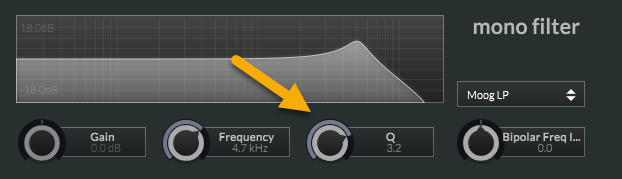
Resonance is to do with the shape of a filter around the cutoff frequency. Most digital filters will have a control for this. I know that the hise filters do! Any change to the shape of a filter response is very dramatic. Even subtle changes to shape can easily be heard and do matter. Another name for resonance is Filter "Q".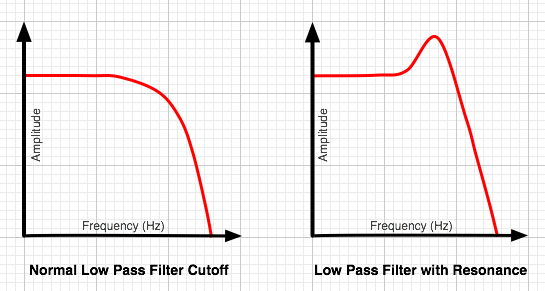
-
@griffinboy turnin resonance up didnt work uhh i can try code it in myself (the filter dsp) but also i was able to make it sund like that on another vst I made so idk why this new one cant do it
-
@David-Healey Please help me
-
@duma Not my area
-
Analyse the filter properly.
See what the filter response is like. The shape of the filter.You can only try to match the filter after you first know why your target sounds the way that it does. You can generally see these things when using metering.
Recreating filters can get really complicated.
So that's why i'm recommending studying the frequency response of the filter you are trying to copy, and then trying to match that response with your own filters. In other words, eyeballing it. This becomes easy if you have the "minimeters" metering software.If you can't create a close enough match that way, it gets much more involved.
You'll either want to find out what type of filter model was used in the plugin (the fastest way would be to contact the programmer and find out) otherwise, it's deep analysis time, you'll want to write Python or Matlab scripts that can fft signals and give you real accurate data on the frequency response and then you can work on matching it perfectly. It's a bunch of work but deriving a linear filter using scientific analysis tools is the most accurate way. There are lots of research papers you can read about this. If you want to go down this route I can give you some information but beware it can take a long time to derive a filter this way if you haven't done it before. -
@griffinboy Yes please give me the information, once I read up on all and find the filter do I put it into hise and use it
-
I'm assuming that you have already tried to match the built in Filters with your Target. Properly using analysis and metering. You should at this point already know what your target filter frequency response looks like at a glance.
Example: Lowpass filter on a saw wave. Using Minimeters, we can clearly see the shape of the filter. And we can try and match this shape in Hise. We can see a little resonance and a "not very steep" cutoff. That gives us immediate clues for matching it.
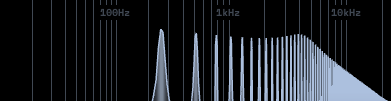
Assuming you've already done this, I would next recommend learning to port 3rd party c++ filters to Hise. You need to learn first how to create c++ custom nodes. There are some forum posts and videos about creating c++ nodes. Search the forum.
After learning this, you will be able to create / import c++ dsp into Hise. You can now search for open source filters on github, there are many good examples of analog and digital filters to be found there. You then need to download the source and work on building a c++ node which can run that dsp. You need to know c++ to do this.
After you've done that you can see if any of the filters you found suit your goal.Now then, assuming you've looked at the frequency response of your target filter in the daw using metering, and you haven't been able to match that shape in Hise with any of the default filters or with any 3rd party filters, and you're dead set on creating a filter with the exact target frequency response, then here is some literature I'd look into:
-
Nevermind i think the problem is the update, because I made a vst on my old version where i used the EXACT same code and evrything worked js like the video but now it stopped?? nope its the update for sure because the filter isnt even moving to what i put it at on the xy pad so i know that its the update