Scriptnode filter.convolution – select External Audio File Slot from UI (ComboBox)?
-
Hi everyone,
I’m building a convolution reverb inside Scriptnode using filter.convolution.
Inside the node I added multiple External Audio File Slots (IRs) (Slot #1..#6) (see screenshot).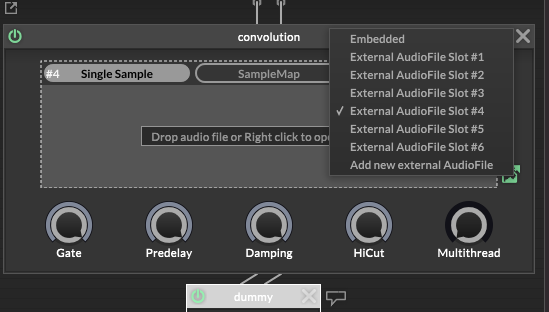
What I want: from the HISE Interface Script / UI, use a ComboBox (or any UI control) to select which External Audio File Slot is currently active.
I tried accessing the Scriptnode network from interface script, but:
fx = Synth.getEffect("Script_FX1") works
fx.getNode(...) does not exist in my build (“function not found”)
fx.getNumAttributes() returns 0 (so I can’t control it via setAttribute() either)
Questions:
Is there an official way to switch the active External Audio File Slot of filter.convolution from UI / interface script?
Do I need to expose a Scriptnode parameter/attribute to do this? If yes, what’s the recommended setup for selecting the slot index?
If direct slot selection isn’t possible, what’s the best-practice workaround (without instantiating multiple convolution nodes)?
Screenshot attached.
Thanks!
-
@filipalex96 What are the multiple external slots connected to?
-
@David-Healey They’re not connected to anything yet.
I just added multiple External Audio File Slots to load different IRs, but I don’t know how to switch/select the active slot inside the Scriptnode network (or expose it to the UI).
My goal is to select the slot from a ComboBox in the Interface Script.
-
@filipalex96 You don't need multiple slots for this, you just need one, and you use the combo box to load a different IR into that one slot.
-
@David-Healey said in Scriptnode filter.convolution – select External Audio File Slot from UI (ComboBox)?:
You don't need multiple slots for this, you just need one, and you use the combo box to load a different IR into that one slot.
Thanks, that makes sense.
Could you please explain how to actually do this with filter.convolution in Scriptnode?More specifically:
– What is the method / API to load a new IR WAV file into the convolution node at runtime?
– Can this be triggered from Interface Script (e.g. from a ComboBox)?
– Or do I need to expose a Scriptnode parameter / use a specific node to call something like “setFile” on the convolution?A small example or hint would really help. Thanks!
-
@filipalex96 Instead of getting the reference to the effect with
Synth.getEffectyou need to get it as an AudioSampleProcessor. That will give you access to a bunch of extra functions.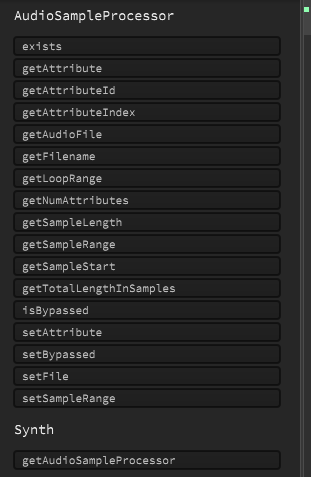
-
@David-Healey said in Scriptnode filter.convolution – select External Audio File Slot from UI (ComboBox)?:
Instead of getting the reference to the effect with Synth.getEffect you need to get it as an AudioSampleProcessor. That will give you access to a bunch of extra functions.
Thanks a lot for the tip, really appreciate it!
I didn’t realize I should access it as an AudioSampleProcessor instead of using Synth.getEffect(). That makes a lot of sense.
I’ll try this approach and see how it goes. Thanks again for the help! -
@filipalex96 Thanks again — I’m very close now.
I call Engine.loadAudioFilesIntoPool() and setFile() works in principle, but I can’t get the correct reference via Synth.getAudioSampleProcessor("...").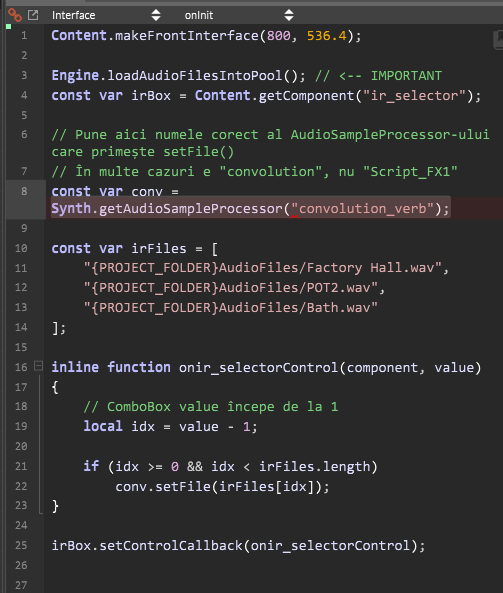
In my Scriptnode network the convolution node is labeled/ID like “convolution_verb” (see screenshot), but Synth.getAudioSampleProcessor("convolution_verb") doesn’t seem to resolve.
Question: what exact name/ID should I use in Synth.getAudioSampleProcessor() to reference the Scriptnode convolution “Single Sample” loader? Is it the Scriptnode node ID, or the module ID somewhere else?
Any quick way to list available AudioSampleProcessors / their IDs from script? -
@filipalex96 said in Scriptnode filter.convolution – select External Audio File Slot from UI (ComboBox)?:
but I can’t get the correct reference via Synth.getAudioSampleProcessor("...").
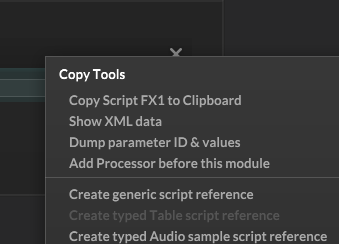
Right click on the header of the script effect and select it.
-
@David-Healey Hi again, thanks for the suggestion! I think there’s a misunderstanding on my side:
I’m not using the classic Convolution Reverb FX module. I’m using Scriptnode → filter.convolution inside a ScriptFX network.However, from Interface Script:
Synth.getAudioSampleProcessor("Script_FX1") exists (auto-generated by HISE), but calling Script_FX1.setFile("SomeIR.wav") does nothing (IR does not change).
fx.getNumAttributes() is 0, and I also don’t have getNode() in my build, so I can’t access the node directly.
-
@filipalex96 I'll make a snippet for you in a bit
-
@David-Healey thank you soo much
-
@filipalex96 fix your 'const var conv' to 'const var'

-
@Chazrox Variable needs a name
Free HISE Bootcamp Full Course for beginners.
YouTube Channel - HISE tutorials
My Patreon - More HISE tutorials -
@David-Healey ahh duhh. long week. smh. I'll take 2 shirts please.
-
HiseSnippet 1535.3ocuX8zaSbDEeVmrAhgTARk6a8ImpTiMALfpZqicrA2hSrhCQTUphFu633oY1Y1t6rIwEwodga8TOvs9EnR8ZuwWfdpeQ52f12LyZuqwAvwBZhT7Ny6e+dy689siS2PgKIJRDhrxu+n.Bx5p18FwkCaLDS4n1air9H6N3HIIzwrU8QA3nHhGxxZoGn1vZ0kQ5e9mupNlg4tjzsPnCDTWxin9TY5tcq8MTFqE1irO0Oi12tVaWAugfIhA7rjcYT.18X7QjcvJ0xYidHNZHx5Ssumaeup22Ce29Uq1+tUb8t+fxUtOlP5u4ct2lj63V0sxfp3xHqUZ5QkhvdRrjDANstvaTughS4l.b.Mh1mQTKpf5AQ1rMpwPJyq63CmHDxZ4toGUKYNp9X6NTO5j8SOxtlVfSpEYOzrx81fTkK.jrx.okMP5518bCoAxTIJ7bE61bnBN.C0lrPwnKJmeN6FBPCtrjO9XRqPXwDKJVsb4Mbf+r9mmOOTehjNzvHmuvoI+HJmThIvdaE6QEsnLRDXlnqPvJBZCpUBffbGrLNDq2JwAl.25IU.2na2JcDQpcROre.iLA9EKXT0Azsfx9adyOwogvuunt3rJIdaxZvaiyCvev1ABNrnXgIZn7wjEkhHfLpj3GUXCURU5GDTdwBOM7o7BqWJjDvT4egm0cuc+5lM1+vV69nsat2yKr9q6EUTCErFXFqOzxVT0EmHNQjB6TNCNvbFDyckTA2YVsJ5NFya3bBlESVO+yxuJcfSQ8Jmuzo754Wc0IGepXqN1KBf+6Lp7YNU9dHXOOelvriPR1kWT6LPhyqKZvfyUVBnXjvyUrZ3M7sYXQdreeRX1TQoHzrN8DvJy2DfqozlQQAuMmJ2Mfjrtkf4o5rUOO67BJo2PM4jfPPUodt4ZIyMiKHHpmZrYR8AoSgrbcnG2darDO1YfegXEPBkTUJYsM4Df3yLTtp81jnikh.stIEXHsmyPeFxx152gfNR8PC3AerdukfG0cuHqaXWozo3SVK+sLero5CfocFBBfZR3Eyvxo4qTL4IBfR3TjDJh.dDUNJa1eAHwJ+VIwlWHdc6tTo6vyGi4NGLBElODXLg5eM6lCFPbko.bY6VOYQ44KO+771l3m2dLGfN3W0NklbJPrSreJ2rpmwBRmDZeqWXmNzF.rc3Px9htL7nhQZV38.fugSelv83dzehL6jdfAW0UZTzcHlyIrnEgPXk2SuRDsmHVR4G0AKCopYDH+6A2lvkzHAcpyfbJt.y5xp0plkdDtmdw+B+jHrxjCLPXkwBSoQP6PjmJBOVWiRdFYcYSAIReHe3.X.dKFSbpZvmlz5BEF8dcErQACEbpqZKiFiQ5V9hXEKgAto880GWNFib3NQ6ioL0XPu3HfKzaWdOvO5KhYszAjvHcLujc4RvuvXwNBOPzJsvtvY9ntX4P07khdEZlIgkbmzTOUZLUek9FYSIV40w2cyfLHg70LcvM2rVJC8nokVsBFXyYBT6nCTRcwLzAFtVHwU9zb5ZfrR00TH8DAKVeTNURbC6ATFbsknRYUYVbOsKtH.WIBlLNaL0elgqrq.5f1bOxYicXSns2Cd0j1rj9nNTdRhZzoC9rIq+0qoXcvg.ZUoC3a6Iqfg+TSSY6RMOkktmjDXZUxr2wjSMGZY2UcvtB7V.IAsO4L49BsufN8SfLWEyqX+XHgF.8Gd.vNxbc7dw8ePnHNPuXlnuMY.NlImYezENUp8K0tXoRd6tgDOBPk8FRmUr0e0i4JSPnyOSxVhN2L4ae0rEEfLY5L42d4K+yYyjWczebiZpLAt6.vECTZugDQc2BWZeB6Cbtb6ZyjKu3umupRse1+uzUkKY+PZiX4arCqUH4GiAdqQyUt.g+byEXezG9gk0r6.QlJGFRvduulYlmpihDptPbrOV+hmE5Zn+u7ZReran3PWya9UTXWVuCPnx0jvqZ2Qs1Yl6VC2uE91yG55NsqlwvasnFt4hZ3sWTCuyhZX0E0v6tnFdu2sgp+4FaEKE9lay.iScaZdylUSNFtnl9Usn+CnJSLzH -
@David-Healey thank you soooo muchhh


